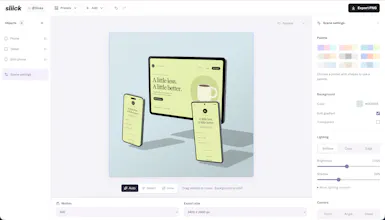
Turn screenshots and videos into beautiful 3D device mockups, right in your browser. Choose a scene, customize shapes and colors, adjust the camera, and add motion. Export images or videos for free, with no account or watermark. Your media stays on your device. Made by Liinks.
sliick turns your screenshots and videos into 3D device mockups, with everything running in your browser.
Upload your screen, pick a scene, then make it yours: arrange the shapes, change the colors, set the camera, and add a little motion. Export a still image or an animated video when you’re happy with it.
It’s 100% free, with no account, no watermark, and no uploads to a server.
Give it a spin at sliick.co. I’d love to see what you make with it and hear what you’d like to see next!
Free with no watermark and no account is not something you see much anymore. If media never leaves the device, does that mean video export renders right in the browser too? I make a lot of launch screenshots so this looks handy.
@protsenkoalexandra Yes, exactly. The scene is Three.js running on WebGL in your tab, and video export records that canvas directly in the browser (MediaRecorder under the hood). Nothing is uploaded anywhere. You get an MP4 (H.264) in browsers that support it, otherwise WebM, up to 1080p and 60 seconds.
Report
I have used this tool to get some better-feeling screenshots for my upcoming app. Really loved the simplicity of the tool, just a small recommendation to add “export to clipboard” as another export option.
Hey Charlie, congrats on the launch. Free status page for sliick.co, already recording uptime: https://upcontrol.io/status/sliick-co UpControl also ships as one npx package for AI coding agents: ask yours to track anything (e.g. "track my users from first visit to purchase"), in plain words
A lot of people default to Rotato (or After Effects) for 3D mockup videos—what’s the clearest quality/workflow point where Sliick wins, and where do you intentionally *not* try to compete with those heavier tools?
@curiouskitty Great question. Where Sliick wins is time to a finished shot. There's nothing to install, no account, no render queue. Upload a screen, pick a scene, nudge the camera and colors, export. For the 80% case (a hero image, a launch post, a store screenshot, a short looping clip) that's usually a couple of minutes instead of an afternoon.
Liinks
Hey Product Hunt! 👋 I’m Charlie, maker of sliick.
sliick turns your screenshots and videos into 3D device mockups, with everything running in your browser.
Upload your screen, pick a scene, then make it yours: arrange the shapes, change the colors, set the camera, and add a little motion. Export a still image or an animated video when you’re happy with it.
It’s 100% free, with no account, no watermark, and no uploads to a server.
Give it a spin at sliick.co. I’d love to see what you make with it and hear what you’d like to see next!
Paste
Free with no watermark and no account is not something you see much anymore. If media never leaves the device, does that mean video export renders right in the browser too? I make a lot of launch screenshots so this looks handy.
Liinks
I have used this tool to get some better-feeling screenshots for my upcoming app. Really loved the simplicity of the tool, just a small recommendation to add “export to clipboard” as another export option.
Liinks
@rohthebuilder great feedback!
HARPA AI
Hey Charlie, congrats on the launch. Free status page for sliick.co, already recording uptime: https://upcontrol.io/status/sliick-co UpControl also ships as one npx package for AI coding agents: ask yours to track anything (e.g. "track my users from first visit to purchase"), in plain words
Product Hunt
Liinks