Launched this week
SideList

SideList

Fast Tasks

2 followers

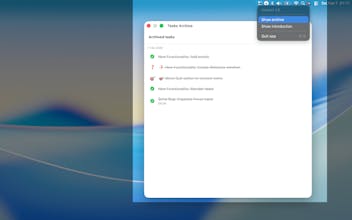
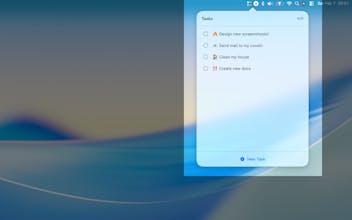
Stop switching windows just to jot down a task. SideList lives in your menu bar for instant, distraction-free task management. Capture ideas before they fade. Built for creators, developers, and busy professionals who need speed over complexity. Click the icon, type your task, get back to work. Always accessible, never in the way. Add tasks in seconds. Clean, minimal design that matches macOS. Lightweight and fast — no battery drain, no slowdown. Simplify your workflow. Download SideList today.
SideList gallery image
Payment Required
Launch Team / Built With
Unblocked AI Code Review
High-signal comments based on your team's context
Promoted

What do you think? …

Fran Sierra
Maker
📌
Over the past few months, I've been learning Swift development. Along the way, I kept running into the same problem: I needed a fast, frictionless way to jot down tasks without breaking my flow — whether I'm in a meeting or deep in focused work and don't want to lose momentum by switching apps. So I built SideList. It lives quietly in your Menu Bar, holds up to 10 tasks, and lets you clear completed ones when you're ready. That's it. Why 10? Because SideList isn't meant to replace your project management tool. It's designed to catch what's on your mind right now so you can get back to what actually matters. Ten tasks is more than enough to stay on track without overcomplicating things. I built this for myself first, but I'm sharing it because I think it can help others who work the same way. It's available for a small price — just enough to keep me investing time into improving it and adding features over time. In its first five days on the App Store, over 25 people have already picked it up, which honestly feels incredible for something I made to scratch my own itch. If you're someone who values simplicity and staying in the zone, I'd love for you to give it a try.