Are your product demos looking flat and boring? 🥱 Creating studio-quality tutorials usually means juggling heavy software and complex timelines just to get a simple video. Screentell changes that by combining everything into one seamless browser tab. ☁️ Zero Install: Runs entirely in browser, cross-platform. 🎬 Cinematic Polish: Instantly add stunning 3D effects and sticker annotations. ⚡️ All-in-One Flow: Simple Record → Edit → Export workflow. check more feature details in the comments below.
I’ve been working on a screen recorder I built to solve my own pain points: https://screentell.com/
The idea was to have a simple record → edit → export flow in one place, without juggling multiple tools. It includes cinematic 3D camera effects and basic stickers for annotations.
On the homepage, I included a few demo videos that introduce Screentell, and all of them were recorded using Screentell itself. Compared to more common focus zoom effects, I personally feel that 3D focus is much better at grabbing attention and making the demo feel more engaging.
Everything runs entirely in the browser, so there’s nothing to install and it works cross-platform.
I tried to keep the feature set balanced—covering the essentials without adding too much complexity.
I’ve been using it myself for a while now, and it’s made my recording workflow noticeably smoother.
👶 Who it’s for (roughly)
If you’re: recording product demos making short tutorials / onboarding clips creating quick social content around your app or workflow …and you don’t want to install heavy software or learn a complex timeline editor, this might be useful.
Feature Details:
If you do screen recordings often, I’d love to know:
What’s the most annoying part of your current workflow? What’s the one thing your current tool still doesn’t do well?
Report
The “record → edit → export in one browser tab” + cinematic 3D camera moves is a clever differentiator vs the usual zoom/pan. Are you building the 3D focus in WebGL/Three.js and compositing with WebCodecs/Canvas, or exporting via ffmpeg.wasm? We dealt with similar browser media pipelines at scale and the real pain was latency + keeping audio/video sync stable across devices. Any plans for auto chapters + cursor smoothing presets? 🔥
@ryan_thill You nailed it! That’s exactly how it works. For exporting, I’m using mediabunny for a more lightweight transcoding process.
You’re spot on about the pain points—I’ve noticed that on lower-end devices, keeping A/V sync stable can be a challenge. It works like a charm on machines with decent specs, but bridging that gap across all devices is definitely on my radar.
Regarding your feature questions:
Cursor smoothing presets: I’m definitely considering this! It’s on the roadmap, though I don’t have a fixed ETA just yet.
Auto chapters: I’d love to hear more about your vision for this. Are you thinking AI-generated based on audio/content, or something else? I'd appreciate it if you could expand on that!
Currently, I support basic trimming via handles on the timeline, allowing users to export specific segments multiple times.
Since you've handled these pipelines at scale, I’d love to learn more from your experience if you’re open to it!
Report
nice work! the 3d focus effect looks really smooth.
quick question : the free plan says unlimited recordings but exports are watermarked. since there's no heavy backend processing, costs should be low, right? giving free users 2-3 watermark-free exports per month could drive more organic sharing and naturally convert serious users to pro.
@topfuelauto Thanks for the kind words! Glad you liked the 3D focus effect—I spent quite a bit of time polishing that. :)
Regarding the exports: That’s a very solid point. You're right—allowing a few watermark-free exports could definitely act as a "taster" and boost organic word-of-mouth.
Since I’m still in the early stages of gathering feedback, I’m seriously considering adjusting this. It’s a great way to balance costs and growth. Thanks for the insight!
Report
How is the video quality and clarity of the final export, and can it meet the requirements of professional scenarios (e.g., official websites, product launches)? Are the supported output formats and resolution options sufficient, and can they be easily adapted to different platforms (e.g., social media, document embedding)?
@ironliuyi Great questions! Let me break down the specs to give you a clearer picture of the quality you can expect:
1. Recording & Export Resolution:
Recording: We capture at Quad HD (2560×1440) to ensure every pixel of your UI is crisp.
Export: You can choose from 480p up to 4K. We provide three quality tiers for bitrates: High (10Mbps), Medium (6Mbps), and Low (2.5Mbps). This gives you total control over the balance between file size and professional clarity.
2. Formats & Compatibility: Screentell is highly versatile for different platforms:
MP4: Supports AVC (avc1/avc3) and HEVC encoding—perfect for high-end product launches and official sites.
WebM: Supports VP8 and VP9 encoding for web-native performance.
GIF: We also support GIF export, which is a lifesaver for quick demos on Twitter/X or GitHub readmes.
3. Pro Scenarios: All the demo videos on our landing page were produced this way. Whether you're embedding a video into a technical doc or posting a 'cinematic' update on social media, the combination of high-bitrate MP4 and our 3D effects makes the output look studio-grade.
I'd love for you to try an export and see the results for yourself. Let me know what you think!
Your core hook is cinematic 3D camera movement rather than the typical 2D zoom/focus. In practice, when does 3D meaningfully outperform classic zoom (attention, comprehension, conversion), and when is it overkill?
@curiouskitty That’s a brilliant question. You're right—it’s not just about 'looking cool,' it's about how our brains process movement.
When 3D outperforms classic 2D zoom:
Spatial Context & Focus: 2D zoom can sometimes feel 'jarring' because it abruptly crops the context. 3D movement mimics a natural eye or camera pivot, which helps the viewer maintain a mental map of the interface while their attention is guided.
High-Stakes Conversion: For product launches or landing page demos, 3D adds a 'premium' feel that builds trust. It signals that the product is high-quality before the user even tries it.
Complexity Simplification: When explaining a multi-step workflow, the 'dynamic perspective' helps break the monotony of a flat screen, keeping the viewer’s attention longer (higher retention).
When is it overkill? It’s definitely overkill for a quick 1:1 bug report or a internal 'look at this' memo. In those cases, you want zero friction and maximum speed.
I built Screentell to bridge the gap. I wanted to give users 'Studio-level' output with 'Quick-memo' effort. If you need it to be simple, it stays simple; but when you need to impress, the 3D power is right there.
Would love to hear if you’ve found classic 2D zooms lacking in your own workflows!
Report
Great work! How much time did you spent building this?
@jeet_soni Thanks! It took me about one month from the first line of code to this launch.
I actually managed to get the core MVP up and running quite quickly, but the majority of that time was spent polishing the details—fine-tuning the 3D camera transitions, optimizing the browser-side export, and ensuring the UI felt 'snappy.'
In my experience, the last 20% of the details always takes 80% of the effort, but it’s what makes the tool feel professional. Glad you noticed the work!
Report
The 3D effects and sticker annotations sound like they’d add that 'cinematic polish' without much effort. I wonder if the stickers are customizable to match my brand's colors, or if we have to use the pre-set ones it comes with.
@theaxx Thanks! You’ve hit on a key part of the workflow. I wanted to make sure the stickers don't just look good, but actually fit your brand.
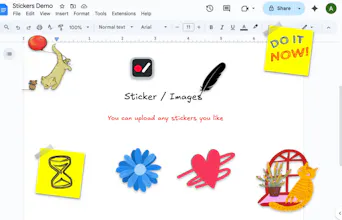
To answer your question: Yes, they are highly customizable. * Graphics & Text: You can adjust the colors of the borders and backgrounds, as well as the size of the stickers to match your brand's aesthetic perfectly.
Custom Branding: Beyond the built-in library, you can upload any image of your own to use as a sticker. This is perfect for adding your own logo, custom icons, or specific brand assets directly into the 3D scene.
The goal is to give you that 'cinematic polish' while keeping your visual identity consistent. I'd love for you to try uploading your own logo as a sticker and see how it looks!


Screentell
Hi, Hunters👋 I’m Shawn, founder of Screentell.
I’ve been working on a screen recorder I built to solve my own pain points: https://screentell.com/
The idea was to have a simple record → edit → export flow in one place, without juggling multiple tools. It includes cinematic 3D camera effects and basic stickers for annotations.
Everything runs entirely in the browser, so there’s nothing to install and it works cross-platform.
I tried to keep the feature set balanced—covering the essentials without adding too much complexity.
I’ve been using it myself for a while now, and it’s made my recording workflow noticeably smoother.
👶 Who it’s for (roughly)
If you’re:
recording product demos
making short tutorials / onboarding clips
creating quick social content around your app or workflow
…and you don’t want to install heavy software or learn a complex timeline editor, this might be useful.
Feature Details:
If you do screen recordings often, I’d love to know:
What’s the most annoying part of your current workflow?
What’s the one thing your current tool still doesn’t do well?
The “record → edit → export in one browser tab” + cinematic 3D camera moves is a clever differentiator vs the usual zoom/pan. Are you building the 3D focus in WebGL/Three.js and compositing with WebCodecs/Canvas, or exporting via ffmpeg.wasm?
We dealt with similar browser media pipelines at scale and the real pain was latency + keeping audio/video sync stable across devices.
Any plans for auto chapters + cursor smoothing presets? 🔥
Screentell
@ryan_thill You nailed it! That’s exactly how it works. For exporting, I’m using mediabunny for a more lightweight transcoding process.
You’re spot on about the pain points—I’ve noticed that on lower-end devices, keeping A/V sync stable can be a challenge. It works like a charm on machines with decent specs, but bridging that gap across all devices is definitely on my radar.
Regarding your feature questions:
Cursor smoothing presets: I’m definitely considering this! It’s on the roadmap, though I don’t have a fixed ETA just yet.
Auto chapters: I’d love to hear more about your vision for this. Are you thinking AI-generated based on audio/content, or something else? I'd appreciate it if you could expand on that!
Currently, I support basic trimming via handles on the timeline, allowing users to export specific segments multiple times.
Since you've handled these pipelines at scale, I’d love to learn more from your experience if you’re open to it!
nice work! the 3d focus effect looks really smooth.
quick question : the free plan says unlimited recordings but exports are watermarked. since there's no heavy backend processing, costs should be low, right? giving free users 2-3 watermark-free exports per month could drive more organic sharing and naturally convert serious users to pro.
Screentell
@topfuelauto Thanks for the kind words! Glad you liked the 3D focus effect—I spent quite a bit of time polishing that. :)
Regarding the exports: That’s a very solid point. You're right—allowing a few watermark-free exports could definitely act as a "taster" and boost organic word-of-mouth.
Since I’m still in the early stages of gathering feedback, I’m seriously considering adjusting this. It’s a great way to balance costs and growth. Thanks for the insight!
How is the video quality and clarity of the final export, and can it meet the requirements of professional scenarios (e.g., official websites, product launches)? Are the supported output formats and resolution options sufficient, and can they be easily adapted to different platforms (e.g., social media, document embedding)?
Screentell
@ironliuyi Great questions! Let me break down the specs to give you a clearer picture of the quality you can expect:
1. Recording & Export Resolution:
Recording: We capture at Quad HD (2560×1440) to ensure every pixel of your UI is crisp.
Export: You can choose from 480p up to 4K. We provide three quality tiers for bitrates: High (10Mbps), Medium (6Mbps), and Low (2.5Mbps). This gives you total control over the balance between file size and professional clarity.
2. Formats & Compatibility: Screentell is highly versatile for different platforms:
MP4: Supports AVC (avc1/avc3) and HEVC encoding—perfect for high-end product launches and official sites.
WebM: Supports VP8 and VP9 encoding for web-native performance.
GIF: We also support GIF export, which is a lifesaver for quick demos on Twitter/X or GitHub readmes.
3. Pro Scenarios: All the demo videos on our landing page were produced this way. Whether you're embedding a video into a technical doc or posting a 'cinematic' update on social media, the combination of high-bitrate MP4 and our 3D effects makes the output look studio-grade.
I'd love for you to try an export and see the results for yourself. Let me know what you think!
Product Hunt
Screentell
@curiouskitty That’s a brilliant question. You're right—it’s not just about 'looking cool,' it's about how our brains process movement.
When 3D outperforms classic 2D zoom:
Spatial Context & Focus: 2D zoom can sometimes feel 'jarring' because it abruptly crops the context. 3D movement mimics a natural eye or camera pivot, which helps the viewer maintain a mental map of the interface while their attention is guided.
High-Stakes Conversion: For product launches or landing page demos, 3D adds a 'premium' feel that builds trust. It signals that the product is high-quality before the user even tries it.
Complexity Simplification: When explaining a multi-step workflow, the 'dynamic perspective' helps break the monotony of a flat screen, keeping the viewer’s attention longer (higher retention).
When is it overkill? It’s definitely overkill for a quick 1:1 bug report or a internal 'look at this' memo. In those cases, you want zero friction and maximum speed.
I built Screentell to bridge the gap. I wanted to give users 'Studio-level' output with 'Quick-memo' effort. If you need it to be simple, it stays simple; but when you need to impress, the 3D power is right there.
Would love to hear if you’ve found classic 2D zooms lacking in your own workflows!
Great work! How much time did you spent building this?
Screentell
@jeet_soni Thanks! It took me about one month from the first line of code to this launch.
I actually managed to get the core MVP up and running quite quickly, but the majority of that time was spent polishing the details—fine-tuning the 3D camera transitions, optimizing the browser-side export, and ensuring the UI felt 'snappy.'
In my experience, the last 20% of the details always takes 80% of the effort, but it’s what makes the tool feel professional. Glad you noticed the work!
The 3D effects and sticker annotations sound like they’d add that 'cinematic polish' without much effort. I wonder if the stickers are customizable to match my brand's colors, or if we have to use the pre-set ones it comes with.
Screentell
@theaxx Thanks! You’ve hit on a key part of the workflow. I wanted to make sure the stickers don't just look good, but actually fit your brand.
To answer your question: Yes, they are highly customizable. * Graphics & Text: You can adjust the colors of the borders and backgrounds, as well as the size of the stickers to match your brand's aesthetic perfectly.
Custom Branding: Beyond the built-in library, you can upload any image of your own to use as a sticker. This is perfect for adding your own logo, custom icons, or specific brand assets directly into the 3D scene.
The goal is to give you that 'cinematic polish' while keeping your visual identity consistent. I'd love for you to try uploading your own logo as a sticker and see how it looks!