
Rewisp
See it once. Ask forever.
217 followers
See it once. Ask forever.
217 followers
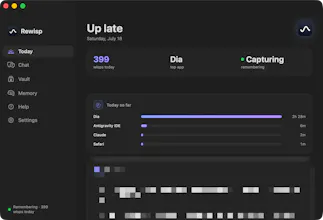
Rewisp gives your Mac a memory. It reads your screen text on-device and remembers it for you. Catches promises like "I'll send it Friday" and reminds you until it's done. Ask "what changed since Tuesday?" and see exactly what's new. Search by meaning, not just words. Tracks numbers like weight or grades over time. Fills forms from your saved details — never passwords. One quiet 9 PM summary each day. Fully private: screenshots never saved, only text stays on your Mac.





Free
Launch Team

Render: Get up to $100K in startup creditsCloud infrastructure for founders who want to move fast and NOT break things
Promoted
@tihomiropacic Great question, thanks for asking!
Rewisp stores everything locally on your Mac. Your screen data never leaves your device by default. Only you can see it.
A few privacy controls built in:
You can pause capture any time with a shortcut.
There's a "nuke" option that deletes the last 10 minutes instantly.
Sensitive apps (messaging apps, banking apps, and other personal sites) are hard-coded to never be tracked. You can check this yourself in the code.
You can also manually add any app or website you want excluded.
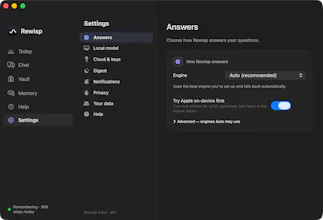
For the AI reasoning layer, by default it runs locally using Apple's on-device model, so nothing leaves your Mac. If a question needs more power, it can use an engine you pick (Claude, ChatGPT, or Gemini) — but even then, it only sends your question and a few text snippets, never screenshots or your full history.
I built it this way because privacy matters to me too. Happy to answer more questions!
Screenshots-never-saved plus everything staying local answers the privacy objection most people would raise first. Curious about the SQLite file itself though: is FileVault the only thing standing between it and a plaintext read, or is there another layer on top?
@vollos
Straight answer: FileVault is the encryption at rest. Rewisp doesn't encrypt the SQLite file itself yet, so a process running as you could read it. On top of that the data folder is chmod 0700 and the local API is token gated, so other accounts and other processes can't get at it.
The layer I lean on most is reduction rather than encryption. Messages, password managers, banking sites and incognito windows fully pause capture, credential shaped text is refused, screenshots are never written at all, and the text expires after about six months. App level encryption is the obvious next step.
@yashmitb Appreciate the straight answer on that, not everyone admits the gap that plainly. Reduction-first tracks with me, you can't leak what never gets captured. Out of curiosity on the app-level step: closer to SQLCipher on the same file, or would that mean rethinking how rows get stored?
@vollos SQLCipher on the same file. Field level encryption is the tempting version but it breaks FTS5, and full text search is the whole retrieval engine, so encrypting the values would mean rebuilding how search works. SQLCipher encrypts at the page level, so the index keeps working and nothing above the storage layer changes.
The real problem is key custody, not storage. A key in the Keychain that unlocks automatically protects a copied file or a backup, but not a process running as you, which is what you were actually asking about. Closing that means gating it behind Touch ID per session, and then deciding what the capture daemon does while the session is locked. That part I have not settled.
@yashmitb Doesn't your reduction rule already answer the locked-session case? Messages and incognito pause capture, so a locked session pausing too is the same move, and the timeline just gets a hole where the lock was. The other shape I've seen for it is making the daemon write-only: each capture gets encrypted with a public key whose private half only exists inside an unlocked Touch ID session, so the daemon keeps capturing but can never read back what it wrote. Costs you indexing until the next unlock, since FTS5 can't see into the sealed rows, which is probably why nobody loves that one either.
the promise-catching and "what changed since Tuesday" bits are the sell for me over a plain screenshot recorder. one solo-dev question: months of full screen text in one SQLite file, does that stay fast to search, or do you end up needing to prune/summarize older entries once it's been running a while?
@galdayan Great question, glad the hook landed :)
Short answer: it stays fast, and it's bounded by design so you're not babysitting it.
Why it stays small: text-only + deduped (near-identical frames get dropped before insert), so growth is a few MB/day. Months of use = tens to low-hundreds of MB, not gigabytes.
Keyword search uses FTS5 + bm25 (inverted index) — sub-millisecond no matter how big the DB gets. Never the bottleneck.
Semantic search is brute-force cosine over embeddings right now, but at the retention cap that's ~20-35k rows, so it's still just a few ms. If I ever let history grow unbounded, that's the one piece that'd need a real ANN index (sqlite-vec/HNSW) — but I haven't needed it yet.
And there's built-in pruning: 6-month retention (importance-based, not just clock-based) plus nightly consolidation that folds old sessions into compact summaries. So the DB actually gets leaner and higher-signal over time, not bigger.
Storage math for the curious: text only, ~0.3 MB of screen text a day (a novel every few days). With the search index and semantic vectors it's under 1 MB/day — roughly 150 MB after six months, where it levels off. Old raw captures auto-expire at six months and fold into compact nightly summaries, so it never balloons. No screenshots, ever.
The promise-catching feature is probably the most useful detail here. small commitments like "I'll send it Friday" are exactly the kind of thing that disappears between chats, tabs, and notes, even though they often matter more than the tasks we formally write down.
I also like the privacy model: extracting text, immediately discarding screenshots, and keeping everything in one local SQLite file feels much easier to trust. Curious how Rewisp distinguishes a real commitment from casual language or quoted text without creating too many false reminders :)
@andrasczeizel Thank you for the kind words! Rewisp only listens on surfaces where you're actually writing (Notes, Mail, Slack, never AI chats or ads or random web pages), rejects questions, negations, hedges and marketing-speak, and nothing ever reminds you until you tap to confirm it, so a false positive costs one dismissal rather than a bad reminder.
on-device is the right call for something reading everything on your screen all day, but on-device isn't automatically safe - if my Mac gets stolen or someone gets local access, is that stored text file encrypted at rest, or just sitting in plaintext waiting to be read?
@omri_ben_shoham1 Good catch, thank you. Right now the database is a plaintext SQLite file, so FileVault plus your account permissions are what protect it at rest, and the Vault holding your personal details sits behind Touch ID(mac's auth) in the app on top of that. App-level encryption is on the roadmap and this is a good push to prioritize it.
The ambient memory idea feels useful for people who context-switch all day. The tricky part for me would be separating “I saw this once” from “this is worth remembering.” Are you doing any local filtering or recency scoring so old or accidental screen content does not pollute answers?
@simon_dao Yes, all locally: near-identical frames are dropped at capture, retrieval fuses keyword and semantic relevance with recency so old content has to be clearly relevant to surface, and anything you actually ask about gets reinforced and exempted from expiry while everything else decays and ages out around six months.
@yashmitb That retrieval design sounds thoughtful. The decay window plus explicit reinforcement is a nice way to avoid turning ambient memory into a junk drawer. Do users get any control over what gets reinforced or forgotten, or is that mostly automatic right now?
@simon_dao Good question, the user has a page in the app called memory and they can either approve or deny things as they get caught in the daily digest. They are able to approve of these and deny them at any point so if they think a memory is no longer important they can remove it. And based on this the app decides which wisps are important and which ones aren't and removes them.
@yashmitb That makes a lot of sense. The daily digest approval step feels like the right balance: automatic enough to catch things you would otherwise lose, but still giving the user a cleanup pass before memory gets stale. I also like that importance is learned from explicit approve/remove actions rather than just raw screen frequency.
The promise tracking part is interesting. If I say "I'll send it Friday" on a Slack call but type nothing, it won't catch that right? Only what appears as text on screen? Just trying to understand where the boundary is.
@arya012 thank you for your question!
Spoken words never reach it, since Rewisp only reads text that is actually rendered on screen, so a promise made out loud is invisible unless it lands as a live caption, a transcript, or something you type.