
QuickQuill
Private, on-device meeting notes for Mac
101 followers
Private, on-device meeting notes for Mac
101 followers
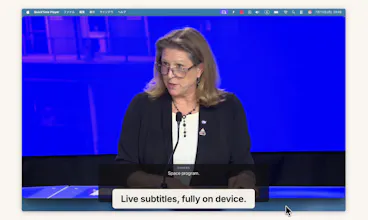
QuickQuill records your meetings and turns them into transcripts and summaries, and nothing is ever sent to the cloud. No bot joins the call, and it keeps working with Wi-Fi off, which is how the demo video was recorded. It also shows live subtitles with translation while you record, and there's push-to-talk dictation for any app. No account, no subscription. Dictation is free forever, and a single $49 purchase unlocks the full meeting workflow. Requires macOS 26 on Apple Silicon.




Free Options
Launch Team / Built With


Framer AI AgentsDesign and publish professional sites with AI
Promoted


The "nothing joins the participant list because nothing joins the call" framing is the actual selling point for me — capturing system audio and mic locally instead of inviting a bot is the right privacy boundary. Two implementation things: for the both-sides capture, are you tapping system audio via Core Audio / a virtual device, and does that need a permission the user has to re-grant after macOS updates? And is transcription running fully on-device, or does the summary step call out to an API?
@hi_i_am_mimo
Thank you! It's ScreenCaptureKit, no virtual device. The system audio recording permission only needs to be granted once, and on my machine I've never had to re-grant it. Both transcription and summaries are fully on-device. That's why it works even with Wi-Fi off. Nothing is ever sent to a server.
@taisei_ide Makes sense - ScreenCaptureKit for system audio is the clean route, and fully on-device is exactly the boundary I wanted. One follow-up: since SCK is a screen-capture API, does grabbing system audio trip the macOS screen-recording permission and its indicator even though you never touch video? And does capture survive the user switching output mid-call - speakers to AirPods - or does the tap need re-arming?
@hi_i_am_mimo
Sorry, I got that wrong. I switched to Core Audio as the main capture path at some point and forgot about it. So the only permission needed is audio recording. As for switching devices, the capture doesn't survive it right now, so changing the output device ends the recording. I'm planning to make recording continue across device switches.
Congrats on the launch, @QuickQuill @taisei_ide ! The "bot fatigue" in modern meetings is incredibly real, and relying on cloud infrastructure for private conversations is a massive friction point for most operators.
From an engineering standpoint, grabbing system audio without forcing users to install clunky virtual audio drivers (like BlackHole) is a huge usability win. Since you are utilizing the new macOS 26 capabilities, I’m curious if QuickQuill relies on Apple's native SpeechAnalyzer framework for the local transcription and voice activity detection, or if you had to package a custom local model (like Whisper) directly into the app bundle to support the offline translations?
Recording the demo with Wi-Fi completely disabled is the ultimate flex. Great work!
@varunvivek
Thank you! You guessed it right.
The app requires macOS 26+ precisely because it depends on the SpeechAnalyzer and Translation frameworks. I did try Whisper as well, but on my MacBook it was a bit slow and sometimes froze.
Turning off Wi-Fi felt like the strongest way to prove the privacy claim.
Give it a try if you're interested!
🔥👏 Awesome work!
Recording the demo with Wi-Fi turned off is probably the best possible proof for this product :) I have never really liked meeting bots sitting in the participant list either, especially when the conversation may include private product or business details. keeping the recording, transcription, translation, and summary entirely on the Mac feels like the right trust model.
The one-time price is refreshing too. Curious how QuickQuill reliably captures both sides of a call across different apps without installing a virtual audio driver, and how well speaker separation works when several people are talking?
@andrasczeizel
Thank you! A demo that works with Wi-Fi turned off is more convincing than any privacy policy. Keeping bots out of meetings was also a must for me when thinking about privacy.
How it captures both sides without a virtual driver:
QuickQuill uses macOS's standard APIs to capture the mic and system audio, so it only needs the standard macOS permissions. The mic is captured separately in parallel, and the two streams are merged in timestamp order into a single transcript.
Speaker separation:
To be honest, right now it's source-based separation, not voice-based. In the transcript, the mic is labeled "You" and system audio is labeled "Others." So you can tell yourself apart from the other side, but if there are multiple people on the remote end, they're currently grouped together as "Others." That said, I do want to implement speaker diarization and I'm exploring whether it can be done fully on-device. I'll let you know when it's ready!
@taisei_ide Sounds great! Thanks for the reply :))
"Nothing appears in the participant list because nothing joins the call" is the line that sells it for me — a bot sitting in the roster is a nonstarter for anything sensitive, and Wi-Fi-off recording proves the point better than any privacy policy. Two genuine questions: on a long, rambly meeting, how does the on-device summary hold up against the cloud notetakers, and which model is doing that work locally? And can I export the transcript plus summary as plain markdown? I live in Obsidian, so an export path matters more to me than an in-app archive.
@hung_tran_from_notebook_os
Thank you! That line came straight from my own discomfort with bots joining meetings.
On-device summary:
It runs on Apple's Foundation Models. It can't match cloud models in context window or raw intelligence, but QuickQuill improves summary quality by splitting the transcript into small chunks and summarizing them. Implementing it required the kind of techniques we all used in the early LLM days. Honestly, it felt a bit nostalgic.
Markdown export:
Yes! You can download a session's summary and transcript as markdown. I'm also planning to ship a CLI and MCP support, which should make it easy to wire into an Obsidian vault. Stay tuned!
The Wi-Fi-off demo is the right kind of proof, and the no-account / one-time-price call is one I really respect — we build free, no-signup tools in a different corner (consumer fraud) for the same reason: the moment you gate the thing behind an account, you've asked the user to trust you to be exactly what you're protecting them from.
One thing I keep turning over, from the other side of the table: with a cloud bot, everyone at least sees it sitting in the participant list — an ugly but honest "you're being recorded" signal. QuickQuill's best feature is that nothing joins the call, which also means the other people lose the one cue that told them. Do you think about that side at all — anything that surfaces "this is being captured" to the room, or is that squarely the recorder's call to make?
@peterdigitalis
Thank you! That's a good question, and I honestly haven't figured out the right answer yet.
You're right that nothing joins the call, so the other person doesn't get that visual cue. There's also nothing QuickQuill can technically show them.
Right now, the app only makes it obvious to the person recording with an on-screen indicator while it's capturing. Letting everyone else know is still up to the person recording.
Since you work on fraud prevention, I'm curious if you've come across any patterns that work well for making this kind of thing visible.
@taisei_ide Really appreciate you engaging with it honestly — "I haven't figured out the right answer yet" is the correct answer for anyone who's actually thought about it.
A few patterns that hold up, from watching where trust breaks in my corner:
What makes the cloud bot "work" for consent isn't the bot — it's that disclosure is automatic. It doesn't depend on a person remembering to be honest in the moment. So the lever isn't showing the other side a badge (you can't reach their screen on a call anyway) — it's making disclosure the recorder's frictionless default: a one-tap "heads up, I'm taking notes on this" the app helps you say or send the second you hit record.
Timing beats wording. The strongest trust signal is that disclosure comes before capture and unprompted. In fraud, "concealed until asked" is the tell; volunteering it early is what honest actors do — same instinct applies here.
Close the loop after: let the recorder optionally share the summary back with the room. That one move reframes it from "surveillance" to "notes we both have."
Honest limit is that you can't force the other side to see anything, so I'd stop trying — and instead make it effortless (and slightly default) for the recorder to be the transparent one. That's not a compliance chore, it's a selling point.
Happy to go deeper anytime — this is the exact seam I spend my days on.
@peterdigitalis
That's a really helpful perspective, thank you. Sending a quick note to the chat could be one way to do it. The app already lets you copy the transcript and download the summary plus transcript as a file, so sharing is possible today, but I'll think about whether there's an even more frictionless way for users to do it. Thanks again!
@taisei_ide Makes sense — copy + download already covers the deliberate sharer; the frictionless version is really about the person who'd never think to. Fun problem to sit with, not a today one.
Genuinely like what you've built here — good luck with the rest of launch day. 🚀
on-device is genuinely the only trust model that survives contact with real work conversations, that part's not even debatable anymore. the speaker separation question that hasn't come up yet: for a video call it's easy since you already know which audio stream is "you" vs "the call," but what about an in-person meeting where several people are talking into one Mac mic? is diarization from a single mixed audio source good enough to reliably tell people apart in the transcript, or does that mode work better as one undifferentiated transcript
@galdayan
That's right. At the moment there's no speaker separation for in-person meetings with multiple people. I want to make it work locally and I'm currently experimenting with it. For now, though, considering the difficulty and the stage the product is at, I've decided to leave mic audio without speaker labels. Showing no labels felt like a better choice than showing wrong ones at this point.
@taisei_ide that's actually the more honest call, a wrong label is worse than no label since people trust the transcript more once names are attached. solo dev shipping something that says 'we're not there yet' instead of faking it is rare, respect for that
@galdayan
Thank you! Being honest might be how trust gets built, and being upfront about the limits helps set the right expectations for the product. If you overhype it, you don't end up with a good reputation anyway.