
Pocket Screen
Keep any Mac window visible in a floating mini screen
311 followers
Keep any Mac window visible in a floating mini screen
311 followers
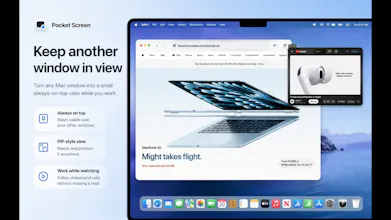
Pocket Screen turns the frontmost window on your Mac into a compact, always-on-top PiP-style view. Keep documents, chats, videos, or reference material visible while you work in another app—without constantly switching windows. Processing stays on your Mac.


Free Options
Launch Team / Built With


Framer AI AgentsDesign and publish professional sites with AI
Promoted


@masaki_iino This is a very practical Mac utility. I can see it being useful for docs, tutorials, dashboards, and any keep this visible while I work flow.
The click through mode is a nice touch.That’s usually what separates a helpful floating window from something that just gets in the way. I’d probably use it most for keeping specs or Slack threads visible while coding
@vahid_davoudi Thanks, Vahid!
Keeping specs or Slack threads visible while coding is exactly the kind of workflow Pocket Screen was designed for.
I’m especially glad you noticed the click-through mode. The goal was to keep reference content visible without letting the floating window interfere with the work underneath it. I really appreciate the thoughtful feedback.
The "captured content stays local, nothing uploaded" point is what makes this feel safe to leave running all day. One implementation question: since the mini view mirrors the frontmost window, what happens when I cover or minimize the source app — does macOS keep delivering frames so the float stays live, or does the mirror freeze until the source is visible again? And does a floating window get excluded from my own screen recordings/screenshots, or would it show up if I am recording a demo?
@hi_i_am_mimo Thanks, Valeria!
Once a window is pinned, Pocket Screen stays attached to that specific window rather than continuously following whichever window is frontmost.
If the source window is simply covered by another app, the floating view generally stays live—I’ve tested browser video continuing to update while the source was covered. If the source is minimized, macOS or the source app may stop rendering new frames, so the mirror can temporarily pause, but it resumes automatically when the window is restored without needing to be pinned again.
The floating window is not automatically hidden from screenshots or screen recordings, so it will appear when capturing the full display.
Thanks, that's exactly the detail I needed — good that a covered window keeps updating and only pauses on minimize. The one that'd change my workflow: since the float shows up in full-display recordings, is there any plan for a per-window 'exclude from capture' flag (macOS exposes sharingType = none at the window level) so I can keep a reference floating while recording a clean demo? Right now that's the only thing stopping me from leaving it up during screen captures.
@hi_i_am_mimo Thanks for explaining the use case so clearly, Valeria. I understand why keeping the floating reference visible while recording a clean demo would be useful.
sharingType = .none appears to be considered a legacy setting, so I’m cautious about relying on it for the current implementation. One possible approach would be to add recording directly to Pocket Screen, which would make it technically possible to exclude its own floating window. However, I would first need to consider whether that would actually provide a practical and intuitive workflow.
I can’t promise an implementation yet, but it’s a very useful idea and I’ll keep it under consideration.
The occlusion question a couple people raised is the real gotcha with this kind of tool. When we built window-mirroring on macOS, ScreenCaptureKit stopped handing us frames the second the source window went behind another one, so the mirror just froze until you brought it back to front. Did you find a way to keep frames flowing for an occluded or minimized source, or does the float only stay live while the source is at least partially on screen?
@dipankar_sarkar Thanks, Dipankar!
That was one of the key cases I tested carefully. In my testing, a source window can be fully covered by another app and the floating view continues updating, including browser video playback.
Minimized windows are a little different: depending on macOS and the source app, new frames may temporarily stop. Pocket Screen keeps the window association and resumes automatically when it is restored, so it does not need to be pinned again.
I’d like to keep improving Pocket Screen based on feedback like this and make it more practical and reliable for everyday use.
That covered-versus-minimized split lines up with the ScreenCaptureKit internals: per-window capture keeps handing you frames for an occluded window because it samples that window's own backing store, but a minimized window loses its backing store so there's nothing to read until it's restored. Our freeze came from grabbing the whole display and cropping instead of capturing the SCWindow directly, which is why ours died on occlusion. Sounds like you took the cleaner path from the start.
@dipankar_sarkar Thanks, Dipankar — that explanation matches what I observed during testing.
Pocket Screen’s primary capture path works directly with the selected window, which is why covered windows generally continue updating, while minimized windows need to be handled differently.
Your comparison with full-display capture and cropping is really helpful context. I appreciate you sharing the technical details.
Makes sense. The one detail that helped our users on the minimized case: instead of holding the last frame quietly, we dimmed it and dropped a tiny 'source minimized' badge, so a stale frame never got read as a live one. Since you keep the window association and resume on restore, do you surface that paused state visually or just hold the frame? Really enjoyed how carefully you tested this.
@dipankar_sarkar Thanks, Dipankar — that’s a thoughtful UX detail.
At the moment, Pocket Screen doesn’t show a dedicated “source minimized” badge. The behavior can vary by source app: in some cases ScreenCaptureKit continues delivering frames while the window is minimized, while in others the content may pause and recover after the window is restored.
Your point about preventing a stale frame from being mistaken for a live one is very valid. Dimming the preview and showing a clear paused state would make that behavior much easier to understand, so I’ll keep this in mind for a future update. I really appreciate you sharing how you handled it.
The single-display framing is really good! A lot of PiP tools assume you already have the screen space and just want a second video running in the corner. On the frontmost-window pick though - once a window is floating, is the mini view still interactive (scroll, click, type inside it) or is it a passive mirror I have to pop back into to actually use?
@artstavenka1 Thanks, Art!
The floating view is currently a live, passive mirror rather than an interactive remote view, so scrolling, clicking, and typing are done in the original window. The click-through option lets pointer input pass through the floating window to whatever is behind it.
Keeping the experience lightweight and predictable was the priority for this version.
This is such a simple but useful Mac utility. I spend a lot of time switching between docs, chats, browser tabs, and whatever I'm actually working on, so keeping one reference window visible without constantly rearranging everything sounds genuinely helpful :)
The opacity and click-through controls are especially nice touches. Curious how well Pocket Screen handles content that changes quickly, like video, live dashboards, or chat windows. does it stay smooth without using too much battery or CPU?
@andrasczeizel Thanks, Andras!
Pocket Screen is designed to stay lightweight, but resource use naturally depends on what you keep visible. A mostly static document or reference page should have a much smaller impact than video, live dashboards, or fast-moving chat content.
In my testing, a single floating window has remained smooth across Safari, QuickTime, and Chrome, including video playback. Battery and CPU usage will increase more with frequently changing content, so for longer sessions, keeping the floating window smaller and using it mainly for reference material is the most efficient setup.