
MESA
Describe your Shopify workflow. MESA builds it.
460 followers
Describe your Shopify workflow. MESA builds it.
460 followers
For Shopify merchants buried in repetitive store operations, MESA turns plain-English requests into automations that work across their existing tools. Unlike more DIY automation platforms, MESA is built for teams that want outcomes, not workflow complexity. Describe what you need, and MESA helps automate the busywork behind orders, inventory, fulfillment, and customer support.


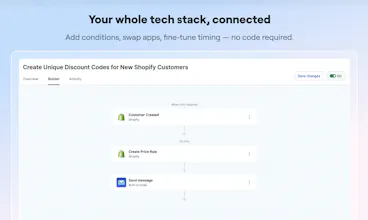

MESA
What's up Product Hunt 👋 I'm Aaron, one of the founders at MESA
Quick question:
What's one thing your Shopify store should be doing automatically... but isn't?
For most merchants I've talked to, the list is long:
Notify the warehouse differently for priority / VIP / wholesale orders
Push orders, customers, and products to Google Sheets (and not break)
Trigger a personalized follow-up when someone buys a specific product
Fix messy data (tags, collections, metafields) automatically
Cancel orders going to PO boxes
Keep inventory in sync across systems without overselling
The ideas aren't the problem.
Building them is.
So folks end up choosing between two not-great options:
❌ Hire a developer (slow, expensive, now every change is a ticket)
❌ Wrestle with a generic automation tool (powerful if you enjoy building software instead of running a store)
We built MESA because this shouldn't be hard.
You just describe what your store needs:
MESA figures out the logic, connects your apps, and builds it for you.
No digging through developer docs. No difficult data mapping. No "why isn't my trigger firing?"
A few things I'm especially excited about:
Just describe what you need and get a working automation in minutes
Works across your stack (Recharge, Etsy, Google, ShipStation, Odoo, 100+ more)
Add human approval when you don't want full autopilot
If you run a Shopify store and have a backlog of "we should figure this out someday..." this is for you.
🔗 https://www.getmesa.com
(use code PHBASIC3 for 3 months free)
We'll be hanging out here all day!
Curious: what's one thing you've wanted to automate but felt too annoying to set up?
MESA
@james_bathgate1 Thanks! We definitely will. @itsdarrylnorris handles setting up integrations and will reach out
MESA
Hey @james_bathgate1
We applied to the Postscript partner program, so you should have received an email from us. Looking forward to hearing more about it and hopefully working together on an integration.
MESA
@james_bathgate1 Oh nice, I'd actually love to see us do that. Postscript is definitely one of those integrations where there are so many interesting workflow possibilities that folks could build.
Pixelesq
Congrats on the launch @itsdarrylnorris!
Quick question on the AI builder. When it generates a workflow from a plain-English description, what does editing look like after that? Like if it gets 80% right but the conditions or logic need tweaking, are you back to re-prompting and hoping it lands, or do you get a visual editor where you can go in and adjust individual steps, conditions, filters etc? That's usually where AI-generated anything feels super limiting! The first pass is impressive but then you need fine control and you're stuck talking to the AI in circles.
Also curious how you think about the line between MESA and Shopify Flow, which keeps getting better and is free out of the box.
MESA
Hey @devanandb ,
If you ever need to make changes to your workflow, you can either chat with our AI assistant, Yedric, and ask it to update the workflow for you, or you can use our workflow builder to make the changes manually.
Shopify Flow is great for certain types of tasks, but we’ve found it can become limiting depending on the complexity of the workflow. Many of our users migrate from Shopify Flow because it cannot fully solve their use case, or because they need integrations and functionality that Shopify Flow does not support.
In some cases, users continue using Shopify Flow for part of their automation and send data into MESA for the more advanced portions of the workflow. We also have an integration with Shopify Flow that allows workflows to send and receive messages between Shopify Flow and MESA.
If you want to see a more detailed comparison between the two platforms, you can check it out here: MESA vs Shopify Flow
"Describe your workflow, MESA builds it" hits the same wall I see in financial-modeling teaching — the bottleneck isn't "how do I write the formula" (every tool can do that now), it's "what is the actual workflow you should be describing?" That mental model takes years to build. I see this constantly with analysts going through my Excel for Financial Modelling course on Udemy (https://www.udemy.com/course/excel-for-financial-modelling/) — formulas land in week one, but workflow choices (where inputs live, when to switch from a flat schedule to a sensitivity, how to layer debt) take 6+ months of real reps. Curious whether MESA exposes the workflow library / patterns explicitly to merchants, or whether the LLM just infers from the prompt each time? The library is where real value compounds.
MESA
@samir_asadov This is a good one! I definitely see merchants entering more sophisticated prompts as they continue to use our AI Assistant, Yedric.
MESA has a growing library of pre-built templates that the AI assistant can pull in when a merchant’s goal aligns with their use case. Yedric is designed to guide that process by asking a few clarifying questions and helping shape the workflow based on what the merchant is trying to accomplish.
What we typically see is merchants start with a generated or templated workflow, then refine and reuse those builds over time as they get more familiar with what works for their business. From there, everything is customizable. Templates can be adjusted, extended, or rebuilt with AI as needed.
All of the pre-built templates are viewable here: https://www.getmesa.com/templates
@shannon_torchia That's the right model — templated start, then refine through use is exactly how non-developer users actually internalize automation patterns. The same dynamic shows up in financial-modeling teaching: students who start from a working model and break/rebuild parts of it learn faster than those who start from a blank workbook. The Yedric clarifying-questions flow is what's missing from most generative tools — they jump to a build before establishing the constraints. Looking forward to seeing how the template library evolves; once it crosses the long-tail threshold, the AI assistant becomes mostly a router, which is the cheap-to-run end-state.
does the inventory sync work in real-time across etsy and shopify? we’ve been having a lot of overselling issues lately during sales and our current setup just can't keep up with the api limits. @aaroneous
Solo founder here — I keep hitting walls where I need 'real' workflow tooling and end up hacking it together. Does this handle non-Shopify webhooks too, or strictly within their ecosystem? Curious if I could use it for our food data pipelines.
MESA
@ethansharg Yep! Definitely not limited to Shopify.
MESA's roots are in the Shopify ecosystem, but it works with arbitrary webhooks, APIs, FTP, and external systems too. A lot of our users connect it to things completely outside of commerce: internal tools, spreadsheets, AI services, ERPs, CRMs, databases, custom apps, etc.
Also, as a fellow "I'll just hack this together tonight" kind of person... a surprising amount of MESA stems from that exact feeling :)
MESA
Hey @ethansharg
Definitely not Shopify-only. A couple of options for your food data pipelines:
Generic Webhook trigger: You can start a workflow from any app or third-party service by sending a POST request to a unique URL.
Webhook-ready integrations: We support webhooks across a wide range of apps, including Stripe, HubSpot, Klaviyo, Slack, Airtable, ReCharge, Gorgias, Zendesk, and more.
Outbound webhooks via the API app: You can send webhooks from MESA to any external endpoint as part of a workflow.
The "plain English" input is the easy part. What does the debugging UX look like when the automation breaks at 2am during a flash sale?
MESA
We built MESA to handle high-volume automation at scale. Everything runs through distributed queues and scales horizontally, so flash-sale traffic itself is usually not the issue. The more common problem at 2am is a third-party service failing, timing out, or rate-limiting.
When that happens, the debugging experience is designed to help you quickly identify, fix, and recover.
First, MESA can proactively notify your team when workflows fail, including email alerts, so your team is aware of issues as quickly as possible instead of discovering them hours later.
The Activity page lets you filter failed tasks in real time so you can immediately see what broke, which workflow failed, and the exact step that caused the issue. From there, you can drill into detailed execution logs using our Debugging page, which provides step-by-step logs and payload data for each workflow run.
We also proactively use AI to analyze failures and suggest possible fixes directly inside the error view. In many cases, you will see recommended troubleshooting steps without needing to investigate everything manually.
If you need deeper help, you can use our AI assistant, Yedric, to investigate the workflow, explain the error, and even help you update the automation logic. Once changes are made, you can run workflow tests to verify the fix before putting it back into production.
For merchants that expect intermittent third-party outages, MESA also supports building fallback and error-handling logic directly into workflows. For example, you can retry tasks, route around failures, notify teams, or temporarily queue work elsewhere when an integration is unavailable.
Finally, if a downstream system was unavailable for a period of time, you can use our Time Travel feature to replay historical events and recover missed automations after the issue is resolved.
So in practice, the workflow is:
Receive proactive failure notifications by email
Detect issues through Activity + Debugging logs
Use AI suggestions and Yedric to diagnose and fix problems
Test the updated workflow
Replay missed events with Time Travel if needed
The goal is not just helping you find the error, but helping you recover quickly without losing any integration or operational visibility during high-pressure moments like a flash sale.
@itsdarrylnorrisThe "run workflow tests to verify the fix before putting it back into production" part is the detail that makes this enterprise-grade. Most automation tools just redeploy and pray. Letting merchants verify the patch first is rare in this category.
MESA
@ebazan33 Great question! Let’s dive into what happens when an automation, or a step in a workflow, starts to fail.
In MESA, when something that was previously working fails, it’s usually due to an upstream change or unexpected data. The goal is to keep that fully transparent through step-by-step activity logs, clear error messages, and full execution history so you can quickly see what happened and where. Our AI assistant can also be used to help interpret errors and suggest next steps for resolution.
From the activity view, you also have the option to replay tasks once the underlying issue is fixed, so recovery is straightforward without needing to rebuild anything.
More detail (including screenshots of the activity list and logs): https://docs.getmesa.com/frequently-asked-questions/how-do-i-handle-a-failed-task
Also, quick pro-tip: leave email notifications on for automation errors so you’re always in the know when something needs attention.
@shannon_torchia Solid breakdown, thank you. The Time Travel feature is what most automation platforms miss. Replay-after-fix is a smart design call.
@benln @aaroneous @ryan_odonnell so basically the seller wont have to come to shopify panel, everything will be automated through this product i just need to text my requirements in the chat box. Furthermore, if i want to get some customisation done in my order creation payload , if i need to send some customised value in my tags field , will this also be altered through this product?
MESA
@benln @aaroneous @tanvi_thakur1 That's exactly right! Once your automations are set up, they run in the background without you needing to touch the Shopify admin. Customizing order tags is a great use case. You can set conditions to add specific tag values to orders based on whatever logic you need: product type, customer info, order value, you name it.