
MenuCopy - View copied text & image
Clipboard manager in your macOS menu bar
42 followers
Clipboard manager in your macOS menu bar
42 followers
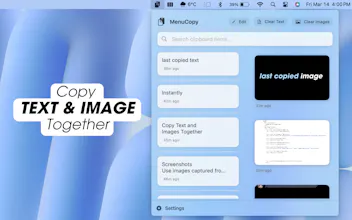
MenuCopy is a clipboard manager for macOS that allows you to simultaneously view and instantly copy your most recently saved text and image from the menu bar. Designed for productivity, it keeps your clipboard history private, organized, and quickly accessible


MenuCopy - View copied text & image
Product Hunt Favorites
@mehmetalidev I love how you upgraded all the clipboard apps popping up recently and added images to it! I already bought the app, thanks for making this! I am constantly copying and pasted screenshots (and I hate to save them and clutter up my desktop or my downloads folder). Would be cool if we also had the ability to add notes/comments to the screenshots or text in the clipboard so we can more easily search for them later too! Are there any plans to make it accessible by other iOS devices, e.g. iphone or ipad?
MenuCopy - View copied text & image
@ph_leeanntrang
Thank you so much for your support and for grabbing MenuCopy — really appreciate it! I'm so glad it’s helping reduce that screenshot chaos we all know too well 😅
Your idea about adding notes or comments to clipboard items is spot on — in fact, it’s something I’ve been thinking about, and I’m happy to say it’s now officially on the roadmap for this winter.
As for multi-device support (iPhone, iPad, etc.), it’s also something I’m actively exploring, especially with more clipboard-focused workflows coming to iOS.
Excited to keep evolving MenuCopy — and super grateful for thoughtful feedback like yours.
that's different. upvoted. good luck with the launch, @mehmetalidev
MenuCopy - View copied text & image
@taniabell Thanks so much, Tania! 🙏 Appreciate the support and kind words — means a lot!
I absolutely love how MenuCopy keeps clipboard history organized and easily accessible directly from the menu bar. It’s such a time-saver, especially for anyone who frequently switches between multiple pieces of text and images. The privacy feature is also a big plus!
If you're looking to scale your app or any future projects, I highly recommend checking out InsertAffiliate. It’s an easy-to-use platform for managing affiliate programs, tracking purchases, and rewarding affiliates, perfect for expanding your app’s reach without heavy marketing costs.
Great work on MenuCopy! It’s definitely going to be a productivity booster for a lot of macOS users :)
MenuCopy - View copied text & image
@alan_rivera Same here. That gap on macOS really needed a fix. Glad you like it!
Fable Wizard
I love how MenuCopy solves such a practical problem by allowing users to see both text and images in their clipboard at the same time! How do you plan to make it even more customizable for different use cases, like managing larger sets of clipboard items?
MenuCopy - View copied text & image
@jonurbonas Hey Jonas! Thanks a lot 🙌 . I’m working on tags, search, and smart folders — all to make managing bigger clipboards much smoother. More soon!