
GhostWriter by MyHandler
Two taps and it's already written
109 followers
Two taps and it's already written
109 followers
Every other AI writes what you tell it. Ghostwriter writes what you already know. Double-tap Left Ctrl in any text field, in any app, and the reply is there — drawn from the thread on screen, your calendar, your files and your past meetings, indexed in an encrypted vault on your PC. It won't double-book you, and it matches how you write to that person, down to the sign-off. Then it stops: it types into the box and never sends. Windows.




Free Options
Launch Team / Built With


Framer AI AgentsDesign and publish professional sites with AI
Promoted


Hey Product Hunt 👋
I'm Tery. I've been shipping software for 40 years, since a Tandy CoCo with 4K of RAM. In 1999 it annoyed me that Pocket PC shipped without Access, so I built one — abcDB stayed the #1 Pocket PC database for a decade, across 135 countries. Even the UN ran it.
That was trick one. Very excited to present another 🚀
MyHandler is a local-first AI for Windows — think OpenClaw, for the rest of us who don't have a Mac Mini in a closet. It indexes your screen, files, mail, dictations, calendar and meetings into an encrypted vault on your own drive. Not our servers.
✍️ Ghostwriter is the feature I'd start with.
If you've ever sat staring at a blinking cursor, this is for you.
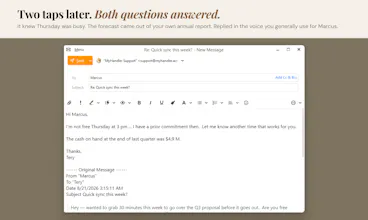
Double-tap Left Ctrl in any text field, in any app.
It reads what's on screen and works out what you were about to write.
You get a draft in your voice ... pulling from your calendar, files and past meetings.
Where OpenClaw acts for you, Ghostwriter never sends. There's no send path in the product. You read it, you edit it, you hit send.
🎉 Start free with 300 credits/month. No card. PRODUCTHUNT30 takes 30% off.
Windows 10 and 11 → myhandler.ai/ghostwriter
@tery_emilson Nice launch ! the local first approach is a big plus, especially with personal email and files , i also really like the idea of the having everythings index locally.
What does it actually see when it reads my screen?
@maria_anosova
Great question!
GhostWriter captures the literal text that Windows reports for the active window ... all UI labels, headings, paragraphs and any selectable text you can copy. It also pulls in content from your calendar, files and recent messages that are indexed in the local vault, so it can reference those when drafting.
In short, it reads what’s on the screen (not hidden code or images) and uses that, along with all the other context it has to generate the reply.
Does that answer your question?
Tery
@tery_emilson Thank you for your reply
interesting idea, but I haven't understood: how does it know things about me? do i have to connect it to sth like Supermemory?
@luca_ardito
That's a really good question.
MyHandler allows you to connect your gmail, outlook, calendars, slack, and many other channels. You can also allow MyHandler to index the files on your hard-drive.
All that data is saved in an encrypted database on your own hard-drive. Not in the cloud.
The more channels MyHandler is following, the better it gets to know you, and thus is able to answer much more intelligently and in your own voice than ChatGPT.
MyHandler also watches your screen, so whatever you see, it sees. That context is also invaluable in providing you assistance.
I hope that begins to answer the question?
THanks for asking,
Tery
@tery_emilson Thank you for your reply
That's pretty neat! Would love to collaborate on a MacOS version 🙌
@matheus_paranhos1 Thanks for the offer. We've already got Mac version scaffolded out. When we've got it ready for beta maybe you'd like to give it a whirl?
@tery_emilson Of course 🤝
Love that it drafts in your own voice, also, loving the local-first focus!
Legend! 🫡