Lately, I've been revising a manuscript on rare-earth-doped perovskite micro/nano lasers.
A friend of mine has been building a desktop academic writing tool called Flowing, and asked if I'd be willing to test its continuation feature. Since I already keep ChatGPT open whenever I'm writing papers, I decided to compare them side by side.
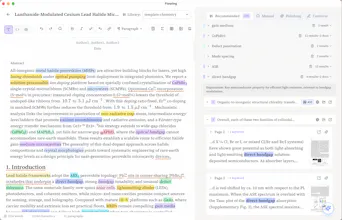
Bridging the painful operational gap between literature synthesis and the active drafting of a manuscript is an exceptional design philosophy for research workflows. The absolute highlight of Flowing is its real-time reference interpolation engine. Typically, executing a rigorous literature review or drafting a complex methodology section forces an academic into a chaotic multi-window dance: pinning a reference manager like Zotero or Mendeley on one half of the screen, scrubbing through highlighted PDFs in an isolated viewer, and attempting to maintain a fluid train of thought in a blank Word document.
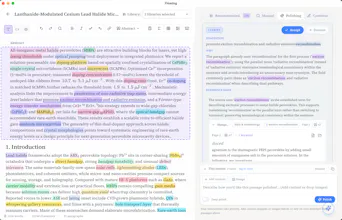
Flowing completely eliminates this layout fragmentation. By analyzing your text inline as you write and instantly resurfacing contextual nodes—pulling exact text blocks, auto-highlighting relevant cross-disciplinary vocabulary, and rendering a compact view of the exact source page right beside your cursor—it functions as an external working memory. Furthermore, restricting the built-in AI assistant to generate and polish text solely from the verified boundaries of your uploaded PDF library addresses the primary danger of academic AI integrations: semantic hallucinations. The editor explicitly blocks generic, unsourced filler text, ensuring that every automated paragraph completion or technical polish is grounded in empirical evidence you've already vetted.
The primary technical strain point for Flowing will involve its semantic chunking and indexing accuracy across non-standard or highly dense academic document styles. If your reference library contains complex, multi-column paper layouts, legacy archival scans with uneven optical character recognition (OCR) baselines, or pages dense with mathematical formulas and inline variable blocks, the text parser can hit edge-case parsing boundaries. This can cause the inline lookup tool to occasionally surface noisy, tangentially related passages that disrupt your typing momentum instead of clarifying it.
Additionally, while the sidebar source page preview is incredibly handy for short-form journal articles, navigating massive 300-page systemic reviews or complex digital textbooks within a narrow preview window can quickly feel visually cramped. The interface needs more granular panel controls to let users expand the reading workspace when checking extensive data tables or long appendices. Finally, the tool must maintain flawless metadata parity during bibliography exports; any slight translation friction when moving from Flowing’s environment into raw BibTeX or standard citation blocks can create formatting issues right at the final journal submission stage.
I’ve previously balanced using discovery-heavy literature networks like ResearchRabbit or Litmaps against standard academic editing plugins like Paperpal, or custom, note-linked markdown folders in Obsidian. Discovery platforms are phenomenal for mapping out historical citation trees and finding missing links, but they offer zero support the second you start tackling a blank page. Conversely, mainstream AI writing assistants are excellent at checking sentence-level mechanics and academic tone, but they are completely blind to your local desktop research folder—forcing you to constantly feed them manual text snippets to get contextually accurate feedback. Flowing anchors itself in a highly distinct, high-leverage alternative lane: it functions as a focused, context-driven academic workspace that transforms your reference repository from a passive collection of static documents into an active, inline co-pilot that follows your cursor as you write.
I've seen a lot of AI writing products over the past two years.
The workflow is what caught my attention here.
Building AI around your own research library instead of treating every prompt as a blank slate is a much more interesting direction for academic writing.
Wishing the team a great launch!
I actually spent some time reading the benchmark article (https://flowing.works/en/blog/ai-paper-continuation-comparison) before coming here.
What I appreciated most was that the comparison felt fair. Same manuscript, same cursor position, first completion only.
It's surprisingly rare to see AI products explain how they evaluate themselves instead of just showing polished demos.
Hope you keep publishing this kind of evaluation as Flowing evolves.
Thank you for taking the time to read the benchmark article—that honestly means a lot.
We deliberately designed the comparison to be as fair and transparent as possible because it's easy to create impressive-looking AI demos. What's much harder is evaluating whether the generated text actually belongs in the manuscript.
We'll definitely keep publishing more real-world evaluations as Flowing evolves. I think that's a much more meaningful way to improve than relying on carefully selected examples.

Hi Product Hunt! 👋
I'm Jim, an independent developer, and I'm really excited to finally share Flowing with you.
Over the years, I've noticed a few recurring pain points in research writing.
You know you've seen the evidence before.
You might even remember the paper—but not where the relevant paragraph, figure, or experiment is.
So you leave your editor, open PDFs, search again, and break your writing flow—sometimes only to realize you still can't find the exact passage you needed.
So I started building Flowing around one simple idea:
Keep your research library inside the writing process.
Instead of leaving your editor to search through dozens of PDFs, Flowing automatically detects high-quality keywords you're writing about and surfaces the most relevant snippet from your own paper library. You can preview the snippet thumbnail or return to the original source with one click.
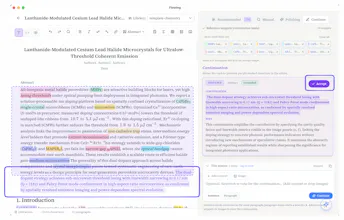
Moreover, thanks to those retrieved snippets and your manuscript as context, Flowing's continuation and polishing suggestions stay much closer to your intended narrative than what you'd typically get from general-purpose AI assistants like ChatGPT. We even benchmarked this on a real chemistry PhD manuscript, where the difference became surprisingly clear. (Here is the detail if you are interested in: 📝https://flowing.works/en/blog/ai-paper-continuation-comparison)
Flowing is now publicly available. 🎉
To celebrate the launch, we're offering an Early Bird program. Join our Discord (https://discord.gg/Vqh7sKeJn4) to receive an invite code, and you'll get 2 years free, plus 50% off for life after that.
If you're already using ChatGPT, Claude, or Gemini for research writing, I'd genuinely love to hear how you currently keep your reference library in the loop—or whether that's still a pain point for you.
Thanks so much for checking out Flowing! 🙌
the tension-check idea in the comments below is the right instinct, and I'd push it one step further: once a suggestion gets accepted and lightly edited into the manuscript, is there any record that this sentence originated from an AI continuation grounded in source X, versus purely the researcher's own synthesis? asking because academic integrity policies are increasingly asking authors to disclose AI-assisted passages, and "draft -> check evidence -> light edit -> keep" as you described it is exactly the kind of workflow that gets fuzzy to reconstruct after the fact if someone asks "which parts did the AI actually write."
@galdayan That's another excellent point, and I hadn't thought about it from exactly that perspective.
You're right that once a suggestion has been accepted and lightly edited, it can become difficult to reconstruct which parts originally came from the AI. We don't currently keep that kind of provenance history, but I think this is definitely something we could support in the future by maintaining a traceable history of AI-assisted edits.
Thanks for bringing this up—it's a really thoughtful suggestion.
the part I'd worry about is subtle misattribution - if it's pulling a passage from your own PDFs to support a claim, does it ever surface a source that's tangentially related but not actually saying what the draft implies it says? that's the kind of error that's easy to miss during a deadline crunch and expensive to catch after submission
@omri_ben_shoham1 That's an excellent question and I'm really glad you brought it up.
It's something we thought about a lot when designing this feature.For Continue Writing and Paragraph Polishing, we'd rather show no related snippet than one that's only tangentially related. During generation, we put a lot of effort into both retrieval relevance and evidence alignment, because a loosely related snippet can create exactly the kind of false confidence you described. We only surface snippets when we're confident they can genuinely support the generated suggestion.
Thanks for raising this—it was exactly the kind of failure mode we wanted to avoid.
@goodbetterbest Congrats on the Lanuch. I wish I had something like flowing during my Management days. This is really need in academics here working with word and docs is just time consuming. Can we collaborate with peers? does it support multiple projects at a time?
@roopesh_donde I'm really glad it resonates with your experience. 😊
At the moment, Flowing is primarily designed for individual researchers, so real-time collaboration isn't supported yet. It's definitely something we've heard interest in, though.
Yes, you can absolutely work on multiple projects. You can create separate documents and switch between different paper libraries depending on what you're writing.
Right now, our main focus is helping researchers stay grounded in their own literature while writing. Once that workflow is solid, we'll continue exploring features that make research collaboration easier as well.
Thanks again for the thoughtful questions!
@goodbetterbest Awesome, I will recommend it to students. Real time collab is tricky, but needed as we have mostly group projects in academics.
@ethanyoungl8 Yes! We've tested Flowing with libraries of 5,000+ PDFs (in the chemistry field), and that's actually quite close to the scale we designed it for.
Both automatic keyword detection—which surfaces relevant snippets as you write—and manual keyword search continue to work well even with libraries of that size.
@lee_jay1 Good question. Actually not yet. At the moment, Flowing focuses on the text content of your PDFs rather than handwritten notes or annotations. It's definitely an interesting direction, though, especially for researchers who annotate papers extensively. Thanks for the suggestion!
@pablo_ani We’re tracking this now (accept / edit-then-keep / dismiss vs typing on your own), but it’s still too early for a reliable %.
In practice it’s rarely all-or-nothing: most useful cases look like draft → check evidence → light edit → keep. “Start from scratch” usually means the suggestion didn’t fit that spot in the manuscript, not that people avoid AI entirely.
Happy to share more once the data is actually meaningful.


Context Note
Thank you so much for taking the time to write such a thoughtful review—it genuinely means a lot.
I especially appreciated your comparison with tools like ResearchRabbit, Litmaps, Paperpal, and Obsidian. I think you captured the workflow really well.
Those tools are incredibly valuable while you're discovering literature, organizing notes, or polishing language. But once you're actually in the middle of writing a manuscript, the challenge changes—you need the right evidence to come back at exactly the right moment, without interrupting your train of thought.
I also appreciate your thoughtful comments on complex PDFs, scanned documents, formula-heavy papers, and large reference collections. We could carefully think about these topics.
Thanks again for the incredibly detailed review.