Edit Mind
Search videos like you'd describe to a friend - 100% local
157 followers
Search videos like you'd describe to a friend - 100% local
157 followers
Built for content creators, video editors, journalists, and video production companies. Search hours of footage instantly. No cloud. No switching your editing software
This is the 2nd launch from Edit Mind. View more
Edit Mind × Strava
Launching today
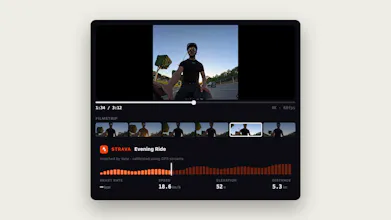
Connect Strava and Edit Mind matches every scene in your footage to the activity it was shot on: heart rate, speed, elevation, and distance, aligned to the frame. Any camera works, GoPro/action-cam GPS telemetry makes the match exact.


Launch Team / Built With


Makerlapse
Hey,
I'm Ilias, an indie maker and a cyclist in my free time. I take videos while I'm riding my bike using my smartphone or my GoPro camera, and I wanna sync and index my videos to my Strava to have video playback while seeing my ride stats.
I spent a couple of days working on this feature of video playback, and you can now search your videos using your Strava activity data like speed, elevation, PR, heart rate- you name it.
Matching footage to heart rate, speed, elevation, and distance at the frame level is useful. How does Edit Mind handle clock drift or missing timestamps when combining footage from multiple cameras with one Strava activity?
Makerlapse
@adityaharish2002 If you're using an action camera, I'm using GPS data to match the Strava activity to the video. I'm using the creation date as a fallback to match non-action cameras like your smartphone videos
@iliashaddad3 using GPS data for action cameras makes sense.
Makerlapse
@adityaharish2002 Thank you!
I work out at the gym. What would be a different prompt than just "give me videos of when I was running on the treadmill"?
Makerlapse
@kamil_infeld Yes, it could be something like this: "Give me moments where I hit my heartbeat's peak moment". You could use Strava data points to search and get the video moments, not only the video files.
the creation-date fallback for phone footage makes sense but phone clocks are the part I'd worry about - travel across timezones without updating settings, or a phone that's just a few minutes off, would throw the match off in a way you wouldn't notice until playback looks wrong. is there any sanity check against the Strava activity's actual start/end window to catch a phone clock that's off, or does it trust the file timestamp as-is