Eagle

Eagle

Manage pictures, screenshots, user interfaces and designs

4.7
β€’43 reviewsβ€’

321 followers

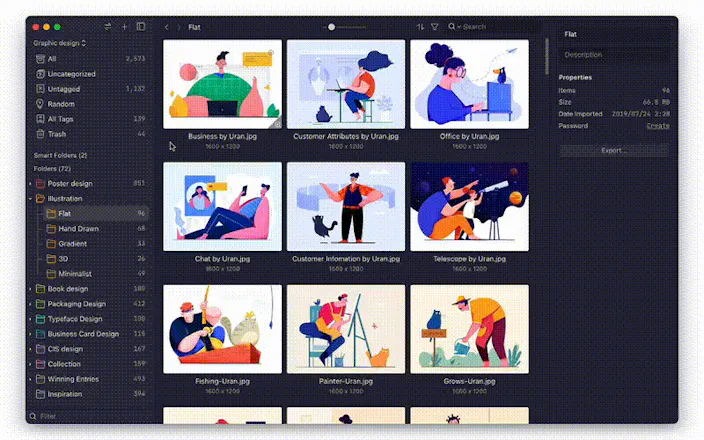
Eagle App is a digital assets management tool to helps you collect, search, organize and unify your creative files in a new logical way and all in one place. Effortless design inspirations collection, Starts with Eagle! Organizing can be so simple!

This is the 3rd launch from Eagle. View more

Eagle App

Unify your creative files in one place.
Eagle App is a digital assets management tool to helps you collect, search, organize and unify your creative files in a new logical way and all in one place. Effortless design inspirations collection, Starts with Eagle!
Organizing can be so simple!
Eagle App gallery image
Free Options
Launch tags:Windowsβ€’Macβ€’Chrome Extensions
Launch Team
Vy - Cross platform AI agent
AI agent that uses your computer, cross platform, no APIs
Promoted

What do you think? …

L.
Definitely one of the best apps to control assets. The only downside is the support. Recently I sent one email for the support team asking for something and it took them 17 days to answer. Anyway I still recommend it.
Angel Wang
@leonardo_mattar Hi Leonardo, I'm sorry it took so long for us to reply. I sincerely apologize for the inconvenience our customer support may have caused you over the years. As previously, we are only one man's team in marketing, development and support that's why it took so long. Now we have expanded our team members and created a learn& support space here -> https://docs-en.eagle.cool/ If your queries have not yet been solved please kindly send us a message at service@eagle.cool or tweet us @eagle_app, we will reply within 1-2 working days. Eagle has promised our users to enjoy organizing in the most intuitive and simplest way through our service, we keep close reviewing our user feedback to improve our product. You can visit here for: Recent updates: 2.0 build 36: https://eagle.cool/blog/post/pro... 2.0: https://en.eagle.cool/changelog Our development road map: https://trello.com/b/LSsVep1d/ea... Learn how to make the best use of Eagle: https://eagle.cool/blog/post/11-... If you have any questions or future feature ideas please send us a message or tweet us to let us know! Thank you very much for your support! πŸ˜„
Chris Messina
Man, this looks an *awful* lot like Pixave.
sascha assbach
@chrismessina i was just looking for an alternative to pixave actually, cause i'm still not really happy with it and it doesn't seem there are any updates coming anytime soon. probably going to try this one here. any other recommendations? i still miss ember or rather littlesnapper
Sara Dove
@chrismessina YES, BUT IT HAS NEVER CRASHED ON ME AFTER 3 MONTHS OF HARD USE. PIXAVE CRASHED REGULARLY AND MY COLLECTIONS OF STOCK WENT POOF! LOVE IT!!
Alfredo VΓ‘zquez
Love this app, It would be awesome if is available to iOS too.
James Dyson
As a marketer and founder, your swipe file is one of your most important assets in your library of tools to help you quickly get inspired when building new marketing campaigns. With my own ever-expanding swipe file, I am always looking for better ways to manage this mix of screenshots, videos, email swipes and more. I was previously a fan of Realmac's Ember, but after this product was discontinued a few years back it has been hard to find a solid alternative which provided the easy interface for managing my swipes library. I've been testing Eagle now for a over a month and it has worked seamlessly to provide easy navigation of my design/swipes library. It includes browser addons for saving webpages, as well as an easy to use drag and drop interface for importing existing imagery and swipes. I particularly appreciate the ability to organise files into folders and sub-folders, and then filter by many different variables including colour, tag, notes and more. There's a 30 day trial so I'd recommend anyone looking for a great tool to manage their design library or swipe file library give this a try...
Angel Wang
@james_dyson Our team wanted to give a BIG thank you to you for listing us on Product Hunt, even making us the product of the day in 2019! I'm sorry the appreciation comes late but we want you to know this means a lot to us, many users found Eagle because of you! πŸ™‡πŸ»β€β™€οΈ πŸ™‡πŸ»β€β™‚οΈ We will continue to make Eagle a better product for everyone! Since 2019, We have launched many awesome new features including speed improvements, please visit our website to get your hands on the latest version! In the upcoming future, there are still many features we would like to create, your continued support is very much appreciated and thank you for showing faith in us from the beginning. πŸ™ŒπŸ»
Colbys Dovi
I've started using this app 1 year ago and I have to say it is damn useful, the experience is well crafted, and the product often updated :)
Angel Wang
@colbys_dovi1 Thank you for your support! πŸ™ŒπŸ» We try our best to update our product every month, you can keep up with our development road map here: https://bit.ly/eagle-roadmap Check out our recent updates and release notes: 2.0 build 36: https://bit.ly/updates-2021 If you have any questions or future feature ideas please send us a message or tweet us @eagle_app to let us know!
Jonathan Zhan
I've used so many things in this product space: Ember, Littlesnapper, Inboard, Pixave. Eagle is in a class of its own. Extensive organisation features, ridiculous speed, multiple libraries, auto-import, non-subscription pricing. If you work with visuals (or just like collecting pretty things) this is a must have.
Bert Simons
Used Picassa,Digikam,Lightroom before but I love the clean undistracting interface on this one. Had to convert a few hunderd MTS files to mp4 (xyplore+ffmpeg script ) but imported some 8000 media files just fine. Used the batch collection to download all my pinterest images which is a really nice feature!
ax
@bert_simons - Nice. Was looking to hear such insights. Any recent updates?
Angel Wang
@bert_simons @ax_tweet Hi Bert and AX, We are pleased to let you know that you may export all content and assets with Eagle's API function, please feel free to develop more creative, personalized add-ons. Check Eagle API here: https://api.eagle.cool/ Also, apart from using Eagle extension's batch save feature to download your Pinterest images, you can now import your Pinterest board into Eagle with ease by following this instruction: https://docs-en.eagle.cool/artic... If you want to check out our most recent release notes, please see: https://bit.ly/updates-2021 If you have any questions or future feature ideas please send us a message or tweet us @eagle_app to let us know! Thank you for your support!!πŸ™ŒπŸ»
123
β€’β€’β€’
Next
Last