
Creavit Studio
Create social media content in seconds
90 followers
Create social media content in seconds
90 followers
Creavit Studio is a professional macOS screen recording and video editing software. It features background removal, camera cursor tracking, GIF/media overlays, dynamic camera layouts, and smart zoom to highlight key moments in your recordings.


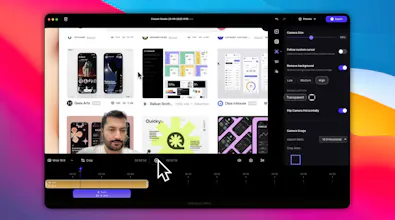


Creavit Studio is a macOS screen recording and video editing tool designed for creating professional-looking content quickly. (a lightweight Screen Studio alternative)
Key features include:
Background Removal: Easily remove and replace video backgrounds without a green screen.
Custom Cursor: Customize the cursor appearance after recording for clarity and branding.
Camera Tracking: Keep the camera focused on the cursor for engaging tutorials and demos.
Automatic Zoom & Focus: Intelligent zoom and focus to highlight key areas during recording.
Dynamic Camera Layouts: Advanced camera positioning with multiple layout options. Resize, reposition, and customize your camera view dynamically.
Media Overlay System: Add GIFs, images, and videos as overlays. Layer multiple media elements with custom positioning and timing.
Export & Optimization: Export in multiple formats and resolutions. Optimize for different platforms with custom quality settings.
Ideal for:
Content creators producing social media videos
Product marketers creating demo videos
Educators and trainers developing video tutorials
Creavit Studio offers a streamlined workflow, enabling users to produce high-quality videos without extensive editing experience, making it a powerful alternative to more complex video editing software.
Congrats on the launch. The background removal and custom cursor features really stand out since they address two pain points I often see when creating tutorials.
I like that you are focusing on making high quality production accessible without needing advanced editing skills. Curious if your early users are leaning more toward educators or product marketing teams.
Looks like a strong alternative to heavy video editing software.
@trgiangpham Thanks for your comment! It actually covers both groups. In fact, for Instagram Reels where the space is limited, having the camera follow the cursor helps avoid leaving dead areas on the screen. This feature can be turned off if needed, so it fits the use cases you mentioned as well.
As someone building a macOS presentation tool (cursor + annotation), I appreciate that you lean on native ScreenCaptureKit and skip the gimmicky real-time backgrounds. Native cursor tracking + auto-zoom is the right call. Do you let users pre-define zoom regions, or is it all click-driven?
Congrats aslanon, i like it. 🥂
@samet_samyeli Thanks Samet, glad you liked it!
Awesome work on Creavit Studio, Onur! It’s great to see it live. Upvoted and wishing you huge success!