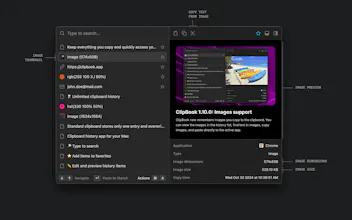
ClipBook is a beautiful and keyboard-centric clipboard history app for macOS. It stores everything you copy and lets you quickly access your clipboard history whenever you need it.
I tried various clipboard managers and apps for macOS, such as Raycast and Alfred, which include built-in clipboard history functionality. While they are excellent and widely used, I couldn’t find one that truly met my needs. This was mainly due to their UX design or the absence of certain features, such as full content preview, the ability to resize the window to display more history items, text search within images, opening clipboard history at the text caret location, or pasting multiple items into an active app at once, among others.
Being a software engineer with over 15 years of experience in commercial software development, I decided to create the perfect clipboard history app tailored to my needs.
After months of development, I decided to make it available for everyone. All data is securely stored on your computer—no analytics, no requests to external web servers. It works completely offline, is open-source, and can save you countless hours if you frequently copy and paste.
Feel free to try it if you like it. If you have any questions or would like to suggest a feature, just let me know.
@vladimir_ikryanov I can definitely see the Raycast inspiration... it would be nice if Raycast allowed extending their clipboard manager so I wouldn't need to run another app to achieve similar functionality.
Speaking of, a couple of the missing features don't seem missing in Raycast, unless I misunderstand?
From your list:
✅ full content preview: hit ⌘-Y
🚫 the ability to resize the window to display more history items
✅ text search within images
❓opening clipboard history at the text caret location
🚫 pasting multiple items into an active app at once
Can't you open the clipboard history at the text caret location by using a hotkey?
You can also "Append to Clipboard" to merge multiple text items in Raycast's clipboard history, but I agree that it's missing the ability to mix media types.
I've been using Pasta for a really long time but this seems like a great hybrid between Pasta and Raycast Pro's clipboard manager. Awesome job @vladimir_ikryanov - going to give it a try :)
A unique clipboard tool that prioritizes privacy and security is quite rare. Do you have plans to add an optional iCloud sync feature? I think convenience might be a higher priority for some users.
@zhiqi_shi there's no such plans for the iCloud sync feature, because the clipboard history is a very sensitive data that must stay on your Mac and never leaves it. Everything that goes to iCloud can be hacked and stolen.
Report
At first glance, I thought it was a Raycast extension! I use that heavily on a daily basis but this seems more robust. Any chance you’ll develop an extension for it?
Congrats on the launch @vladimir_ikryanov.
Text search within image - I dont think Alfred or any similar provides this. Do they?
Would love to give it a try.
@naveenkumar if you build your own ClipBook app from open source it will not be signed and notarized (because it requires Apple Developer ID certificate, you will need to buy and use your own certificate) and the the "Check for updates" feature won't work (because the update server includes only the official builds). The rest of functionality is identical.
Report
Sounds that something I was looking for. I use Maccy for a year and I'll be happy to test your tool!



ClipBook
Osaurus
ClipBook
Product Hunt
Recap
ClipBook
ClipBook
IntroJoy
ClipBook