
CleanRoll AI
AI-powered rent roll standardization for CRE investors
55 followers
AI-powered rent roll standardization for CRE investors
55 followers
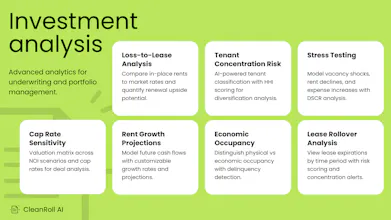
CRE investors spend 1-2 hours reformatting every rent roll before analysis can begin. Yardi, AppFolio, RealPage, PDFs—every format is different. CleanRoll fixes this in under 30 seconds: → Upload any rent roll (Excel, CSV, PDF) → AI maps columns to 12 standard fields → Review, adjust, and export clean data Plus: lease rollover analysis, loss-to-lease calculation, cap rate sensitivity, tenant concentration risk, and stress testing. All built in.



Free Options
Launch Team / Built With


Exploit Alarm
Rent rolls from Yardi/AppFolio/RealPage are never clean, and PDFs make it worse. CleanRoll AI standardizing them plus rollover and loss-to-lease is handy. How do you treat concessions and rent bumps in multiple rent columns? Confidence flags and an audit trail keep it trustworthy.
Exploit Alarm
Thanks for the kind words, @piroune_balachandran! You've touched on something we think about a lot.
Multiple rent columns: When we encounter Base Rent, Effective Rent, Gross Rent, etc. in the same file, our AI selects the most appropriate value for standardization and shows you exactly which column it chose with a confidence score. You can override any mapping before processing. We standardize to a single monthly rent value since that's what downstream analysis (rollover, loss-to-lease, comparisons) needs to work consistently.
Concessions: We don't currently capture unit-level concession amounts as a separate field. However, when you run our rent roll <-> T12 reconciliation, we identify collection gaps that reveal where concessions or delinquencies are impacting income. The T12 side captures property-level concession line items.
Rent bumps: Scheduled rent escalations within a lease aren't tracked yet. We use the current in-place rent. This is on our roadmap.
Confidence and verification: Every mapping shows a confidence percentage with color coding (green/yellow/red). You'll see AI notes explaining the mapping logic, sample values from your data, and can adjust anything before processing. Our anomaly detection flags statistical outliers, missing data, date issues, and calculated field mismatches with a 0-100 data quality score. Each flag includes the current value, suggested correction, and statistical context.
The full audit trail (processing history, change tracking) is something we're considering for a future release. Would that be valuable for your workflow?