Launching today

Claire Mail
Email, calendar and reminders, in one fast app
49 followers
Email, calendar and reminders, in one fast app
49 followers
Claire brings Gmail, Google Calendar and Apple Reminders together for Mac and iPhone, with AI that triages your inbox, writes your daily brief and preps your meetings.






Launch Team / Built With


Customer.ioAutomate Messaging Everywhere — Startups Get 12 Months Free
Promoted
Hi Product Hunt,
Claire Mail brings Gmail, Google Calendar and Apple Reminders together in one app for Mac and iPhone.
We built it because mail, meetings and to-dos lived in three apps, and it was easy to miss the reply you owed or the meeting you needed to prepare for.
What’s in it:
Today: mail, meetings, reminders and weather together, plus a short brief every morning
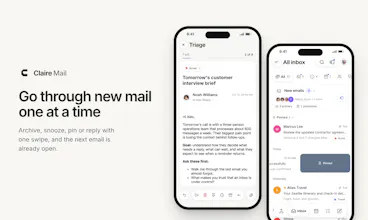
Triage: go through new mail one at a time. Archive, snooze, pin or reply with one swipe, and the next email is already open
Sort like Gmail: Primary, Updates, Promotions, Social and Forums, or Claire’s Primary, Other and Newsletter
Your Apple Reminders, with Triage: mark it done, snooze it, skip it or delete it, card by card
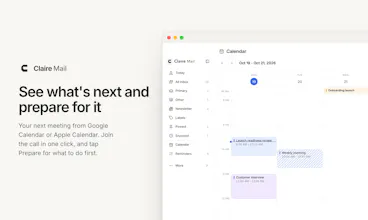
Your next meeting from Google Calendar or Apple Calendar, with Prepare for what to do first
Ask Claire about any email: key points, a next step and help with your reply
Your mail stays in Gmail. AI is optional: Apple Intelligence runs on the device with no key, or use your own key. Ask Claire suggests a step and waits for you to tap it.
It’s free during beta. The Mac app is a notarized download, and the iPhone app is on TestFlight.
What would keep you from switching from your current mail app? That’s the feedback we need most.
does the inbox triage run locally or does email content get sent off to a server somewhere
@jaewon_seo Thanks for asking. Triage runs on your device: it's your Gmail, loaded straight from Google into the app on your device, and swiping archives, snoozes or pins through Gmail directly. No AI is involved in Triage, and nothing from it goes to our servers.
Two things do touch a server, and both are optional:
- AI (Ask Claire, the daily brief): off unless you turn it on. With Apple Intelligence it stays on your device. With your own key (Claude, OpenAI, Gemini, Groq...) the email goes straight to that provider, never through us.
- iPhone notifications: our push server reads the sender and subject of a new email so it can show you the banner.
The privacy policy lists every data flow: clairemail.app/privacy
I've tried every "email and calendar in one" app and gone back to Gmail every time, so convince me :) Does it work with Google Workspace?
@jean_bonnenfant_tinct Ha, same here. That's exactly why we built it. I tried every email client under the sun, and they always fell short, so I kept going back to Gmail too, then Apple Mail, then Gmail again..
Yes, it works with Google Workspace, and with several accounts side by side. It talks to Gmail directly, so your labels, categories and filters stay as they are, and nothing needs migrating.
What made you go back each time? That's the bar I want Claire to clear. We're focusing on bringing in a chaotic information overload.
are you saying i can uninstall gmail, mail, calendar, google calendar, and the reminder app?
@tamilselvi_ramasamy2 That's right :) And it all works seamlessly. Claire was built to help you get through your busy day without having to scroll endlessly. Check out the triage feature for mail and reminders. Thanks for giving it a try!
What will it cost once the beta is over?
Giving email and reminders the same card-by-card treatment makes sense. It turns clearing the daily list into a series of small decisions.