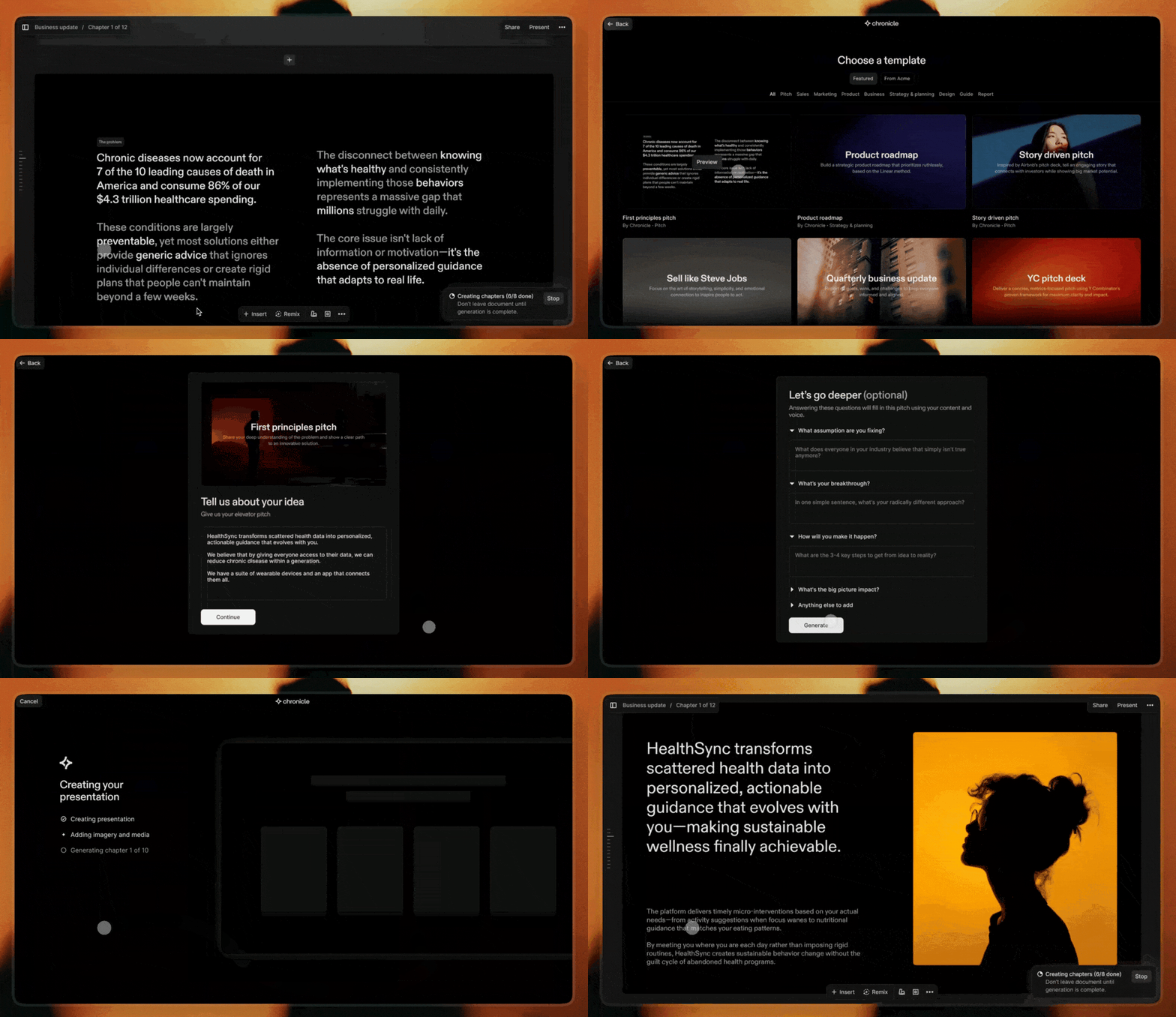
Chronicle combines AI generation with powerful editing to create stunning presentations. Start from a prompt, notes, or raw idea and generate beautiful, on-brand slides in minutes. Edit with full control and export to PPT, PDF, or any format. No design skills required.
Chronicle is your AI-powered design partner for presentations. Turn notes, prompts, or existing decks into beautiful, on-brand slides in minutes. It asks a few questions, builds an impressive first draft, and lets you refine slides through conversation.
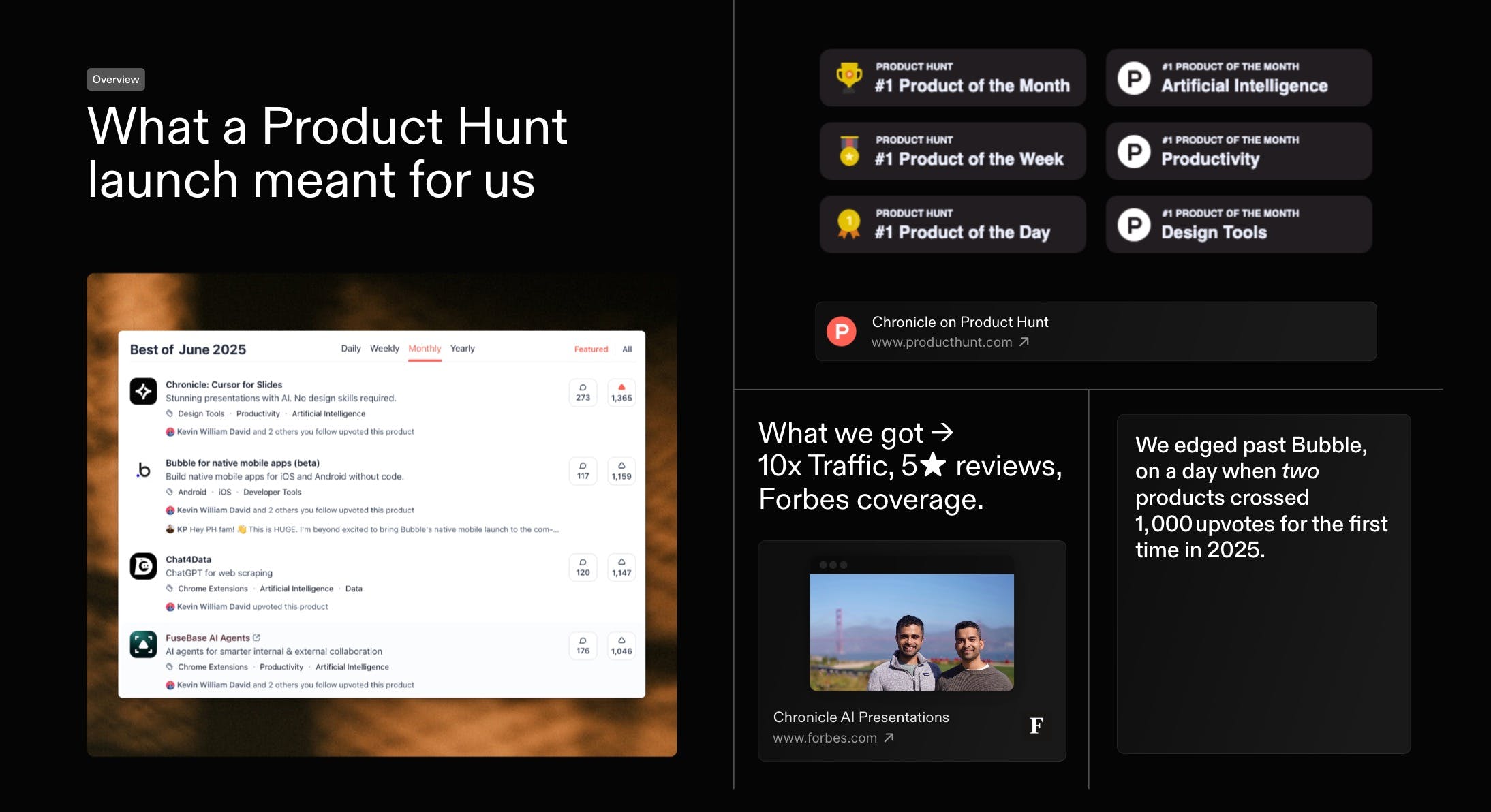
First, thank you. Everyone who voted, commented, or tried Chronicle. You helped us with a #1 finish in our first official launch on the same day Bubble also crossed 1000 votes. Massive gratitude
As a first-time founder, this was a special day. I would love to share what we've learnt. And would love to hear how we can do better, both in growing Chronicle and in improving the product itself.
Last month we kicked things off with a high-level recap of our Product of the Month launch - and you had so many questions that we went back to document every tactic in full. Today, here s the in-depth playbook: the exact strategies, experiments, and community-powered tests that took Chronicle to #1 on Product Hunt and over 1,000 upvotes within 24 hours.
Reviews praise Chronicle’s speed, clean flow, and collaboration, with many saying it turns rough notes into coherent, professional decks in minutes. Makers of
highlight fast, structured slide creation without fussy formatting, reinforcing strengths in AI-assisted narrative and layout. Users love tasteful design, templates, and team features, and report wins in pitching and internal alignment. Common asks: better exports (Keynote/PDF), image generation, auto-layout polish, looser sharing requirements. Some report glitches and weak mobile performance, plus occasional failures on structured tasks like SWOT.
The product shows tremendous potential. I really like the concept of starting with a few notes, refining them into a structured narrative, and then moving seamlessly into visual presentation. That said, there are some key areas that still need refinement. For example, I expected an automatic layout optimization feature to clean up the design after manually adding individual widgets. Unfortunately, viewing the presentation on my iPhone 13 was a poor experience—glitches and a lack of smooth performance made it frustrating to use. Also, requiring users to log in just to share their work feels unnecessarily restrictive.
What's great
visual presentation (2)
What needs improvement
mobile performance issues (1)automatic layout optimization (1)login requirement for sharing (1)
Thanks for the feedback Hugo. We haven't worked on the mobile experience yet - we have big dreams for it and surely we will get to it soon. There is an automatic layout optimisation. It is called remix. There is also a tidy up feature for simpler layouts.
Re: requiring users to login just to share: you can publish your work to the web and others can see it without logging in. Presentations need to be secure and private more often than not. Logging in is the safest way to do that. If you have alternative ideas or examples would love to hear.
I just started trying out Chronicle, and I'm already super impressed by what it offers. For me something that really stood out is the story. I love that this tool has been built with so much care by people who enjoy storytelling.
In our team, we use Canva Pro to make presentations and one of the main reasons for us to use it - is the access to so many beautiful templates that we can build on top of. In addition to that, there is access to lot of illustrations and graphics that we can just pick from.
But I always felt the layout aspect and the ease of storytelling missing, which you guys are doing so well. Eg: I can't even run the slides bullet point by bullet point on Canva. For that, I have to duplicate the slides.
Will you be able to give us templates on Chronicle? I couldn't find any so far. Especially since Mayuresh is a pro at presentations, if you templatise some of his presentations and let us re-use them, it will be super valuable!
Thanks a lot @gayathri_meka1 We are working on some curated templates made by experts right now. It is coming to the product very soon. Here is a sneak peek:
Chronicle has basically elevated how I present anything to my product team. My previous workflow of creating a presentation from a product document now takes 1-10th of the time as I can just add the content to the prompt and watch it create a visually striking presentation. Can't see myself going back to slides ever again.
What's great
fast presentation creation (3)visual presentation (2)
A few months ago you helped Chronicle become #1 Product of the Month, and later #4 Product of the Year. Since then, the product has grown to 200k+ users. With that, came a huge amount of honest feedback. Hundreds of you told us where Chronicle worked, where it didn’t, and where it could be much better. We read all of it.
Today, we're excited to launch Chronicle 2.0 to all of you! Chronicle turns notes, prompts, or existing slide decks into stunning, on-brand presentations, generates an impressive first draft, and lets you refine slides through conversation. There are a lot of AI presentation tools popping up right now. But most of them generate what we’ve started calling AI slide slop: generic layouts, messy structure, and decks you still have to spend hours fixing. Our ambition is simple: to build the best storytelling tool for teams.
Here are a few things I’m most excited for you to try:
✴️ Chronicle AI: Think of it as a slide design coworker. Give it anything: notes, a prompt, or a rough idea, and it builds an impressive first draft you can refine and iterate on together.
🖼️ Custom branding & themes: Dozens of beautiful templates with real design taste, plus full brand customization so teams can stay on-brand.
📊 Charts & graphs: You can now add and customize charts directly inside Chronicle. They automatically adapt to your presentation’s theme.
🗃️ Export to PowerPoint & PDF: One of the most requested features, now live.
🪄 Hundreds of world-class templates: Created by designers from places like Apple, IDEO, McKinsey and BCG.
Special thanks to @benln for hunting us. And honestly, thank you. The feedback from this community is the reason Chronicle 2.0 exists. As a small thank you, use code PHPRO this week for 1 month of free PRO on any new account.
We’re shipping updates every single day, and will be hanging out in the comments all day. We’d genuinely love your thoughts. What should we build next?
PS. We also have a Slack community where you can interact with the team directly, get early access to new features, and shape what we build next. Would love to see you there: chr.so/slackcommunity
@benln@tejgw This is so exciting! 👏 It's been inspiring to see the team launch so many new capabilities + improvements. Cannot wait for everyone to try it out! 💖
@benln@tejgw And a lot of what Chronicle 2.0 became came directly from feedback from this community. We’re grateful for it! Can't wait for everyone to try the new product.
Congrats on the PH launch! I've been testing with Chronicle extensively over the past week and I can say that the pre-built templates are far and away the best out there from a pure design and visual standpoint. However, the AI assistant part of Chronicle leaves a lot to be desired. I fed it markdown, pptx and pdf files to turn into presentations and it ended up building very basic decks - not pulling from the huge template library, even when some screens (like a timeline) were very obvious. Even when I provided explicit instructions and showed which templates to use when it created the presentation, it still churned out basic slop. Right now, Chronicle is a great zero-to-one manual presentation builder, but the AI component is more like a "baby AI" where it can just understand text but needs better training in order to know which templates (which, again, are really really nice) and layouts to apply.
@apcarpl Thank you for sharing that. We’re actively iterating, and Muse gets better every day with feedback like this. While we've noticed some brilliant outputs with our agent, it does struggle with picking more visual layouts, and that's something we're actively looking to improve.
@apcarpl Thanks for the shout Alex! I definitely am a big fan of our templates and 99% of my decks are created with them! Totally understand you though, we're working hard on making sure our underlying foundation picks from the right templates :)
Report
"AI slop" is mostly framed as a visual problem — generic layouts, stock-photo energy. But I think it's structural: AI defaults to the safe presentation shape because it's optimizing for what "good" looks like across millions of decks, not for the specific argument you're trying to make.
The fix isn't better design. It's intent capture before layout. When the AI knows your actual thesis upfront — the one thing you need the audience to walk away believing — the structure that follows feels authored, not assembled.
Building an AI travel planner, I hit the exact same wall. Itineraries defaulted to Eiffel Tower / Louvre / croissants not because the design was bad but because the AI didn't know why this specific person was going to Paris. Once you capture intent first, the output becomes personal.
Curious where in your flow intent capture happens — is it before the first draft or iteratively after?
@giammbo Great question, and it's one that we've spent countless hours refining. When you ask our AI agent muse to build a presentation, it surfaces a bunch of point of view options before it starts to even think about an outline.
You can then work with the AI to iteratively refine that outline before we think about the visual aspects of a deck.
Chronicle is meant for serious work, so yes the outputs look good, but your data and viewpoint matter most. Of course, you can start from a well researched document, or even another presentation, and it'll pick up the same outline for you.
Report
Love the idea of combining AI generation with real editing control. That’s usually where many AI tools fall short. As someone designing AI-powered products, I’m curious: Does Chronicle generate slides within a consistent design system, or can teams plug in their own brand styles/templates?
@victoria_samoilenko1 Absolutely! 💯 Teams can create their brand fonts, colours and visual rules within the workspace and make everyone stay consistent across the team.
@victoria_samoilenko1 We have a great themes system in place, and it's super customizable.
Report
I've used Chronicle, and I've used Gamma, but I felt that Chronicle fits my vibe much better than Gamma.
Both tools are good, but for me, Chronicle is a better fit. I really enjoy using the app, but if there's one thing I would improve, it is the customer support. I feel the customer support has a lot of scope for improvement. And a bad experience (delayed response) can leave a bitter taste.
Anyhow, wish you guys the very best! Onwards and upwards...
Report
Maker
@bhavvikminhas Really appreciate this - glad Chronicle fits your vibe better! That’s exactly what we’re aiming for: helping people take rough thinking and turn it into something that feels polished and ready to present.
Also hear you on the customer support - that’s on us and something we’re actively working to improve. Thanks for calling it out, and for the kind words. Onwards and upwards 🙌
On the customer support side, thanks for calling that out. Feedback like this is super helpful, and it’s something we’ve already been talking about internally.
@bhavvikminhas Hey Bhavvik, we're a small team + an overwhelmingly large user base, so we're not able to get to all our support requests immediately. Thanks for your patience!
I really like how Chronicle is focused on how information flows throughout the deck. Especially since a slidedeck is meant to tell a story.
Are there ways to give further context to Chronicle such as the specific target audience, tone, or even the type of narrative/story I want my slides to convey? For example, "a startup pitch deck that is meant to be playful but concise and to the point for investors"
@lienchueh You’re touching on something we're actively working on! When you start creating a deck with Chronicle AI, the agent asks you to pick a narrative style if there isn't one already. You can also just include this in your initial prompt, and it should be picked up.
Would love your thoughts on how we can make this better once you've had a chance to try it out!
@lienchueh Absolutely! you can curate the storyline with Chronicle at the start of every project. There, you can choose to narrate your story, add cues for target audience and tone. Muse will research and ask for your input simultaneously creating the slides.
@lienchueh Love that! You can always natural language prompt and converse with Muse, our AI slide design agent!
Report
How does Chronicle’s widget-based architecture ensure that layout integrity and interactive elements remain intact when exporting to static or legacy formats like PPTX and PDF, and does it allow for the ingestion of existing corporate master slides to maintain strict brand compliance?
When exporting to PPTX, widgets are converted into native PowerPoint elements while preserving layout, position, and size. For PDF exports, the conversion ensures the output is pixel-identical to what you see on screen. Neither PPTX nor PDF support advanced interactivity but we ensure that all links remain clickable. In the case of PPTX, rich text is exported natively (and remains editable), some video embeds are playable directly within PowerPoint, and all embeds remain clickable.
Brand consistency in exported decks is driven by colors, fonts, and layout patterns which teams can customize and lock in on Chronicle. Currently, we don't support ingesting external PPTX master templates - we're happy to hear more on your use case as we look to actively improve our export capabilities.
Chronicle
Thanks for the feedback Hugo. We haven't worked on the mobile experience yet - we have big dreams for it and surely we will get to it soon.
There is an automatic layout optimisation. It is called remix. There is also a tidy up feature for simpler layouts.
Re: requiring users to login just to share: you can publish your work to the web and others can see it without logging in. Presentations need to be secure and private more often than not. Logging in is the safest way to do that. If you have alternative ideas or examples would love to hear.