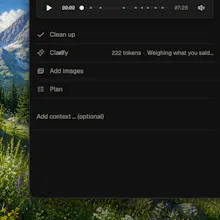
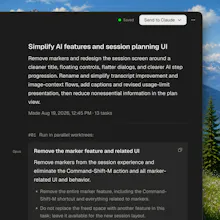
Feedback is easier said than written. Aloud records your voice, your screen and a live transcript together while you talk through your app – pointing at things, changing your mind. Then one press: it rewrites the transcript into what you actually meant, asks about anything that could be read two ways, pulls the screenshots you were pointing at, and turns the session into tasks for Claude Code, Cursor or Codex. Whisper runs on-device – your audio and video never leave the Mac.
I build with coding agents all day, and the bottleneck stopped being the
code a while ago. It's the brief. I'd spot something wrong in the UI, then
spend five minutes typing what I could have said in ten seconds – and still
leave out the screenshot that would have made it obvious.
Aloud is the opposite. Hit record and talk through the build like someone's
sitting next to you. Voice, screen and a live transcript, captured together,
with the recorder hidden from the video.
The part I'm proudest of is what happens after you stop. Real speech is a
mess: you say "move this over there", you change your mind mid-sentence, you
trail off. Aloud rewrites the transcript into what you actually meant, keeps
only the calls you stood by, then asks about anything still ambiguous – one
question at a time, over the line it's about, with a recommended answer and
one alternative. It pulls the frames you were pointing at, crops and captions
them, and turns the whole thing into tasks sized for one agent in one
worktree. Copy a task, or export the session as a single self-contained HTML
file and drop it into Claude Code, Cursor or Codex.
Transcription is on-device Whisper – audio and video never leave your Mac.
Only transcript text goes out, and only when you ask for the cleanup.
macOS, Apple silicon, free. What does your feedback → agent handoff look like
today? I want to know where this breaks for you.
Report
@wojciech_dobry Being able to just point and talk feels way more natural than typing it all out.
@wojciech_dobry The brief-quality framing rings true, but spoken feedback leans hard on pointing: "move this up", "that button". When the transcript says "this" and the capture shows where my cursor was, does the task your agent receives carry the actual element or file reference, or just the words?
@clement_avq Neither – Aloud never touches the DOM, it reads pixels. What it does is refuse to let "this" stay "this": a vision pass reads the frame from the moment you said it and tries to name the thing itself, and only when it can't does Clarify ask you – over the line it's about, with a recommended answer and one alternative.
Report
@wojciech_dobry that clears it up, thanks. Naming the thing visually still leaves the agent to locate it in the source though, and a screen can show two instances of the same component where "the one on the right" is unambiguous to me and identical in the code. does the brief carry anything to disambiguate that, or is resolving the name to a file the agent's problem?
@clement_avq if screen shows two instances of the same thing it's going to be clarified with the Clarify step. At least it's designed to do so.
Report
@wojciech_dobry Makes sense, that's Clarify doing the heavy lifting then. Congrats on the launch.
Report
@wojciech_dobry Congrats on the launch. The pointing is the part I'd use. Not having to describe where something is, top left, bottom of this panel, that saves a hell of a lot of time. Definitely worth a try. Thanks for making this.
Aloud
@wojciech_dobry Being able to just point and talk feels way more natural than typing it all out.
awesome!
Aloud
@wojciech_dobry The brief-quality framing rings true, but spoken feedback leans hard on pointing: "move this up", "that button". When the transcript says "this" and the capture shows where my cursor was, does the task your agent receives carry the actual element or file reference, or just the words?
Aloud
@clement_avq Neither – Aloud never touches the DOM, it reads pixels. What it does is refuse to let "this" stay "this": a vision pass reads the frame from the moment you said it and tries to name the thing itself, and only when it can't does Clarify ask you – over the line it's about, with a recommended answer and one alternative.
@wojciech_dobry that clears it up, thanks. Naming the thing visually still leaves the agent to locate it in the source though, and a screen can show two instances of the same component where "the one on the right" is unambiguous to me and identical in the code. does the brief carry anything to disambiguate that, or is resolving the name to a file the agent's problem?
Aloud
@clement_avq if screen shows two instances of the same thing it's going to be clarified with the Clarify step. At least it's designed to do so.
@wojciech_dobry Makes sense, that's Clarify doing the heavy lifting then. Congrats on the launch.
@wojciech_dobry Congrats on the launch. The pointing is the part I'd use. Not having to describe where something is, top left, bottom of this panel, that saves a hell of a lot of time. Definitely worth a try. Thanks for making this.
Aloud
@richardmohammed Thank you for your comment!