
AgentMicro
Live Codex task status in your macOS menu bar
232 followers
Live Codex task status in your macOS menu bar
232 followers
AgentMicro is a local-first macOS menu-bar companion for supervising parallel Codex Desktop and CLI tasks. It surfaces task state, project, elapsed time, and results at a glance, then opens the matching Codex Desktop task with one click. It observes local metadata only and never uploads prompts, responses, source code, or task history.


Free
Launch Team

CloudflareStill paying to deploy your apps? Try Cloudflare Workers for free
Promoted
You asked which signals help without adding noise, so here's the one I'd add: the state that isn't in your list.
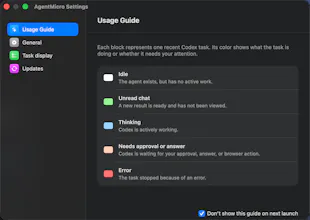
You have thinking, unread result, input needed, error, idle. There's nothing for I don't know. White for idle and white for the metadata went stale or Codex isn't where I expected are the same pixel to me, and they mean opposite things. Idle is fine. Lost is not. If the menu bar can't separate those, then a quiet menu bar tells me nothing, and quiet is the state it's in almost all the time.
Second one, on blue. Elapsed time is a weak proxy for stuck. A long legitimate task and a hung one look identical behind a spinner, and what separates them isn't duration, it's whether anything has changed recently. Blue that decays into thinking, but nothing has moved for six minutes would tell me more than a timer, and it costs you no extra permission since you're already watching that metadata change.
The five states are well chosen otherwise, and orange being the only one that means act now is exactly right. Noise usually comes from having two colours that both mean maybe.
In base mode with no Accessibility permission, orange for input needed has to be inferred from session metadata, and a long tool call looks identical to a prompt sitting unanswered. If that's a timeout threshold I'd want the number documented, because a 90 second web fetch showing up as needing me is the false positive that gets the whole menu bar ignored by Thursday. Five states only pay off if orange is never wrong.
Every state in your list is instantaneous, and I think that is the gap. Thinking at 30 seconds is healthy. Thinking at 30 minutes is hung. Same colour today. @asadmalik901 gets at it from the permission side, that a long tool call and a prompt sitting unanswered look identical. Duration in state separates both, and it needs no Accessibility permission, because you already know when the state last changed. So I would not add a sixth state. I would age the five you have, and let orange escalate itself once thinking crosses your own p90. That also answers your noise question, because the threshold learns itself instead of you picking one up front. The missing-state point above is right. I just think the missing thing is an axis, not a state.
The five state breakdown above covers the local case well. Different question: if Codex is running on a remote box over SSH rather than on the Mac you're looking at, does the menu bar have any way to see that session, or is this strictly scoped to tasks running on the same machine as the app itself?
The orange-only “act now” state is a really smart detail. Most agent status tools get noisy fast, but this feels designed around attention instead of just visibility. Also love that base mode works without Accessibility permissions.
Can it also inform me which task done is correct ( i.e. as intended ) and which task is partial or less ? As at times we get the message from Codex or Claude Code that the task is done, but is it done as needed or not ( will it be able to do the same ) ?