
StepShot
AI that turns real workflows into step-by-step guides
71 followers
AI that turns real workflows into step-by-step guides
71 followers
StepShot is an AI-powered documentation tool that turns real on-screen workflows into polished step-by-step guides as you work. It captures clicks and typing; local AI frames screenshots, writes instructions, and explains which actions to keep or skip. Edit, annotate, reorder, and redact every step, then export to PDF, Markdown, or HTML. It runs locally on your Mac with no account or product telemetry, while optional cloud AI polishing uses your own OpenAI-compatible provider.




StepShot
Hey Product Hunt 👋
I kept writing the same kind of document: click here, then here, screenshot, crop, arrow, number, repeat. An hour of work to describe four minutes of clicking. Every tool that promised to fix it was a browser extension — useless the moment the workflow touched System Settings, a native app, or a terminal.
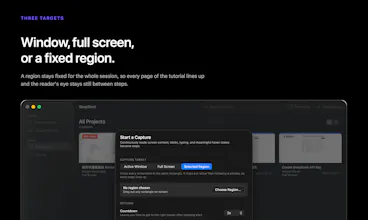
So StepShot is a native Mac app. It watches clicks and keystrokes through the accessibility layer, grabs the screen before each click lands (the frame you want is the one showing the button you're about to press, not the menu that opened), and assembles a document while you work. Two capture modes: action-driven for tight step lists, screen-recording when you want the full video kept as evidence. Three targets: active window, full screen, or a fixed region.
Four decisions I'd defend:
The preview is the export. The editor canvas, the preview pane, and all three exporters run the same renderer. A tool whose entire output is images cannot let you approve one image and ship another.
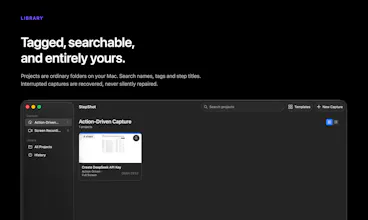
Local-first, and specific about it. Projects and screenshots live in a folder on your Mac. There is no account and no telemetry. Passwords are never read at all — secure-input fields are excluded at the engine level, so the characters never reach memory. The AI is deterministic and local by default; if you want a model to polish the wording, you bring your own OpenAI-compatible endpoint and key, and it only refines a draft that's already complete. Sending screenshots to a model is a separate, off-by-default consent, and samples are redacted locally before they leave.
Redaction is destructive. Sensitive regions are resampled down and back up, burned into the bitmap. Not a blur, not an overlay someone can strip. Local Vision OCR proposes them; you confirm each one before export unblocks.
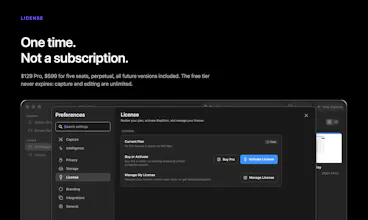
One-time purchase. $129 Pro, $599 Team (5 seats), perpetual, all future versions included. The free tier isn't a trial: capture and editing are unlimited and never expire, exports cover the first 10 steps in Markdown and HTML.
macOS 14+, Universal (Apple Silicon + Intel), signed and notarized. UI in English, 简体中文, and 日本語.
If you'd rather try the paid tier than read about it: drop your email in a comment and I'll send you a 30-day key with everything Pro unlocked — unlimited steps, PDF, branding. No card, no account, one per address. When it ends the app goes back to the free tier and nothing you recorded is touched.
Honest about what's not there: no Notion export, no auto-translation, no cloud sync or team accounts, and Windows is a private test build — not a release. I'll be here all day for questions, including the annoying ones.
@thomas_ellon_stewie_ Hey there. This is the job I hate most when onboarding a new vendor or hire: documenting the "obvious" clicks nobody ever wrote down. How well does it hold up when the underlying app UI changes? Every guide tool I've tried looks great on day one and quietly rots the moment a button moves.
StepShot
@artem_fedorovich That’s a fair concern, and it’s exactly where most workflow documentation breaks down.
Today, StepShot doesn’t automatically detect when a third-party app changes its UI, so I don’t want to overpromise. The guide remains a local, editable project, but if a button moves or the workflow changes, you’ll need to recapture the affected flow and export an updated version.
What StepShot does shorten is that refresh cycle: perform the updated workflow once, and its AI-assisted planning rebuilds the step sequence and draft instructions instead of making you manually retake, crop, number, and rewrite every screenshot.
Automatic change detection and version comparison are areas we’re interested in, but they aren’t shipped yet. Which changes cause the most pain in your onboarding docs: renamed labels, moved navigation, or the workflow itself changing?
StepShot
@karozieminski Absolutely — DM me the address you'd like it on and I'll send a key today. (Or drop it here if you don't mind it being public.)
It's 30 days with everything Pro unlocked: unlimited steps, PDF export, branding. No card, no account. When it ends the app just goes back to the free tier — nothing you recorded gets deleted or locked.
macOS 14+. Happy to hear what breaks.
StepShot
Want to try StepShot Pro free for 30 days?
Request your trial here: https://stepshot.app/pricing/
Or email support@stepshot.app with the subject “30-day Pro trial”.
No credit card or account required. One trial per email, valid on one device. Applications close on September 1, 2026 at 23:59 UTC, and each key remains valid for 30 days from the date it is issued.
Please don’t post your email publicly in the comments.