
Bo AI
An AI personal assistant that lives in your texts 💬
230 followers
An AI personal assistant that lives in your texts 💬
230 followers
Bo is the first consumer AI product that exists to serve everyday people. Bo helps you stay organized, save time, live healthier, and answer your questions—all via text.
Free Options
Launch Team / Built With


Framer AI AgentsDesign and publish professional sites with AI
Promoted
Hey Product Hunt 👋 Brandon here, Founder of Bo Labs.
I used to be an NBA Trainer, then I spent the last 6 years grinding in tech.
And like many of you, there were times where I sacrificed my health for business.
I got away with it for a long time, until last year when my body broke down on me.
It was the hardest year of my life, filled with countless doctor visits and physical therapy sessions.
Once I got better I was driven to build a tool I know could help millions.
We’re excited to introduce Bo Labs.
Our mission is to build AI products that help everyday people.
~6.8B have still never used AI.
We believe this is because of the form factor it takes.
That’s why we’re bringing AI to iMessage.
Today, we're excited to announce our first product.
Introducing Bo AI: Your AI Personal Assistant.
Bo makes your life easier. Helping you stay organized, save time, live healthier, and answer your questions—all via text.
These are just a few kinds of people using Bo today:
Students, hospital staff, active military, athletes, teachers, entrepreneurs, creators, elderly, busy parents, and more.
Amazing tech exists, but it’s still wildly inconvenient to use.
The average person has 50+ apps on their phone.
Most of which are never used.
Everyday people deserve access to AI in a way that meets them where they already are, and improves of their quality of life.
We welcome you to join us.
Special for the PH Community: use code HUNT20 with your Free Trial → getbo.com
@turp Congrats, Brandon.
Are people using Bo more for health/lifestyle routines reminders maybe, or quick everyday questions?
@dmitrii_volosatov both!
@dmitrii_volosatov thanks btw
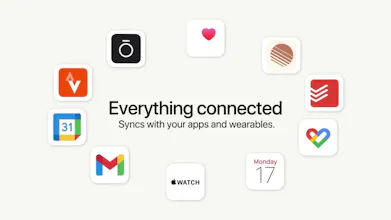
the audience you're describing, elderly, busy parents, people who've never really used AI, is exactly the group least equipped to reason about what they're granting when they connect Gmail, Calendar and a watch to a texting assistant. a technical user at least has a rough mental model of an OAuth scope. someone who's never used AI probably doesn't. how does Bo explain what it can actually see and do in a way that lands for that audience specifically, not just a permissions screen with checkboxes that everyone taps through anyway?
@galdayan we do a pretty decent job of outlining this in our onboarding imo! if you have any specific feedback would love to hear it
@turp here's a concrete one: swap the permissions list for a worked example during onboarding. instead of listing what Gmail/Calendar/watch access means, show one real text Bo would actually send once it's connected, like "saw an email from your pharmacy about a refill, want me to remind you Tuesday", right there before the person taps allow. a list of capabilities is abstract no matter how plainly it's worded, but a single concrete before/after example is something someone who's never used AI can actually picture and decide whether they want. easier to build trust from an example than from a well written paragraph.
Works on iMessage only or other messenger apps as well?
@divya_kothari1
We are on iMessage and android messages app for now (as long as it is SMS, Bo is there)
Any specific messaging app on your mind?
the elderly/non-technical audience angle is what stands out to me more than the permissions question gal raised. it's the correction problem. if bo books something or sends a reminder off a wrong read of a text, what does undoing that actually look like for someone who was never going to open a settings screen in the first place? is there a "no, that's wrong" reply that actually unwinds the action, or does it turn into another back and forth over text to sort out
On the error-rate question above, from a year of shipping an assistant to non-technical people: the rate is the wrong number, because the errors are not fungible. Our worst class was never wrong actions. It was confident false reports. The assistant would tell someone "she picked up and it was delivered successfully" about a six-second call nobody answered. That ran at 24% of calls carrying some fabricated confirmation, and we got it to 2% across about 1,200 calls. What did not work: lowering temperature, and putting "be honest" in the prompt. What worked: every claim had to point at something literally present in the transcript, and the exact forbidden phrases had to be named rather than described. The reason this matters more for you than for us: an assistant that is wrong 3% of the time and says "I don't think that worked" keeps the user. One that is wrong 1% of the time and reports success on that 1% loses them, because they find out from the other side. And text has no tone to hedge with, so whatever hedging you want has to be literally in the words.
I like the idea Brandon! Any plans to make it work on Whatsapp too? in the UK at least, iMessage is mainly used for verification codes and appointment reminders - people don't interact with it too much.
This is so cool, I literally was trying to make this. It seems cool. Not sure if I would use it because I would scare of it messing up. Whats the error rate?