
WebBrain
The sidebar agent for the rest of us
97 followers
The sidebar agent for the rest of us
97 followers
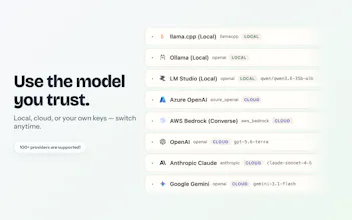
Your browser, your models, your data. WebBrain is a free, open-source AI browser agent for Chromium browsers and Firefox. Run it locally with llama.cpp and most queries cost nothing — your data never leaves your device. It reads pages, extracts data, and automates tasks right from the sidebar. Prefer the cloud? Bring your own API key for OpenAI, Claude, OpenRouter, or 100+ OpenAI-compatible providers. Multilingual UI, token-conscious screenshots. MIT licensed.




Hi Product Hunt! I’m Emre — and I’m back.
Today I’m launching WebBrain, a free, open-source AI browser agent that lives directly inside your browser.
I built it because the most capable browser agents are generally closed source, tied to specific models, and locked behind subscriptions. WebBrain takes a different approach:
Works with Claude, OpenAI, OpenRouter, or local models through llama.cpp
Runs on Chrome, Firefox, and Edge
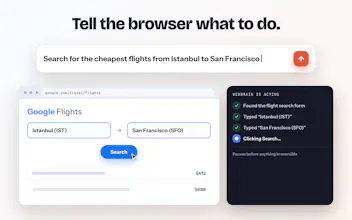
Uses screenshots and browser accessibility data to understand and operate websites
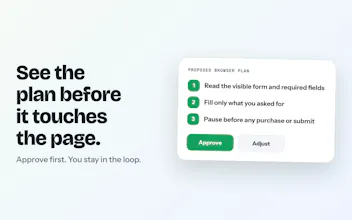
Keeps you in control of the model, provider, and data
Drafting this launch, I used WebBrain to write parts of it. 🙂
Ask. Act. Automate. Any LLM.
This isn’t my first attempt at making the web more programmable. In 2006, I launched Grou.ps, which grew to 350,000 communities and 12 million registered members before its assets were acquired by a publicly traded telecom company.
Later, I launched GraphJS here on Product Hunt—an open-source toolkit that let developers add social-network features to websites using a few HTML tags and JavaScript. About a year later, it was acquired by its first enterprise customer.
Now I’m bringing that same open-web philosophy to AI browser agents.
Try it: 👉 webbrain.one
Star it: ⭐ github.com/webbrain-one/webbrain
MIT licensed and open source.
Try it on this page right now — have it draft or revise your comment and actually post it. Or just ask "who built this?"
@emresokullu Small positioning note: I would lead with local-first, not open-source. Open source tells people they could read the code, which almost nobody does. Local tells them the page they are looking at never leaves the machine, and that is the objection that actually stops browser agents from getting installed at work.
I typically use @Dia Browser which has its own AI assistant built-in, but I appreciate that@emresokullu’s WebBrain extension gives people choice who use Chrome and other browsers.
The power of this approach is that the assistant has access to your sessions, cookies, and context — intact.
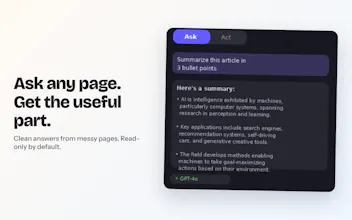
And you can BYOK or point it at Claude, OpenAI, OpenRouter, or even a local model through llama.cpp, then ask it to understand the page, fill forms, or take action. You can use any LLM in your browser with WebBrain.
I've known @emresokullu from back in the social web days when I hunted @Grou.ps v2 7 years ago! Nice to see him back at it!
@chrismessina Thanks, Chris — it really is full circle, from Grou.ps to browser agents 😄
And yes, that freedom of choice is exactly the point: Chrome or Firefox, local or cloud models, BYOK — basically, bring your own brain.
It’s great to have you hunting WebBrain after all these years!
@emresokullu @chrismessina The intact context point cuts both ways, and I think that is the real design question here. An extension holding your sessions and cookies does not have access to your accounts, it has access to your identity. Nothing was granted to it. It inherited everything you happened to already be logged into.
Which makes the local model less a privacy feature than a containment one. The page never leaves the machine, so the blast radius of one bad instruction stops at the machine too. A hosted assistant cannot offer that, and it is the line I would put on the box.
How well do local models handle more complex multi-step browser tasks compared with Claude or OpenAI? Do you see local inference becoming good enough that most everyday browser automation can eventually stay fully on-device?
@andrasczeizel, great question, and thanks! Local models perform really well, especially Qwen 3.6 27B. If you have a GPU with 24 GB or more of RAM, or a MacBook with at least 32 GB of RAM, you are in good shape.
Laguna XS 2.1 is also quite good, although it is text-only for now. We have added vision support, but it is still a work in progress: https://huggingface.co/webbrain-one/Laguna-XS-2.1-Vision-NVFP4
Muse Glimmer 30B and Nemotron 3.5 Lightning 30B-A3B, released this week, also look promising. We will have Qwen 3.8 27B today, too. We plan to include all three in a benchmark soon.
The advantage of Gemma 4 QaT 31B is that it is extremely fast. For now, though, I find its quality a little lower than Qwen 3.6 27B, especially for vision tasks.
If you have less memory, other good options include Gemma 4 26B A4B, Gemma 4 12B, and Qwen 3.5 9B.
For more benchmarks of local models, follow our blog at https://www.webbrain.one/blog and our social media accounts: Mastodon at https://mastoturk.org/@webbrain and Bluesky at https://bsky.app/profile/webbrain-one.bsky.social
Cheers!
@emresokullu wow, so detailed! thanks! rooting for you & your launch! LFG
@andrasczeizel Thanks! It’s a passion of mine 🥰