
qpilot
Run your manual test cases in a real browser — no code
10 followers
Run your manual test cases in a real browser — no code
10 followers
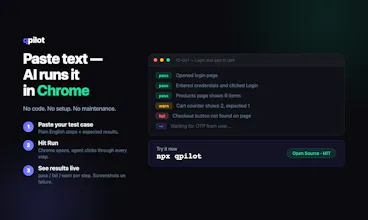
qpilot is an open-source AI agent that runs your plain-text QA test cases in a real Chrome browser. Paste your steps → hit Run → watch pass/fail/warn per step stream live. If it hits a captcha or OTP, it pauses and asks you directly, then continues. No Playwright scripts. No selectors to maintain. Works with Claude or any OpenAI-compatible model.


Hey Product Hunt! 👋
I built qpilot because I was tired of watching QA teams (and myself) click through the same test cases release after release — while "proper" automation kept breaking on every UI change and needed a developer to maintain.
qpilot takes a different path: you paste your manual test case as plain text, and an AI agent opens a real Chrome browser and walks through the steps itself. You watch pass / fail / warn appear live for each step. When it hits a captcha or OTP, it doesn't die — it pauses and asks you, then continues.
What makes it different:
🧠 Reads the page like a human — via ARIA semantics, not CSS selectors, so it survives UI changes
📝 Anyone can write tests — if you can write a step-by-step description, you can automate it
⏸️ Human-in-the-loop — captchas and 2FA pause the run instead of killing it
📂 Batch mode — point it at a folder of .md test cases and run them all
🔓 Open source (MIT) — bring your own model: Claude or any OpenAI-compatible endpoint (Qwen, Ollama, vLLM)
Try it in one command:
npx qpilot
I'd love your honest feedback — especially: where would this break in YOUR testing workflow? What's the one feature that would make you actually adopt it?
GitHub: https://github.com/broxhq/qpilot
how does it handle dynamic content like lazy loaded images or infinite scroll without explicit waits in the steps?
@boranrjwh Good question — the agent handles this itself, no explicit waits in the test case needed.
Every action returns a fresh snapshot of the rendered page, so the agent sees what actually loaded before moving on. For infinite scroll, the scroll tool reports real feedback (how far it moved, position vs. limit, bottom reached) — so it scrolls, checks the new snapshot, and repeats until the target appears. If something renders async, it adds a short wait on its own.
Does the "plain text" QA steps need to be in any specific format, or can it interpret the messy step-by-step docs my PM writes in Confluence?
@zlemnasuhb87sr No strict format — it's an LLM reading the text, so messy PM-style docs work fine. The agent parses whatever you paste into a structured plan itself (numbered or not, grouped or not).
Two things it does need somewhere in the text: a starting URL and any credentials/test data. And the clearer the expected results are, the stricter the verification — "Expected: cart shows 1 item" gets checked literally against the page, while vague steps leave more to the agent's judgment.
Honestly, the best way to find out is to paste one of those Confluence docs as-is and watch what plan it builds — that's exactly the use case it was made for.
How does it handle dynamic content or pages where elements shift around, since it sounds like theres no selector layer to anchor onto?
@ebayraktut54124 That's actually the trick: there are no stored selectors to go stale. Before each action the agent reads the page as an accessibility tree (roles + labels), and every element in it gets a short-lived ref. It acts on refs from the latest read only — after any action it gets a fresh tree back in the same result, so if the layout shifted, the next action is anchored to the page as it is now, not as it was when someone wrote the test.
If a ref does go stale mid-flow (page re-rendered under it), the action fails with "take a fresh snapshot", the agent re-reads and retries. So a redesign doesn't break the suite — as long as the button is still recognizably "the login button" to a human, the agent finds it by its role and label.
How well does it handle dynamic content like elements that load after a delay or popups that appear mid-flow?
@tahsinsuludag Pretty well — that's actually where the agent approach beats scripted automation.
Delayed elements: every action returns a fresh snapshot of the rendered page, so the agent sees what's actually there. If the expected element hasn't appeared yet, it waits briefly and re-checks instead of instantly failing.
Popups mid-flow: when an overlay blocks a click, the agent doesn't get a cryptic Playwright error — it gets a readable hint that something is covering the target, and it has a dedicated dismiss action to close the overlay (click-outside), then retries. Cookie banners, dropdowns left open, promo popups — that's the usual flow.
It's not magic — a truly broken page still fails — but "the popup appeared at the wrong moment" doesn't kill the run, the agent just deals with it and moves on.
The pause-and-ask flow for captchas and OTPs is genuinely clever, that kind of human-in-the-loop handoff is usually the thing that breaks these tools. Love that it's plain-text steps instead of forcing you to maintain selectors.
@arifevrec Thanks! The handoff was born from real pain — every serious app has a login wall, and most automation just dies there. Pausing and asking felt more honest than pretending it can solve captchas 🙂
And yeah, selectors are exactly what makes manual QA teams avoid automation — they break on every redesign. Plain text + an agent reading the live page means there's nothing to maintain. Appreciate you digging into the details!