
PM OS
Upload a SOW. Get a complete project plan with AI.
31 followers
Upload a SOW. Get a complete project plan with AI.
31 followers
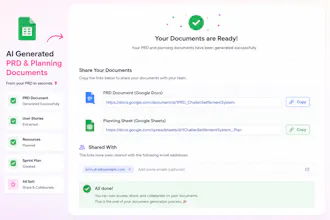
Stop writing project plans manually. PM OS turns your Statement of Work into a PRD, user stories, resource plan, and sprint plan — delivered as ready-to-share Google Docs and Sheets.




real SOWs are messy though, vague scope language, contradicting sections, stuff that got negotiated verbally and never made it into the doc. what happens when it hits an SOW like that, does it flag the gaps or just make a best guess and hand you a plan that looks clean but is built on an assumption nobody signed off on
@galdayan Fair concern — it doesn't silently guess. Contradictions and vague scope get flagged explicitly in the PRD (under Assumptions/Open Questions) rather than smoothed over, so you see exactly what it inferred vs. what was actually stated. Verbally-negotiated stuff that never made it into the doc obviously can't be picked up — no tool can read minds — but the goal is to surface gaps for your sign-off, not hide them behind a clean-looking output.
@tarun_patel123 That's the right answer honestly - surfacing the gap for sign-off beats a tool pretending it knows something it can't. Appreciate the straight answer, that's the difference between something I'd actually trust with a client SOW and something I'd double-check line by line anyway.
@galdayan Appreciate that — and honestly "double-check line by line anyway" is the right instinct even with the flagged assumptions. It's meant to speed up the first pass, not replace your judgment on a client SOW.
How does it handle a Statement of Work that's basically a mess of bullets and vague timelines, is there any cleanup built in or do I need to prep it first before uploading?
@utku1011889 Good question — it handles messy SOWs fine, that's actually the main use case. You don't need to clean it up first; the AI parses unstructured bullets, vague timelines, and inconsistent formatting and pulls out scope, assumptions, and deliverables on its own. If a timeline is genuinely missing (not just vague), it'll flag that as a gap in the PRD rather than guess.
Does it actually parse existing SoW docs accurately or do I need to reformat them first?
@cemile39555 No reformatting needed — upload it as-is (PDF, DOC, or DOCX). It parses the actual content, not a specific template, so inconsistent structure or bullet-heavy docs work fine. It'll ask for clarification only if something critical (like scope) is genuinely missing, not just messily written.
The SoW-to-sprint pipeline saved me a full afternoon on Monday. Docs and Sheets export worked cleanly in my workspace, no weird formatting cleanup needed.
@melahat38429 Really glad it saved you time! Clean Docs/Sheets export without manual reformatting is exactly what we optimized for — appreciate you calling that out.
Congrats on today's launch!!
@daniel_nwankwo thank you