Launching today

ShellMate
Manage SSH servers, credentials, and teams in one place
165 followers
Manage SSH servers, credentials, and teams in one place
165 followers
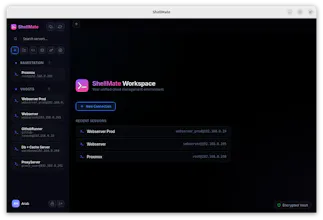
ShellMate is a modern, ultra-fast, and secure SSH client featuring a zero-knowledge encrypted vault, cross-device sync, and advanced team workspace collaboration.



ShellMate
The zero-knowledge vault for SSH credentials is architecturally sound. Most SSH managers store secrets in a way that the vendor could access them, so client-side encryption is the right call. We've dealt with credential sprawl ourselves: private keys shared over Slack is a scary common default. How does cross-device sync work under zero-knowledge constraints? Is the vault key derived from a passphrase with the encrypted blob synced, or something different?
ShellMate
@retain_dev The encrypted vault is synced through the server, so your devices don't need to be online at the same time. When you sign in on a new device, it downloads the latest encrypted vault automatically.
Updates are also synced across your connected devices and shared workspace members in real time, so everyone stays up to date without manual syncing.
The important part is that ShellMate only stores encrypted data. The actual decryption happens locally on your device, so the server never sees your plaintext credentials.
Security is one area where I'm probably overly cautious. I'm still actively refining this part of the architecture to make it as robust and bulletproof as possible while keeping the user experience simple.
SSH credential sprawl is genuinely painful when managing multiple environments across a team. The team-based access model makes sense: keeping prod keys isolated from staging is something everyone knows they should do but it's rarely implemented cleanly. How does key rotation work? Do you push updates to all hosts automatically, or does each server need a manual sync?
ShellMate
@anand_thakkar1 That's a great question, and honestly one of the reasons I started building ShellMate.
Right now, ShellMate focuses on securely managing access, credentials, and collaboration around infrastructure. For key rotation, it doesn't automatically push changes to servers yet. My goal was to first solve the day-to-day pain of credential sprawl, sharing access safely, and keeping teams organized.
That said, automated key rotation and distribution is definitely on the roadmap. I'd love to get to a point where rotating access across environments becomes a few clicks instead of a manual process spread across dozens of servers.
I completely agree with you on the prod vs staging separation. Everyone knows it's the right thing to do, but once a team grows, it often turns into a mix of shared credentials, old keys, and tribal knowledge. Making those boundaries easier to enforce without adding operational overhead is something I'm thinking about a lot.
Out of curiosity, how are you handling key rotation today? Is it mostly manual, or are you using something like SSH certificates, Ansible, or another access management solution?
ShellMate
@anand_thakkar1 I just realized I missed part of your question! Within ShellMate, updates are synced automatically. If a credential, host, or permission changes, the update is pushed to all connected devices and shared workspace members in real time, so there's no need for anyone to manually sync.
Clean take on an SSH client, and the zero-knowledge encrypted vault is reassuring for credentials. I like that sync is built in. For a solo dev not on a team, does the vault still sync across my own Macs without setting up any workspace stuff?
ShellMate
@ianhxu Thanks Ian!
Yep, absolutely 😊
You can use ShellMate as a solo user without creating a team workspace. Your credentials and hosts can sync securely across your own devices, so if you're switching between multiple Macs (or other devices), everything stays in sync and ready to use.
Also, ShellMate is free forever for individual users. The only things that may be part of a paid plan in the future are optional AI features. Everything else is built to be useful from day one without needing a subscription.
One thing I cared about a lot was keeping the onboarding simple. I didn't want another tool that takes an hour to configure before it's useful. You can install it, add or import your hosts, and start connecting in just a few minutes.
Team workspaces are there when you need them, but they're completely optional.
Out of curiosity, what are you using today for SSH and credential management? I'd love to hear if there are any pain points or missing features that annoy you in your current workflow.
ShellMate
@naresh_chandanbatve Thanks for pulling it! 😊
The target servers themselves don't need internet access. As long as your device can reach them over a VPN, private network, or local network, ShellMate can connect.
For a completely air-gapped setup with no access to the ShellMate API at all, that's not supported yet. Self-hosted support is something I'm actively exploring since it's a common requirement for security-focused teams.