
Silkwave Voice
Record your microphone, system audio simultaneously
29 followers
Record your microphone, system audio simultaneously
29 followers
Silkwave Voice records your microphone, system audio, or both simultaneously. Transcription runs entirely on-device using Apple's speech-to-text models. Supports 10 languages. Your audio never leaves your Mac. Get structured AI summaries with key topics, action items, and decisions powered by ChatGPT through Apple Intelligence. Start recordings from the menu bar without switching apps. Full-text search across all your recordings, transcripts, and summaries. Requires macOS 26 (Tahoe) or later.



Free Options
Launch Team / Built With


Render: Get up to $100K in startup creditsCloud infrastructure for founders who want to move fast and NOT break things
Promoted
Hi Product Hunt! 👋 I'm Bakhshi, the maker of Silkwave Voice.
At some point I realized that macOS now provides everything you need to build a privacy-first meeting assistant: on-device speech-to-text, mic and system audio recording APIs, and free ChatGPT summarization through Apple Intelligence. All the pieces were there, just nobody had put them together into one app. So I built Silkwave Voice, a one-time $14.99 purchase (launch price, will increase later) with a 7-day free trial, no subscriptions, no per-minute fees, and no server costs.
Silkwave Voice is a macOS app that does three things well:
🎙️ Record: mic, system audio, or both at once (perfect for Zoom, Meet, podcasts, no third-party drivers needed)
✍️ Transcribe: in real time, on-device, using Apple's speech-to-text models in 10 languages. No internet required, no audio leaves your Mac
🧠 Summarize: structured summaries with key topics, action items, and decisions, powered by ChatGPT through Apple Intelligence
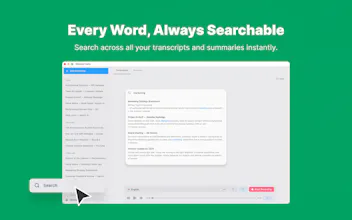
Plus a menu bar app for quick access and full-text search across your entire recording library.
Since everything runs on your Mac, there's nothing for us to charge you monthly for. It's available now on the Mac App Store.
I'd love to hear: what's the one feature that would make you switch from your current transcription workflow?
Happy to answer any questions. I'll be here all day. Thanks for checking it out! 🙏
On-device makes sense for corporate environments where IT won't allow audio on third-party servers. Any plans for team sharing of transcripts, or is this intentionally staying a personal tool?
@klara_minarikova
Hey Klara. Thank you for your comment. Keeping it strictly personal for now! But, users can just copy/paste the transcript or summaries directly into their own internal tools(Slack, Teams, etc.). There are dedicated copy buttons on each view to make it super quick.
The one-time pricing is such a breath of fresh air in a space where everything is $20/month. The fully on-device angle is what actually makes it believable too, most tools say 'privacy-first' but still send audio somewhere. Congrats on the launch Bakhshi! :)
@andrasczeizel
Thanks so much, Andras! 🙏 Yeah, Macs are already powerful enough to handle most AI note-taking and meeting assistant needs. Really glad the 'on-device' privacy aspect resonates with you. Appreciate the support today!