Launching today
ClipboardManager-Supercharged

ClipboardManager-Supercharged

Your macOS clipboard, supercharged with AI β€” completely free

2 followers

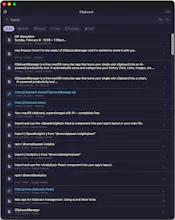
ClipboardManager is a free macOS menu bar app that turns your single-slot clipboard into an AI-powered productivity tool. It automatically saves and categorizes your history (Text, Links, Images, etc.) while masking sensitive data like passwords. AI Power: Reword text, translate 33 languages, or extract data via Claude/OpenAI. Smart Search: Use natural language to find old clips. Efficiency: Global hotkey, OCR for images, and paste-on-select. Free, no account required. Requires macOS 14+
ClipboardManager-Supercharged gallery image
Free
Launch tags:Macβ€’Productivityβ€’Artificial Intelligence
Launch Team / Built With
Webflow | AI site builder
Start fast. Build right.
Promoted

What do you think? …

A Ashraf
Maker
πŸ“Œ
Hey Product Hunt! I'm the maker of ClipboardManager and I'm excited to share it with you. The inspiration came from a frustration every Mac user knows: you copy something important, then copy something else, and that first thing is just... gone. I found myself constantly switching between Slack, Docs, email, and Jira β€” copying and pasting the same things over and over. The default macOS clipboard felt like it was designed in 1984 and never updated. I wanted something that didn't just remember my clipboard history, but actually understood it. That's where the AI layer came in. ClipboardManager auto-classifies everything you copy β€” it knows a password from a URL from an email address. It masks sensitive data automatically. And with AI, you can reword text, translate to 33 languages, extract structured data from messy copy-pastes, and search your history with plain English like "that API key from this morning." The problem this solves is death by context-switching. Every knowledge worker on a Mac copies and pastes dozens (or hundreds) of times a day. That's hours of lost productivity over a week β€” re-finding things you already had, accidentally pasting the wrong thing, exposing passwords in plain text. Who is this for? Honestly, everyone on a Mac. Developers who juggle code snippets, API keys, and terminal output. Designers copying hex codes and specs between tools. Writers drafting and rewording across documents. PMs pulling data from emails and Slack into docs. If you use Cmd+C and Cmd+V, this makes your life measurably better. It's completely free β€” no catch, no trial, no subscription. AI features use your own API keys (Claude or OpenAI), so you're in full control. I'd love to hear your feedback. What clipboard frustrations do you deal with daily?