
Layrr
Framer for your actual codebase
310 followers
Framer for your actual codebase
310 followers
Layrr gives you Framer-style visual editing for your actual codebase. Drag and resize components, convert Figma to code, edit text in-browser, or design with AI, all while working with real files in your repo. Framework agnostic (React, Vue, Svelte, HTML). Deploy anywhere. 100% free and open-source.



Hi Product Hunt! 👋
I'm Kiran, and I built Layrr to solve a problem I kept running into.
I've been using Claude Code to build websites, and while it's incredible for generating and editing code, something felt off when it came to design. I'd describe what I wanted, but I couldn't just point at an element and say "make THIS bigger" or "move THAT 20px to the right."
I realized I needed more direct control, the ability to click, drag, and visually manipulate
specific elements while still working with real code. That's when I started building Layrr.
Layrr is a browser-based coding agent that gives you visual editing superpowers over your actual codebase. Think Framer's drag-and-drop interface, but instead of being locked into their platform, it works directly in your browser with your code, React, Vue, Svelte, plain HTML, whatever you're using.
Key features:
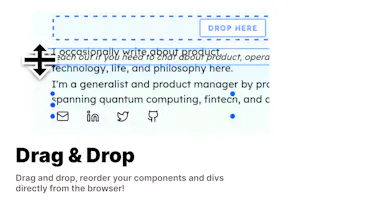
1. Visual editing - drag, resize, and position elements
2. Figma-to-code conversion
3. Quick text editing directly in browser
4. Design with natural language
5. Works with any framework
6. Your code stays in your repo
And here's the best part: it's 100% free and open-source (AGPLv3). No subscriptions, no vendor lock-in, no proprietary formats. You own your code, you choose your stack, you deploy anywhere.
I built this for product engineers like me who want the speed and comfort of visual editing without sacrificing control or freedom.
Would love to hear your thoughts and feedback!
~ Kiran :)
It’s crazy simple.
Now it’s easier than ever for non tech savvy people to manage their websites
really curious how setup works?
@shajin it's pretty simple, just run layrr in a terminal window in your code base. If you have a dev server running, layrr detects automatically and opens a proxy dev server at port 9999
https://www.layrr.dev/docs
🎉 congrats on the launch of Layrr!
This looks like a beautiful and powerful tool for enabling quick "what-if" scenarios and rapid visual prototyping for everyone. Making it so easy to quickly rethink and iterate on designs is a game-changer.
Well done! 👏
@melvingeorge Thanks a lot, how are things going with PulpMiner
Great work @kiranjohns . Writing prompts to describe visual changes is such a time sink, this will massively improve dev ergonomics. Kudos for open-sourcing it!
@manzoorsamad Thank you :)
Great work, Kiran. This makes it so much easier to make simple website edits without touching the code.
Do you plan to release a version for less tech-savvy users, one that doesn’t require terminal setup?
@shyjal Totally, right now it's packaged as a CLI tool, which make it hard for folks to operate, thinking through a better approach, maybe a desktop application?
this looks really great (thank you!) - when will it be available for windows ?
@isabell1 My current priority is to make it into a better form factor + improve ease of use! Don't have a date right now but hopefully soon
Looks really cool - perfect for small design adjustments!
Nowadays, when you use an LLM to modify specific components, you often have to do some magic tricks to make it work properly.
@shahar_shalev started building this to solve that exact problem