Could anyone provide insights into the new version of Claude code that separates Back End, Front End, and Dev Ops? I would appreciate any encountered challenges or potential pitfalls.
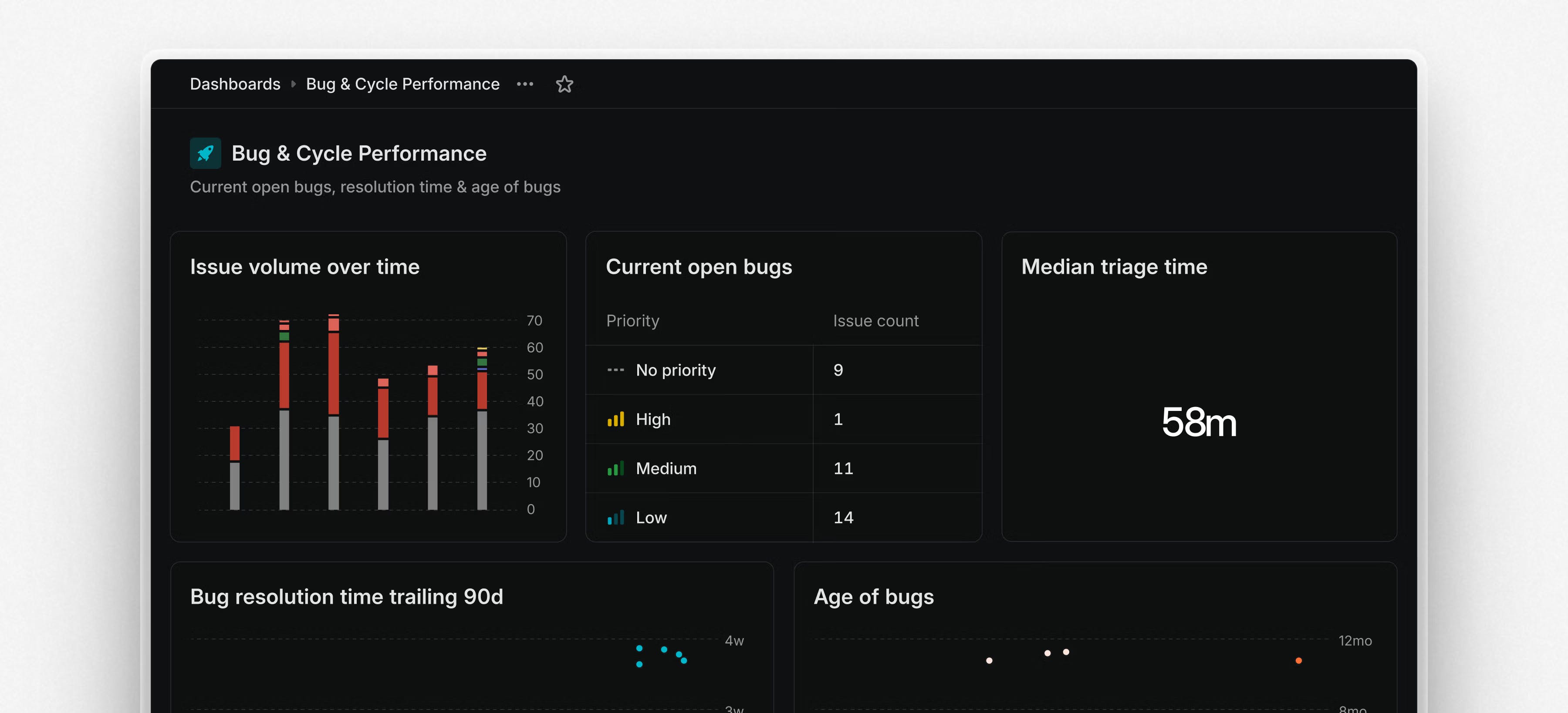
@Linear recently launched Dashboards, a combination of different insights into a single page view. "Use them to monitor operational health across teams and workflows or build reporting dashboards to show how resources are spent across initiatives and projects."
I have been a big fan of @Aqua Voice but do need something local for the times I don't have internet or am traveling. So I wanted to give @OpenWispr a try but didn't really want to go through the whole setup for it... so I gave @Claude for Desktopaccess to my files and computer and... it basically instantly installed the whole thing and got it working! Then I asked it to package for me as a Mac app (.app) and what do you know... it did! Was honestly kind of amazing. There was one issue that I had to keep troubleshooting and that's sometimes Claude would reference the wrong environment or file... it could figure it out, but just something to pay attention too.
So now you can vibecode and quickly iterate on Open Source software using Claude Desktop, @Cursor, and @Warp. Use Claude to set it up, Cursor to iterate and build, then Warp to polish and debug.
Have there been any Open Source software that has scared you away but you might try install with this method?
I have been a big fan of @Aqua Voice but do need something local for the times I don't have internet or am traveling. So I wanted to give @OpenWispr a try but didn't really want to go through the whole setup for it... so I gave @Claude for Desktopaccess to my files and computer and... it basically instantly installed the whole thing and got it working! Then I asked it to package for me as a Mac app (.app) and what do you know... it did! Was honestly kind of amazing. There was one issue that I had to keep troubleshooting and that's sometimes Claude would reference the wrong environment or file... it could figure it out, but just something to pay attention too.
So now you can vibecode and quickly iterate on Open Source software using Claude Desktop, @Cursor, and @Warp. Use Claude to set it up, Cursor to iterate and build, then Warp to polish and debug.
Have there been any Open Source software that has scared you away but you might try install with this method?
I have been a big fan of @Aqua Voice but do need something local for the times I don't have internet or am traveling. So I wanted to give @OpenWispr a try but didn't really want to go through the whole setup for it... so I gave @Claude for Desktopaccess to my files and computer and... it basically instantly installed the whole thing and got it working! Then I asked it to package for me as a Mac app (.app) and what do you know... it did! Was honestly kind of amazing. There was one issue that I had to keep troubleshooting and that's sometimes Claude would reference the wrong environment or file... it could figure it out, but just something to pay attention too.
So now you can vibecode and quickly iterate on Open Source software using Claude Desktop, @Cursor, and @Warp. Use Claude to set it up, Cursor to iterate and build, then Warp to polish and debug.
Have there been any Open Source software that has scared you away but you might try install with this method?
I have been a big fan of @Aqua Voice but do need something local for the times I don't have internet or am traveling. So I wanted to give @OpenWispr a try but didn't really want to go through the whole setup for it... so I gave @Claude for Desktopaccess to my files and computer and... it basically instantly installed the whole thing and got it working! Then I asked it to package for me as a Mac app (.app) and what do you know... it did! Was honestly kind of amazing. There was one issue that I had to keep troubleshooting and that's sometimes Claude would reference the wrong environment or file... it could figure it out, but just something to pay attention too.
So now you can vibecode and quickly iterate on Open Source software using Claude Desktop, @Cursor, and @Warp. Use Claude to set it up, Cursor to iterate and build, then Warp to polish and debug.
Have there been any Open Source software that has scared you away but you might try install with this method?
Raycast just shipped a new release introducing Auto Transcribe, powered by @Granola, and two new AI experiments: Auto Models and Bring Your Own Models.
Do you spend 3 hours trying to find a clever .com before writing a single line of code? Or do you ship the MVP and slap on whatever domain wasn t taken at the time?
Do you spend 3 hours trying to find a clever .com before writing a single line of code? Or do you ship the MVP and slap on whatever domain wasn t taken at the time?
I'm a software engineer. I'm used to using an IDE + git to manage complex code. And, I'm leaning more and more heavily on AI to write my actual code.
Hex has its own revision control and audit trails (via git export), but git syncing is one-way; I can't make edits and sync back to Hex. And, it has its own AI magic, but it is pretty limited (and I don't have control over it).
We were ready to launch this week, but we decided to delay the official launch by seven days. We didn't hit a wall; we want Aera Vibe to feel right from day one. This is especially true on mobile devices.
I might be missing some but I've been pretty much in love with @Lovable, @Cursor, @bolt.new and have been trying to use @Replit more and I honestly haven't touched @BASE44 too much but have heard good things. @chrismessina has nudged me to use @Windsurf for whenever I build another Raycast Extension! Currently I use: - @bolt.new / @Lovable - @Cursor - @Warp Curious what everyone thinks is the top one so far!
I'm a big fan of voice dictation apps. In fact, I'm using one right now to write this very post (you'll have to wait till the end to see which one I'm using )
The two main products I've used in this space are @Aqua Voice and @Wispr Flow. From talking to others, these are the two that I typically hear people mention using. In general, I hear a lot more people talk about using Wispr Flow.
I'm a big fan of voice dictation apps. In fact, I'm using one right now to write this very post (you'll have to wait till the end to see which one I'm using )
The two main products I've used in this space are @Aqua Voice and @Wispr Flow. From talking to others, these are the two that I typically hear people mention using. In general, I hear a lot more people talk about using Wispr Flow.
I'm a big fan of voice dictation apps. In fact, I'm using one right now to write this very post (you'll have to wait till the end to see which one I'm using )
The two main products I've used in this space are @Aqua Voice and @Wispr Flow. From talking to others, these are the two that I typically hear people mention using. In general, I hear a lot more people talk about using Wispr Flow.
Product Hunt is great for discovery , but sometimes there are concerns about authenticity and trust when products are submitted by people not affiliated with them.
Would verifying domain ownership (e.g., via email or DNS) help ensure that only legitimate makers or teams can submit a product? Or would it add too much friction to the launch process?