
ZumiLabs OmniCapt
Capture one page or your whole site. All local. All private
10 followers
Capture one page or your whole site. All local. All private
10 followers
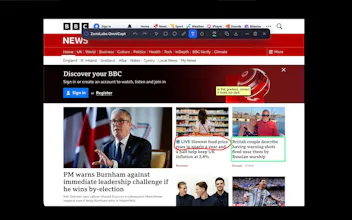
Most screenshot extensions upload to a cloud and capture one page at a time. OmniCapt is 100% local and captures at scale: paste a URL list or sitemap and it shoots every page at every breakpoint (50 URLs × 3 sizes = 150 shots), auto-sorted into folders by domain/path/date. Every capture gets a JSON sidecar of scraped page metadata, so your library is searchable, and the file browser compares any two shots side-by-side or with a slider-wipe. Plus annotation & WebM recording. Nothing uploaded.




Free
Launch Team

Tines The single, secure environment for agents, apps, and automations.
Promoted
Curious how the metadata scraping actually works under the hood — is it pulling from the rendered DOM, structured data, or something custom, and can I customize which fields end up in that JSON sidecar? Also wondering about the limits when a site lazy-loads basically everything.
@helinbxw5
Thank you for taking a look. These are great questions.
Regarding Metadata Scraping:
It’s a custom client-side script running on the rendered DOM. When you take a capture, our injected content script queries the DOM for standard metadata.
- Tags: It pulls and sanitizes tags by combining `meta[name="keywords"]` (and news keywords) with all `meta[property="article:tag"]` elements.
- Structured Meta: It grabs Open Graph data (`og:title`, `og:description`, `og:image`, `og:type`), canonical URLs, and the page author.
- Runtime Context: It attaches runtime metadata like the tab's current URL, title, exact capture timestamp, and the viewport resolution.
Regarding :Sidecar Customization
Right now, you can toggle the JSON sidecar generation on or off in the Settings. The fields themselves are predefined. However, since the extension already features a robust token-resolution system for customizing filenames (using tokens like `{{domain}}`, `{{date}}`, `{{time}}`, etc.), adding custom JSON templates or field toggles is definitely something I can consider and shouldn't be too hard to implement
Regarding Handling Lazy-Loaded Content
For full-page captures, we use a scroll-and-stitch pipeline. Here's how it manages lazy-loaders:
- It forces instant scrolling (`scroll-behavior: auto !important`) to disable smooth transitions.
- It scrolls the page down in viewport-sized increments.
- It inserts a 600ms delay at each scroll step before capturing. While this is primarily to avoid triggering Chrome's API limits on tab captures per second, it serves as a reliable buffer allowing images and viewport-triggered scripts to load.
- If a site has infinite scroll, you can hit the "Stop & Save Now" button in the popup at any time to instantly stop scrolling and stitch what has been captured up to that point.
I hope that addresses your questions, let me know if you have any more, and thanks very much for taking the time to comment.
The sitemap batch capture is genuinely useful, and being able to wipe between breakpoints right in the file browser saved me from jumping tabs. Nice touch with the JSON sidecar for searching across a huge library.
Hi @nuriyetarkay
Thank you so much for taking the time to have a look, I really appreciate it.
That exact pain point - getting lost in a sea of Finder/Explorer files and constantly jumping between tabs to spot layout shifts - is why we built the built-in file browser and the slider-wipe tool.
Using the companion JSON sidecars was another deliberate choice: keeping all the metadata local, lightweight, and offline-friendly means searching through thousands of captures is instant, and it makes it super easy to script or grep your library if you want to integrate it with other tools.
Thanks again, and do let me know if there are other features of interest
Finally a screenshot tool that doesn't fire everything off to some random server. The batch capture from a sitemap at multiple breakpoints is honestly the killer feature, saved me hours on a design audit. Loving the JSON sidecar detail too.
@metintuncttkx
Thanks so much! That was exactly the problem I built OmniCapt to solve.
I wanted everything to stay local by default, while making large capture jobs - like whole sitemaps and multiple breakpoints - something you could kick off and leave running. I'm really pleased the JSON sidecars have been useful too; I wanted every screenshot to carry the context needed to make it easy to organise and automate workflows later.
Really appreciate you taking the time to share your experience!
finally a screenshot tool that respects my storage and doesn't sneak past my firewall. the breakpoint sweep idea is genuinely useful for catching that one weird layout bug in mobile that always slips through.
@muammer1177418
Thank you! Privacy was one of the main reasons I started building OmniCapt. I wanted a tool that worked entirely on your machine, so it could handle localhost, staging, VPN-protected sites, and anything else you wouldn't want leaving your network.
The multi-breakpoint capture came from exactly the scenario you described—thinking everything looks great until you check that one mobile width where the layout has other ideas.
Really appreciate you taking the time to leave some feedback!