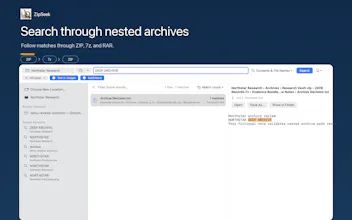
ZipSeek is a native macOS app for searching text inside folders, PDFs, Office documents, images, and nested ZIP, 7z, and RAR archives—without unpacking everything first. Results can point to PDF pages, Word paragraphs, PowerPoint slides, Excel cells, and OCR regions. Processing stays on your Mac, with no background full-disk index.
Wispr Flow: Dictation That Works EverywhereStop typing. Start speaking. 4x faster.
Promoted
Maker
📌
Hi Product Hunt,
I built ZipSeek after running into the same frustrating problem again and again: I could remember a sentence from an old document, but I couldn’t remember which file it was in.
Sometimes the file was a PDF or Word document. Sometimes it was buried inside a ZIP, which contained a 7z archive, which contained another folder of documents and images. Finding a few words meant unpacking everything and opening files one by one. That felt a little ridiculous.
ZipSeek lets you search directly inside folders, PDFs, Office documents, images, and nested ZIP, 7z, and RAR archives.
It also tries to show exactly where a match came from: a PDF page, Word paragraph, PowerPoint slide, Excel cell, OCR region, or the full path through a nested archive.
There’s no background full-disk indexing, and files aren’t uploaded anywhere. The search and OCR happen locally on your Mac.
I tried to keep the workflow simple: choose a file or folder, type what you remember, and inspect the results.
ZipSeek is now available on the Mac App Store. It includes a full 3-day trial, followed by a one-time purchase rather than a subscription.
I’d especially like to hear:
- Do you ever need to search through old or nested archives?
- Is it clear enough where each result was found?
- Which file formats would you want supported next?
I’m building ZipSeek independently, so real feedback will directly influence what I work on next.
Thanks for taking a look.