
Yibelin
Translate PDFs online while keeping the original layout.
9 followers
Translate PDFs online while keeping the original layout.
9 followers
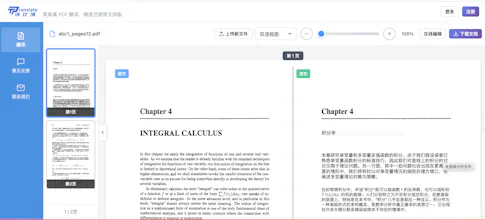
Yibelin is a web-based PDF translator focused on layout preservation—not just sentence translation. Upload a PDF in your browser. The tool translates paragraph by paragraph and keeps two-column papers, tables, headers, and footers as intact as possible. After translation, you can edit terms inline and download a new PDF—no Word reformatting. Good for: academic papers, scanned archives, product manuals, contracts. Currently in public beta. Free credits to try; pay per download for full exports.




Translation came out clean and the two-column layout actually held up on the paper I tested, which was a nice surprise. Wish the inline term editing was a bit faster on longer docs, but overall pretty solid for academic PDFs.
@sevim1016236 Thanks for testing it and sharing the honest feedback! Great to hear the two-column layout held up well. We’ve noted the inline editing performance on longer documents and are working to make it faster.
Layout preservation sounds genuinely useful, especially for two-column papers. One thing that would make this a no-brainer for me: a side-by-side preview that highlights the original and translated paragraphs together, so I can quickly spot where the formatting might have shifted. Would save a lot of QA time before exporting.
@minabehll3jm8 Thanks—that workflow is already built in. Once the translation finishes, you can review the full document side by side and inspect corresponding paragraphs at the paragraph level. You can also edit the translation inline to fix terminology or formatting before exporting.
Tried it on a two-column research paper and the layout held up way better than I expected, tables and footnotes stayed right where they should. The inline term editing is a nice touch for matching field-specific jargon.
@sebahattinzokt Thanks for trying it out! Great to hear the two-column layout, tables, and footnotes held up well. Inline editing was built for exactly that kind of field-specific terminology—really appreciate the feedback!
The layout preservation sounds genuinely useful for dealing with those two-column papers where everything breaks apart. One thing that would help me a lot: a side-by-side preview mode before I pay to download, so I can spot-check whether the translation caught tricky terminology correctly. Right now I'd be paying to find out.
@dilci75504 Thanks, Caner — that’s exactly how it works today. Once the translation is complete, you can review the entire document side by side, with the original on the left and the translation on the right. You can spot-check terminology, layout, and tables—and even edit translated paragraphs—before paying. Payment is only required when you choose to download the translated PDF.
Really cool focus on keeping the layout intact, that part actually matters for academic papers. One thing though, could you add a glossary import option so I can upload a list of terms like proper nouns or lab jargon and have them used consistently across the translation? Would save a ton of time on longer docs.
@samierbaxfrc Thanks! That's a really thoughtful suggestion.
A glossary import would be especially useful for research papers and technical documentation where terminology needs to stay consistent across dozens of pages. While we don't have that feature yet, every translated document is fully editable, so it's easy to correct specialized terms or preferred wording without breaking the layout.
We'll definitely keep glossary support in mind as we continue improving the workflow. Thanks again!