
XuTerm
Tablet SSH client with tmux, inline preview and native trzsz
6 followers
Tablet SSH client with tmux, inline preview and native trzsz
6 followers
- Added common toolbox and visualization modules
- Native TOTP 2FA manager with live verification codes
- Inline PDF/XLSX/PNG preview
- Resume-capable trzsz transfer
- Native tmux split pane & multi-window support
- Built-in SFTP browser and remote editor
- Biometric protected keys, local encryption
- Vertical marker bars distinguish commands and output
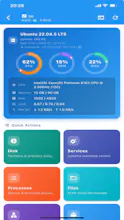
- Layered real-time monitor for CPU, memory and load average with sparklines
- SFTP file hash calculation, remote-first with local fallback


Free
Launch tags:Developer Tools
Launch Team / Built With


Viktor.comAn AI coworker that actually does the work
Promoted
honestly the inline pdf preview in terminal is kind of a game changer, no more alt tabbing to check a file. mosh roaming works pretty smoothly too when i bounced between wifi networks.