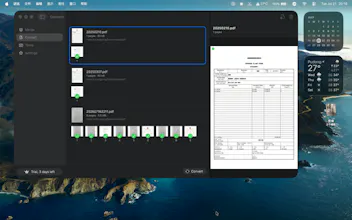
WPDF is a PDF merging and file conversion utility designed for macOS. No account is required, and your documents are never uploaded. PDF processing, OCR, and file conversion all take place locally on your Mac.
No reviews yetBe the first to leave a review for WPDF: Local PDF to Word&Merge
Maker
📌
Key features:
• Merge PDFs
Combine multiple PDF files in your preferred order and export the result as PDF, PNG, JPG, or Word.
• Convert PDF files
Convert PDFs to PNG, JPG, PDF, or Word. Process a single document or convert multiple files in a batch.
• Select individual pages
Choose the pages you need from a visual thumbnail grid before exporting.
• OCR for scanned documents
Use the built-in macOS text recognition technology to process scanned PDFs and create editable Word documents. OCR can be enabled or disabled in Settings.
• Drag, drop, and reorder
Add files by dragging them into WPDF and rearrange their order before merging. Multiple selection, deletion, and Show in Finder are supported.
• Task management
Follow conversion progress, output status, file size, and save location. Double-click a completed task to open the generated file.
• Local and private
Your documents stay on your Mac. PDF content, OCR recognition, and conversion are processed locally. PDF passwords are not stored in task history.
WPDF is suitable for organizing PDF documents, extracting text from scanned pages, converting multiple files, and creating image or Word outputs quickly.
PDF merging is available for free. Premium unlocks additional conversions, batch processing, and the complete feature set.