Launching today

Wordbit
One new English word a day in your Mac menu bar
1 follower
One new English word a day in your Mac menu bar
1 follower
One new English word a day in your Mac menu bar: how to say it, an example, the Chinese meaning and where it comes from. Daily quiz, spaced review, an emoji picture game and a streak. Works offline, no account. Free, open source (MIT). macOS 13+.


Free
Launch Team

Tines The single, secure environment for agents, apps, and automations.
Promoted
Hi all, I'm Jim. I'm still learning to build, so this is a small one.
Why: I wanted a tiny daily habit for learning English that lives where I already look, the Mac menu bar, with no account and no app to open.
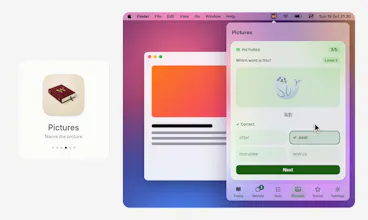
What it does: click the little book in the menu bar and you get one English word for today: how to say it (with a speaker button), what it means, an example sentence, the Chinese meaning, and where the word comes from when we know. Words you've seen go into review boxes and come back at the right time: right answers move up a box and wait longer, wrong ones drop back to Box 1. There's a five-question daily quiz, a Pictures game (an emoji, pick the right word out of four look-alikes, 156 picture words), Saved words, and a daily streak with no streak freezes. The interface is in English or 简体中文 and follows your Mac, or you can choose.
It's free and open source (MIT). It's a native Swift app with no account, no ads and no tracking. Every word is inside the app, so it works offline. The only network use is "Check for updates", and only when you click it.
Honest limits:
- The Chinese meanings are checked by AI, so some may be wrong. Corrections are very welcome (GitHub issues).
- The meanings are in Chinese only today. The words stay English.
- It's Mac only (macOS 13 or newer, Intel and Apple chip), and there are 400 study words in this version.
- It's unsigned (I don't pay for an Apple developer account), so the first open needs "Open Anyway". The steps are in the README.
- The word lists come from open sources (Wiktionary, WordNet, CMU dictionary, ECDICT) under their own licences. They are credited in the README and in the app.
I'd love feedback on:
1. First open: was the "Open Anyway" step clear?
2. Is one word a day the right pace, and does the review and quiz feel useful?
3. Which other meaning languages (besides Chinese) would you want?
Ideas welcome. Thanks for looking.