
WordBinary
AI and Plagiarism Checker with Grammar Review and PDF Report
15 followers
AI and Plagiarism Checker with Grammar Review and PDF Report
15 followers
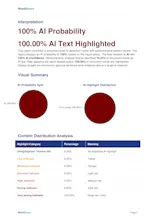
Check AI writing, plagiarism and grammar in one academic review platform. Review sentence highlights, source matches and download clear PDF reports.




honestly this looks super useful for academic work, but it would be really helpful if you could add a feature that lets users compare two documents side by side, like for checking revisions between drafts or matching against a reference paper. would save a lot of time going back and forth between files
@zmratasgldubs The platform already has this feature: https://wordbinary.com/self-plagiarism-detector There is also a google chrome extension and mozilla extension to check two documents side by side. This feature is 100% free to use forever.
honestly looks really useful for academics juggling multiple papers at once. one thing that would make it even better is a feature to compare two documents side by side, basically to spot overlap or changes between drafts without flipping back and forth. that would save a ton of time during peer review
@eypqkxk The platform already has this feature: https://wordbinary.com/self-plagiarism-detector There is also a google chrome extension and mozilla extension to check two documents side by side. This feature is 100% free to use forever.
honestly this looks pretty useful for students, the PDF reports are a nice touch. one thing i'd love to see is a side-by-side comparison view, like showing the original text next to the highlighted sentence and its source match in the same window. would make reviewing faster instead of bouncing around
@coztturk23123 Thank you for the feedback. The original formatting of the document is preserved in the pdf reports so you never have to juggle between mutiple tabs.
Would be really helpful if the PDF reports could include a summary table at the top showing overall scores for originality, grammar, and AI detection side by side, basically a quick snapshot before the detailed breakdown. Right now I find myself scrolling through to find the key numbers when sharing with classmates or advisors.
@mustafaaflu Thank you for the feedback. The current WordBinarty reports page presents a Ai% and Similarity% side by side but both reports are downloaded separately. Grammar check score is to be obtained separately by uploading the text and then our system not only gives a score but also highlights all spelling mistakes, sentence structure issues and other grammatical issues and the user has the option to accept or reject the suggestions.
The sentence highlight overlay alongside source matches makes it so much easier to see where the AI flags actually land in context. Clean PDF report option is a really thoughtful touch for handing work off to professors.
The sentence-by-sentence highlights actually made my own draft easier to trim, since I could see exactly which lines flagged as AI. Source matches link out cleanly too, which beats most plagiarism tools I've messed with.