Wispr Flow

Wispr Flow

Speak naturally, write perfectly & 4x faster in every app

4.7
51 reviews

3.2K followers

Wispr Flow is a voice-powered dictation tool that helps you write 4x faster across all your apps. Speak naturally, and Wispr Flow transforms your voice into perfectly formatted text with real-time auto-edits, tone matching, and support for over 100 languages. Whether you’re writing emails, reports, or coding, Wispr Flow saves time and eliminates manual edits. Unlock seamless productivity and streamline your workflow—effortlessly and accurately.
This is the 3rd launch from Wispr Flow. View more
Wispr Flow for iOS

Wispr Flow for iOS

Voice-first writing—now on iPhone
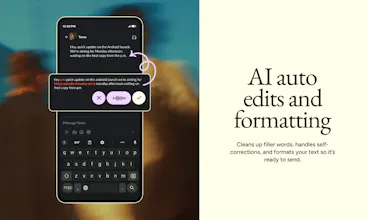
Flow for iPhone is fast, natural voice dictation that works wherever you type—from iMessage to Gmail, Slack to Substack. Whether you’re on the go, juggling tasks, or just tired of typing with your thumbs, Flow helps you get stuff done 5x faster.
Wispr Flow for iOS gallery image
Free
Launch Team / Built With
Vy - Cross platform AI agent
AI agent that uses your computer, cross platform, no APIs
Promoted

What do you think? …

Tanay Kothari

Hey Product Hunt! I’m Tanay, co-founder & CEO of Wispr Flow.

When we launched Flow on Mac and Windows, thousands of users had the same feedback: “I still lose ideas when I’m away from my desk.”

With Flow for iPhone, you can capture ideas, clear your Slack inbox, and ... from anywhere--on a walk, coffee in hand or mid bench press. It's dictation for iPhone that formats, adapts, and just works.

What’s in the iOS release?

- Works in every app – WhatsApp, iMessage, Slack, Notion—Flow just appears.

- Whisper – Dictate late-night thoughts without waking anyone up.

- Cross-device sync – Start a Flow Note iPhone, finish your thought on on Mac or Windows .

- Privacy Mode – Your data, your control with zero data retention in Privacy Mode.

We've heard from beta testers they reply to emails 60% faster, plus they're capturing to-dos they'd normally forget.

We’d love your feedback on:

1. Where dictation with Flow shines—or falls short—in your workflow.

2. Shortcuts we should add (AirPods tap to dictate? Apple Watch queue for your runs? CarPlay commands?).

3. Features you want next.

We’ll be here all day answering questions and shipping quick tweaks. If Flow saves you a few keystrokes, your support or comment would mean the world to the team.

Thanks for checking us out and helping us change the way people interact with technology!

❤️ — Tanay

Gabe Moronta
@tanaykothari this app is utterly amazing! Incredibly accurate! Been using for a while! Love it!
Zarrak Khan

Looks really interesting!
Excited to see where this goes! Always great to see tools that aim to simplify tasks. Best of luck with the launch! 🚀👏

Rajiv Ayyangar

I’m impressed with the implementation here — Apple doesn’t make it easy. Despite the occasional added friction of opening the app, I find myself using Wispr on iOS daily - the higher fidelity transcription is very impressive.

Matt Swulinski

@rajiv_ayyangar The team has put a lot of work over the last couple weeks, really putting in the polish around latency, responsiveness, and interactivity features. Glad you like them!

Ruslan Davletshin

Great to see the iOS version after getting used to the Mac one. I enjoy using it to quickly capture new ideas as they come!

Matt Swulinski

@ruslan_davletshin Amazing to hear. Where do you use it most? In Mac vs iOS?

Ruslan Davletshin

@mswulinski If we’re talking screen time to Wispr Flow usage ratio, the iOS is a clear winner!

Matt Swulinski

Now I don't have to look at a message on my phone, put it down, and open up my laptop to use Wispr Flow to effortlessly dictate what I want to respond to someone in iMessage or Slack. The ability to dictate a background note without unlocking my phone is a hidden but life-changing feature once you enable it!

What's your favorite way to use the product on mobile?

Tanay Kothari

@mswulinski I usually start my day by making to-do lists in Flow’s in-app notes. It’s the fastest way for me to clear my head and get a sense of what needs to get done :)

Noor Sharma

@mswulinski I love prompting GPT on the go!

Rajiv Ayyangar

@mswulinski how do you set up dictation without unlocking your phone? I haven't seen that feature!

Constanza Hasselmann

Good question, @rajiv_ayyangar ! You map the "dictate with Flow" shortcut to your action button (later iPhones) and voila. Reach out if you have any issues

Yong Woo Shin

Sounds like a shortcut for everywhere with text!

Don't even need to worry about typos.

Congratulations :)

Matt Swulinski

@pritraveler Plus, you can also capture notes quickly using the built-in notes feature. Let us know what you think!

Noor Sharma

Thank you,@pritraveler !
I agree, it’s perfect for getting stuff out of my head without fussing over how it sounds.

Sam @CRANQ

Flow for iPhone is such a smart follow-up - Capturing ideas while walking or clearing Slack in between sets lol? That’s how mobile dictation should work.

Best of luck with the launch!!

Noor Sharma

@cranqnow Thank you, Sam 😎 Would love to know what you'd like to see next!

Sam @CRANQ

@noorbadalsharma Will be sure to let you know!!

Matt Swulinski

@cranqnow You can even squeeze in a response in between reps. 💪🏻

Sam @CRANQ

@mswulinski I do be gymming daily :)

Supa Liu

The ability to speak naturally and get clean, well-formatted text—complete with tone matching and auto-edits—is incredibly impressive.

Noor Sharma

@supa_l Totally agree—I love how natural it feels. Do try the in-app notes to jot down thoughts on the go :)

123
•••
Next
Last