
WindowReturn
Restore your Mac windows across displays and Desktops
2 followers
Restore your Mac windows across displays and Desktops
2 followers
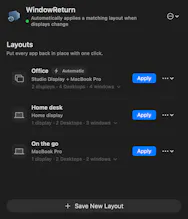
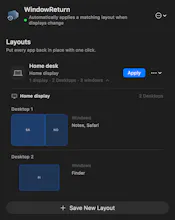
Save and restore Mac window layouts across displays and Desktops. WindowReturn remembers sizes and positions, switches layouts when matching monitors connect, and can reopen saved apps and Finder folders. Preview each Desktop, then get back to work with one click. A native menu bar app with a 14-day free trial.

Free Options
Launch Team

CloudflareDeploy serverless functions globally in seconds
Promoted
Hi Product Hunt! I’m Kadir, the maker of WindowReturn.
I built it because I kept rearranging the same windows every day. At my office, VS Code and DBeaver live on separate Desktops on an external monitor, while Safari and my other tools stay on my MacBook. Unplugging the monitor mixed everything together. Connecting it again meant another round of dragging windows around.
WindowReturn saves a layout for each setup and brings supported windows back to their display, Desktop, size, and position. Apply a layout with one click, or let a matching monitor setup trigger it automatically. It can also reopen saved apps and, with optional Finder permission, local folders.
It lives in the Mac menu bar. Layouts stay on your Mac, and sharing diagnostics is optional.
Try it free for 14 days. A license is $14.99 once for two Macs, with updates for the purchased major version included. No subscription.
Launch offer: use LAUNCH40 at checkout for 40% off, from September 17 at 07:00 UTC until October 8 at 07:00 UTC — 21 days, so you can try it before buying.
How do you organize your workspace: a laptop and a monitor, or multiple Desktops on each screen? I’d love your feedback on real-world setups.