Launched this week

WhoIsCooking
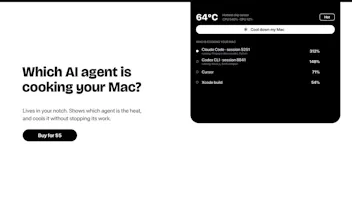
See which AI agent is heating your Mac and cool it down.
140 followers
See which AI agent is heating your Mac and cool it down.
140 followers
A Mac app that shows chip temperature and which AI agent (Claude Code, Codex, Cursor) is heating your Apple Silicon Mac. One click moves busy work to the efficiency cores, so everything keeps running, cooler. $5 one time.





Payment Required
Launch Team

AWS Startup AdvisorPersonalized AWS guidance that meets you where you’re already building
Promoted
Grouping child processes by agent session solves the part Activity Monitor misses. I'd add a short thermal timeline beside each session and mark what was running—build, tests, dev server, verifier—when the spike happened. That would separate a healthy long compile from a runaway loop and make "cool down" a decision instead of a blind throttle.
@keesan12 hat's a sharp way to put it: a long healthy compile and a runaway loop look the same in a live view. Today the app flags runaway agents and left-behind processes, but it doesn't keep a timeline. A short graph per session showing what was running at each spike is a good next step, and it would make "cool down" a more informed choice. Adding it to the list. will let update you when its done
@keesan12 Done, it's in 1.9. Every agent session now has a timeline coloured by what it was doing (building, testing, checking or dev server), with a thin line when it's open but idle. Each row also says things like "building 12 min", so you can tell a long compile from something stuck before you hit cool down. Thanks for the push on this one.