
WhimPop
Hold right-click and your clipboard, apps, and files appear
9 followers
Hold right-click and your clipboard, apps, and files appear
9 followers
WhimPop is a fast, native panel that pops up at your cursor when you hold down the right mouse button. Clipboard history, snippets, favorite apps, folders, files, and a timer, all in one place.
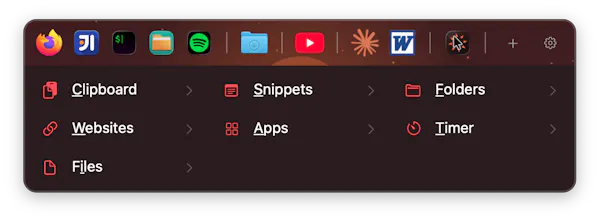


Holding right-click to open it might get tiring during long sessions, so a toggle to switch between hold-to-open and click-to-open would be a nice option to have.
@atakanzoluryzq Thanks for having a look! The hold time is adjustable between 100 and 1000 ms, and at the low end it feels very close to a normal click. For long sessions there are also two instant triggers with no hold at all: an extra mouse button and a global keyboard shortcut.
Holding right-click already feels heavy on the wrist, so adding a small toggle to open the panel with a quick double-tap on the right mouse button would be really useful. It would cut down on fatigue during long sessions and make accessing snippets way snappier than holding the button every time.
@ervabuldan Thanks! Double-tap is a clever idea. The tricky part: to detect a double-tap, the app would need to hold back the first click briefly to see if a second one follows, which would add a small delay to every normal right-click menu. Keeping the ordinary context menu instant is the core promise, so that's a real tradeoff.
For no-hold access today there are two instant triggers: an extra mouse button and a global keyboard shortcut, and the hold time itself adjusts down to 100 ms, which feels close to a regular click.
Finally something that doesn't get in the way when I just want to right-click normally. The snippet idea is kind of brilliant honestly, going to try it with my most-used text blocks tomorrow.
Really like how snappy it feels and the timer tucked in alongside snippets is a nice touch I didn't expect.
@glen1334476 Thank you! The timer started as something I wanted for myself, so I'm glad it's landing with others too. Happy to answer anything if you dig deeper into it.
Holding right-click to summon snippets and clipboard history feels surprisingly natural, and the timer tucked in there is a nice touch I didn't expect to actually use.
@duyguridapagq Thanks! Glad the timer's earning its spot.