
Wharfy
See who opened that port — then stop it safely
4 followers
See who opened that port — then stop it safely
4 followers
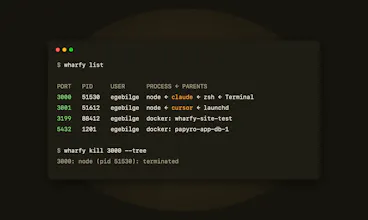
A macOS menu bar app that shows every listening dev port with the app or AI agent that opened it, warns when a server is exposed to your LAN, and stops it safely. CLI and MCP server included.


Free
Launch Team / Built With


Viktor.comAn AI coworker that actually does the work
Promoted
Hey Product Hunt 👋
This started as a personal annoyance. I run Claude Code and Cursor side by side, and half the time I'd hit "port 3000 already in use" with no idea which of them left a server running. lsof gives you a pid. I wanted a name.
So Wharfy lives in the menu bar and shows the chain: node ← claude ← zsh, and you know exactly who to blame before you kill anything. It stops things politely (SIGTERM first, never touching your shell or IDE), knows Docker from a real process, and warns you when a dev server is quietly exposed to your whole network — that one caught me more than once.
It's free while in beta. There's a CLI and an MCP server too, so your agents can clean up after themselves.
How many agents are you running locally these days? Curious if I'm the odd one.