
Web4 Browser
AI fingerprint browser for trusted real-device environments
3 followers
AI fingerprint browser for trusted real-device environments
3 followers
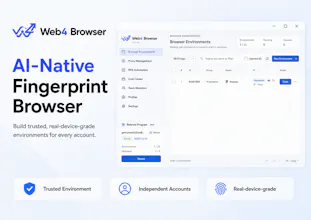
Web4 Browser is an AI-native fingerprint browser that builds trusted browsing environments, giving every account an independent, real-device-grade experience.
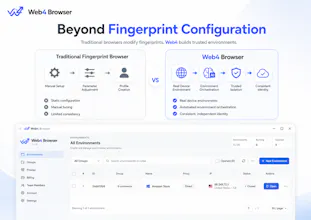
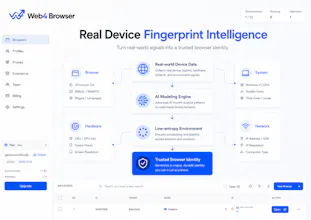
Unlike traditional fingerprint browsers that rely on manual parameter configuration, Web4 uses AI modeling and real-world device data to create realistic, low-entropy browser environments with consistent characteristics.
Web4 helps users move beyond simple profile isolation and build more trusted, independent account environments.
Free
Launch Team / Built With


Floot MCPBuild and ship web and mobile apps inside Claude or ChatGPT
Promoted


Hey Product Hunt,
I’m part of the team building Web4 Browser, and we’d love your feedback before launch.
Web4 Browser is an AI-native fingerprint browser designed to build trusted, real-device-grade environments for every account.
We started with a simple observation:
Traditional fingerprint browsers are great at creating isolated profiles, but modern multi-account operations require more than profile separation.
Teams need browser environments that are consistent, easier to understand, and easier to manage over time — from environment setup and proxy consistency to account records, workflow execution, and operational review.
Web4 takes a different approach by combining AI-driven environment intelligence with real-world device fingerprint patterns.
We are exploring how AI can help teams:
1. Build trusted environments
AI-assisted environment generation, environment health insights, and fingerprint-proxy consistency checks.
2. Manage multi-account workflows
Reusable workflows, task orchestration, and structured operations across multiple environments.
3. Understand changes and issues
Anomaly insights, operation history, and reviewable records to understand what happened and why.
4. Scale team operations
Shared workflows, permissions, SOPs, and collaboration tools for teams managing multiple environments.
Our goal is not to bypass platform rules. We’re building Web4 to help legitimate teams manage complex browser environments with more structure, consistency, and visibility.
We’d love your feedback:
For teams managing multiple browser environments today, what is the biggest challenge you face — creating environments, maintaining consistency, managing workflows, or understanding issues?
Honestly curious how it handles the proxy-fingerprint consistency checks in practice, that's the part most tools get lazy with.
@metehanzgg5
Great question. Proxy–fingerprint consistency is exactly why we focus on the environment as a whole, not just individual fingerprint parameters.
Web4 uses AI-driven environment construction to consider browser characteristics, system signals, and network context together, aiming to create more coherent and realistic browsing environments.
This is an area we’re continuously improving as we develop Web4.
How does the AI anomaly diagnosis actually decide what counts as suspicious behavior across different accounts?
@halitmarali9g7
This is one of the areas we’re paying a lot of attention to.
Instead of relying on a single rule, the AI looks at consistency across different signals — browser environment, device characteristics, network context, and account activity patterns.
The goal is to help users understand unusual changes and maintain more reliable account environments over time.