
Web to PDF
Save any web page to a clean PDF in one click
18 followers
Save any web page to a clean PDF in one click
18 followers
Web to PDF is a Chrome extension that turns any webpage into a tidy PDF you can save, share, or print — in one click. It keeps the layout clean, preserves content, and works right from your browser.


Hi everyone! A year ago I set out to build the most convenient browser extension for saving web pages as PDFs.
So what’s wrong with the built-in “CTRL+P” and how is this different from other extensions? The browser’s default print-to-PDF can’t save the page the way you actually see it on the screen. You get a PDF meant for printing — with broken styles and messed-up layout. Other extensions often “save” to PDF as an image, so you can’t select text or click links in those files.
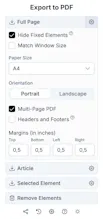
My extension fixes all of that and lets you comfortably save any web content to real PDF, share it, or keep it for offline reading. You can save the whole page or just specific elements, choose page size and orientation, and remove unnecessary blocks. There are also special export modes: reader-style article export, ChatGPT conversation export, and saving Reddit posts.
Give it a try — it’s way more convenient than anything you’ve used so far for saving pages to an offline format!
🔥 Features:
✅ Paginated output or a single long page
✅ Links stay clickable and text remains selectable
✅ Option to save only a specific page element
✅ Article-only export (no menus, banners, or sidebars)
✅ Export conversations with ChatGPT
@borzab Love how simple this looks to use — perfect for saving pages I need to read later.