
Vynix
Vynix turns visual website feedback into structured context.
18 followers
Vynix turns visual website feedback into structured context.
18 followers
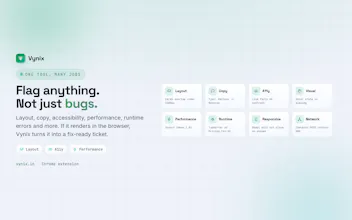
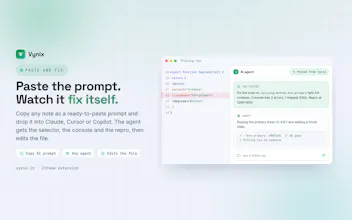
Vynix turns visual website feedback into structured context AI coding agents can act on: DOM, console, and network included.






Would love a way to pin specific issues to a thread so agents can reference earlier findings instead of re-scanning the whole site every session.
@elelcizehr93509 Great suggestion! That's definitely on our roadmap. Persistent issue threads and context reuse would let agents build on previous findings instead of starting from scratch every session. Thanks for the feedback! 🙌
Does the structured context get fed into the agent in real time as I click around, or do I need to manually capture each session for it to pick up properly?
@mzeyyendad0opc You capture the context when you choose to. You can either copy the generated AI prompt/Markdown directly into your AI agent, or send it to Vynix where it's saved in your project. From there, you can use our MCP server to feed it into your AI agent, or create a GitHub issue and assign it to GitHub Copilot or your preferred AI coding agent. You can also capture multiple sessions and group them into a single issue for more complex debugging.
You can always try it yourself. Every plan includes a 14-day free trial, and you can cancel anytime if you don't find it useful. We'd also love to hear your feedback as we continue improving Vynix.
How does it actually capture the DOM and network info, does it run a local script or do I need to install a browser extension?
@sra82hg
You have two options. You can either install our lightweight script (just ~16 KB gzipped) on your website, or, if you prefer not to modify your app, simply use our Chrome extension. Both let Vynix capture the DOM, network, console, storage, screenshots, and other debugging context when you choose to capture a session.
Privacy and security are built in. Vynix is designed to avoid capturing sensitive data like passwords, tokens, API keys, cookies, and other secrets. Your captures are encrypted, private to your workspace, and only accessible by you and your team. You can also review every capture before sharing it with your AI agent.
Plugged it into a Next.js project I was stuck on and the DOM + network context it pulled back actually let my agent fix the auth bug without me copy-pasting anything. Felt like magic for about ten minutes.
@sedat1233717 Love hearing this! That's exactly the experience we're aiming for giving AI agents the context they need so you don't have to keep copying logs or reproducing issues. Thanks for sharing! 🚀
how does it handle sites behind a login since most of the bugs we find are in authenticated flows?
@yeim7obx That's actually one of the primary use cases. Since Vynix captures context from your active browser session, it works seamlessly with authenticated flows. Simply log in as you normally would, reproduce the issue, and capture it. The capture includes the relevant DOM, network, console, storage, screenshots, and other debugging context, while avoiding sensitive data like passwords, tokens, API keys, cookies, and other secrets. This makes it much easier for AI agents to understand and fix bugs that only occur after login.
Would love a way to auto-tag recurring feedback patterns across sessions, like grouping "broken layout on mobile" issues so I can spot trends before they pile up. Could save a lot of triage time.
@hlyavzf8 That's a great idea. Auto-grouping recurring issues across sessions would make it much easier to identify patterns and prioritize fixes instead of treating each report in isolation. Appreciate the suggestion!