VPN Peek
See if your VPN is actually working from your menu bar
66 followers
See if your VPN is actually working from your menu bar
66 followers
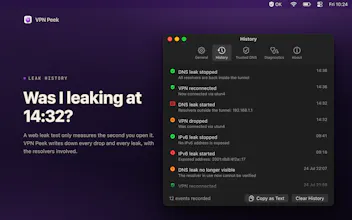
VPN Peek monitors your VPN status from the macOS menu bar and detects DNS & IPv6 leaks. Get instant notifications when your VPN drops or your traffic leaks. Works with any VPN provider. $3.99, pay once.


VPN Peek
The notification is great, but does VPN Peek have the ability to act as a system-wide 'Kill Switch' (cutting internet access instantly) when a leak is detected, or is it strictly for monitoring/alerting only?
VPN Peek
@liusally4 Monitoring only!
Kill switch would need system-level network access that macOS App Store sandbox doesn't allow.
Think of it as an early warning system that works alongside your VPN's built-in kill switch 👍
@anhphong Thank you for your reply.
Clean concept and I like the focus on verification instead of just “VPN on/off.”
That said, I’m curious how deep the leak detection really goes. DNS + IPv6 checks are great, but how often are they sampled, and are edge cases like split tunneling or per-app VPNs handled correctly?
Also, the value prop depends a lot on trust, since the app checks public IP/location, it’d be nice to see a short technical breakdown (or whitepaper) explaining exactly what requests are made and how false positives are avoided.
VPN Peek
@mees_schiks
Good questions!
Quick summary: checks are event-driven (instant on network changes) + configurable auto-refresh (30s–10m). DNS detection runs locally, IPv6 check uses a single external request.
Split tunneling isn't handled yet, but on the roadmap.
You're right about trust/transparency. Working on a technical breakdown covering exactly what requests are made and how detection works. Will share soon 👍
Wow, VPN Peek is genius! Love the menu bar integration for quick checks. Does it handle split tunneling VPN configurations effectively to avoid false leak positives?
VPN Peek
@jaydev13
Thanks! Honestly, VPN Peek would flag split tunneling as "leaking" because it detects traffic leaving the VPN tunnel, even if that's intentional on your end.
For those who prefer to have all their traffic go through the VPN, that's the right call. However, power users with split tunneling would experience false positives.
I'm noting this for a future config option. Appreciate the feedback! 🙇♂️
This VPN monitor is solid for working remotely. It’d be awesome if it had native OpenVPN support—like a Tunnelblick alternative.