Launching today

VoxStudio
Turn long videos into clips by asking
2 followers
Turn long videos into clips by asking
2 followers
Transcribe recordings, create voiceovers, and ask questions across sessions. Turn long videos into clips with subtitle cues and word-level timestamps, or connect ChatGPT, Claude, and Codex via MCP. Free plan, plus a 14-day full-feature Mac trial.
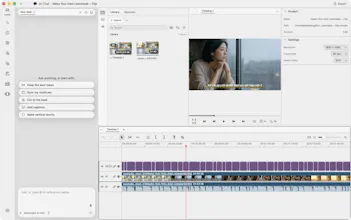


Finding a good clip in a long interview can mean listening, scrubbing, and listening again. Then you set the cut by ear, catch half a word, and try again.
We built VoxStudio to make that part easier. Describe the moment you want in the Mac editor, and it searches the transcript and subtitle cues. Word-level timestamps help it cut at the right words and put the result on a new timeline, leaving the original untouched. Review the cut, add captions, and export when it feels right.
VoxStudio also transcribes audio, video, and meetings, with speaker labels and timestamps. Create speech from text for voiceovers, translate and dub recordings, or ask questions across sessions in your knowledge base and check the source.
Connect ChatGPT, Claude, or Codex through MCP to work with your recordings and the Mac editor from the assistant you already use. VoxStudio has a free plan you can keep using, including MCP access, plus a 14-day trial of the full Mac features.
Download for Mac: https://assets.voxstudio.me/downloads/voxstudio/VoxStudio.dmg
We’d love to hear how you find clips today and what would make this workflow more useful.