
Vox
Superb free Voice-to-Text that never leaves your device
38 followers
Superb free Voice-to-Text that never leaves your device
38 followers
Vox is voice typing that runs entirely on your Mac or Windows machine. Hold a hotkey, speak normally. Cleaned-up text lands on your clipboard, ready to paste. Whisper / Parakeet handle transcription. Superb and fast local Gemma 4 model cleans it up. No audio ever leaves your device, no account to create, no tracking in the app, and it keeps working on a plane. Free for personal use.




Hey Hunters 👋
I built Vox because I type a lot (AI prompts, emails, Slack, etc.) and every good dictation app I tried wanted me to send my voice to their servers, create yet another account, and pay for one more subscription. For something that hears everything I say all day, that felt backwards.
So Vox does the opposite: everything runs on your own device. You hold a hotkey, talk normally (the "ums", self-corrections, and lists are fine – it cleans them up), and the polished text lands on your clipboard ready to paste.
Whisper or NVIDIA's Parakeet do the transcription;
Superb local Gemma 4 model or Apple Intelligence do the cleanup.
No audio, no transcripts, no telemetry ever leaves your machine – you can verify it yourself with Little Snitch or GlassWire. It even works on a plane.
A few things that make it nice to actually live with:
1. No account. Download, hold the key, start dictating. Nothing to sign up for.
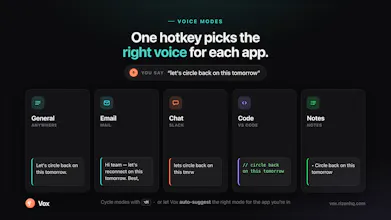
2. Voice modes. It picks a cleanup style based on the app you're in (formal for email, terse for Slack, present-tense for code comments, etc.) or you can write your own.
3. Free for personal use. Your own writing, side projects, hobby work – free, forever. (If you want to roll it out to the multi-person company, there's a commercial license.)
It runs on Apple Silicon Macs (M1+, macOS 14+) and Windows 10/11.
What I'd love feedback on: the cleanup quality across different apps, and whether the voice modes match how you actually write. If there's a mode you wish existed, tell me – custom modes are a core feature and I want to see what people build.
You can see everything I'm planning to work on at rizenhq.com
Say hi on X.
Report issues in Github.
Join the Discord community.
Thanks for taking a look 🙏
P.S. macOS version is already live for almost a month, was used by 300+ people and polished according to the feedback.
Windows is more fresh. While it has all the features, some bugs may be present.
– Serhii Klymenko
The app-aware cleanup modes are the detail that stands out to me. Switching tone for email vs Slack vs code comments is exactly the context most dictation tools ignore. I build voice AI for older adults, where transcription has to survive slower speech, long pauses, and heavy disfluency, so I'm curious whether running Whisper/Parakeet fully on-device forces a smaller model that trades off accuracy on non-standard speech, or whether the local Gemma cleanup pass recovers most of that. Privacy-first dictation is a real gap. Nice work.
@igorgurovich It's a very good question!
First, small honest point - I've never tested it imitating any medical speech limitations / issues. Saying that, sometimes I make stops to think about my next word (while app is running), often I'm speaking (um, uh, etc.), sometimes I change my mind in the middle. It handles all these cases perfectly.
It's honestly a great question, and I'll run an experiment right now:
Here is the initial text I was speaking:
Here is the output:
Link to the video demo of this particular case -
I used 'General' mode for this polish. I'd say that for elderly people the output can be improved even more by making a custom mode for the with system prompt for Gemma 4 tailored for them.
Also, users can make their custom modes by themselves.
In the future, I have an idea to create a marketplace of free custom modes created by other users, so you can find some mode that other user created and use it if you find it useful.
This is an amazing product. I have always wanted a tool that allows me to use dictation everywhere, but the issue was that every single app has their own dictation capability and they all differed in quality. On top of that you almost always have to manually clean it up afterward. This meant that it always felt more cumbersome to dictate rather than to type.
Building Vox as a Mac app changes things completely and the AI layer on top of it makes it feel absolutely seamless. I still have to remind myself to stop typing and start dictating but I can see this app changing how I work completely. Well done.
@victorykung Thank you!
I’ve been using Vox for a little over a week and am very impressed by it so far. Good luck with your launch!
@cronberry Thank you, I appreciate it a lot!