
Vox
Voice in, voice out — with GitHub Copilot
206 followers
Voice in, voice out — with GitHub Copilot
206 followers
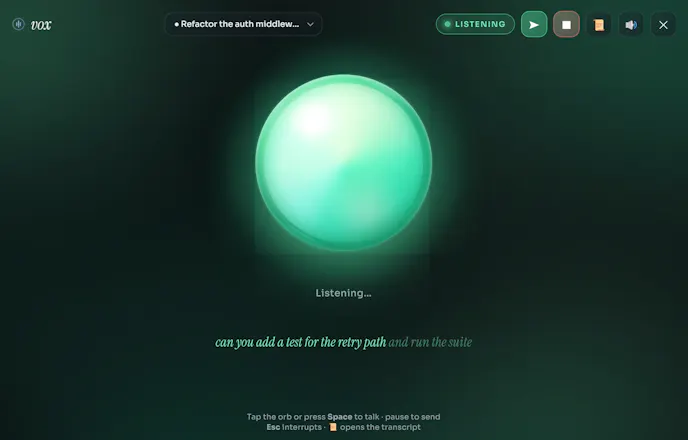
Vox is a GitHub Copilot CLI extension: run /vox and a reactive listening orb opens in its own window. Speak your turn, hear the agent reply. Voice in, voice out — on Windows, macOS, and Linux.



voice in / voice out for coding is the interface i keep wanting — the friction was always latency and round-tripping audio to a server. are you running the speech piece locally or in the cloud? been deep in on-device voice on my side and the tradeoffs are brutal.
@sabber_ahamed Totally hear you — Vox is 100% cloud for speech today, riding the browser's native Web Speech API, so it round-trips to Google's servers, not on-device. Zero extra latency/infra from Vox itself, but no offline mode yet — a local/offline (Whisper-based) option is on the roadmap.
launching Chromium in app mode instead of shipping Electron is such a clean hack, one-line install with no build step because the browser already has the speech APIs. more tools should steal this
the barge-in interrupt is the detail that makes voice actually usable btw, nothing worse than waiting out a wrong answer
@yarslav Thank you! Yeah, launching Chrome/Edge in app mode was the unlock — get a real desktop-style window with zero Electron overhead and the Web Speech APIs just work natively. Glad the barge-in landed too, that was the detail I iterated on most.
How does it handle background noise or interruptions mid-conversation, and is there any kind of wake-word or do I have to trigger it manually each time I want to talk to the agent?
That's clever. Any plans to support other AI coding assistants beyond GitHub Copilot?
@dhiraj_patel5 Right now it's built tightly on the Copilot CLI's extension/SDK hooks (that's how it taps into turns, streaming replies, and session state) — so it's Copilot-specific today, not agent-agnostic. That said, the voice layer itself (mic capture, barge-in, TTS queue) is a self-contained browser front-end, so porting the "wiring" to another agent's extension API is architecturally possible if there's interest — just not on the roadmap yet.
Ashish, the hands free angle speaks to me more than I'd have guessed. Some days my wrists are done and the thought of just talking through what I want sounds like a real relief. Love that it grew from an accessibility idea too.
The reactive listening orb in its own dedicated window is a really nice touch, keeps the voice interaction feeling like a proper companion rather than just another terminal pane.
@alperen397545 Thanks! That was very deliberate — I wanted it to feel like a companion you glance at and talk to, not just another pane competing for attention in your terminal. Launching it as its own chrome-less app-mode window (rather than a browser tab or Electron app) is what makes that possible while still keeping the Web Speech APIs working natively.