Hey everyone!
I wanted to take a moment to thank each and every one of you for the incredible support during our launch week. Seeing VolumeHub climb the rankings and reading all your thoughtful comments has been absolutely amazing. The fact that 200+ people upvoted and believed in this project means the world to me!






VolumeHub
Hey everyone! 👋
I built VolumeHub because macOS still doesn't let you control volume per app — something Windows has had for years.
I kept running into the same problem: I'd be on a call and my music would be too loud, or a notification sound would blast through while I was listening to something quietly. The only option was the single system volume slider.
I didn't want to install apps that require kernel extensions or third-party audio drivers just to control volume. So I built VolumeHub entirely on Apple's native Audio Tap API — no hacks, no drivers, nothing sketchy running in the background.
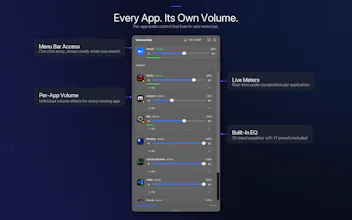
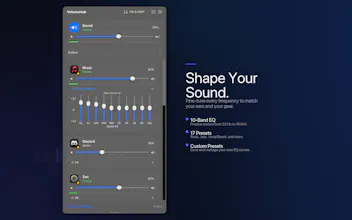
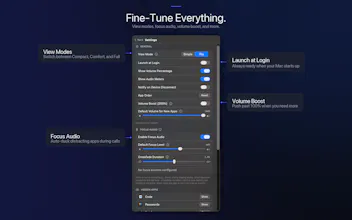
It sits in your menu bar and gives you a per-app volume slider, a 10-band EQ per app, and a Focus Audio feature that automatically lowers other apps when you're on a call.
I'm a solo indie dev, so I'd love to hear your feedback. Happy to answer any questions!
🎉 Launch week special: VolumeHub is just $0.99 on the Mac App Store (normally $4.99). Grab it before the price goes back up!
honestly surprised macOS still doesn't have this built in. i keep spotify pinned in one desktop and slack notifications blast at full volume during focused work sessions. curious about the Focus Audio auto-duck feature - does it detect calls from multiple apps (zoom, meet, discord) or do you manually configure which apps should trigger it? also wondering if it persists per-app levels across system reboots
Wow, VolumeHub looks amazing! Per-app EQ is a game changer. Wondering if Focus Audio can be customized to duck based on specific apps instead of just calls?
VolumeHub
@jaydev13 Thanks so much! Yes, Focus Audio works exactly like that! You can select any app as a focus app, and when it starts producing sound, all other apps automatically lower their volume. You can even have multiple focus apps at the same time, and add exceptions for apps that you don't want ducked. So it's fully customizable to your workflow!
Finally. The fact that macOS never had this built-in is wild. Auto-duck during calls alone is a game changer. Clean approach using native APIs instead of sketchy kernel extensions. Nice work.
VolumeHub
@varun_dhamija1 Thank you! Yes, I wanted to keep it as clean and safe as possible—no kernel extensions, just native APIs. The auto-duck feature has been a lifesaver for me too during calls. Really appreciate the support! 🙏
Nice. Finally. It's really weird that we had this feature on Windows for ages, but not on Mac
VolumeHub
@oleksii_tkachenko1 Right?! I've always wondered why Apple never added this. Windows has had it forever. Hopefully VolumeHub fills that gap for Mac users now!
I adore this, thanks for building it!
VolumeHub
@qoobes Thank you!!! s2