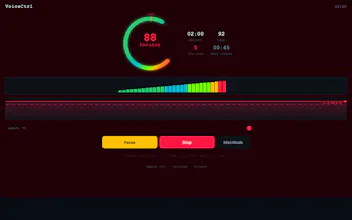
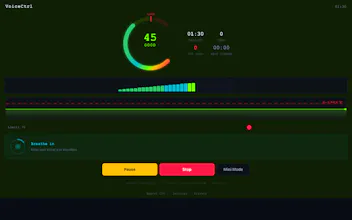
A lightweight overlay (Mac + Windows) that reads your mic and classifies your voice into 5 color-coded zones — Silent, Quiet, Good, Loud, Too Loud. Calibrates to your voice in 10 seconds. Tracks session stats. 100% local. No account. ~8MB Tauri build.
Hey Product Hunt! 👋
I built VoiceCtrl after catching myself yelling on Discord calls one too many times — and noticing teammates doing the same. Your mic's input meter is hidden in settings; you have no idea how loud you actually sound until someone tells you.
What it does:
Floats an always-on-top overlay (or a tiny mini bar) over any app
Reads your mic at 60fps and shows a radial gauge + frequency spectrum
Classifies loudness into 5 zones with distinct colors — so you can glance and adjust
Calibrates to your natural volume in 10 seconds (no one-size-fits-all threshold)
Tracks session stats: time per zone, Too Loud events, streaks, peak level
Breathing guide for warm-ups + micro-rest reminders to protect your voice
Who it's for:
Remote workers on Zoom/Teams/Discord
Streamers and podcasters
Gamers tired of being "that guy" in team chat
Teachers, coaches, anyone who talks for a living
Built on Tauri + React — ~8MB bundle, tiny memory footprint, no Electron bloat. 100% local — audio never leaves your machine, no account required, no telemetry.
Free on the Mac App Store and Microsoft Store. Would love your feedback — especially on the zone thresholds and the mini overlay. 🎙️
Report
No reviews yetBe the first to leave a review for VoiceCtrl